EasyManua.ls Logo

Marantz SR6006 - Page 6

Marantz SR6006
175 pages
Print Icon
To Next Page IconTo Next Page

To Previous Page IconTo Previous Page
Loading...
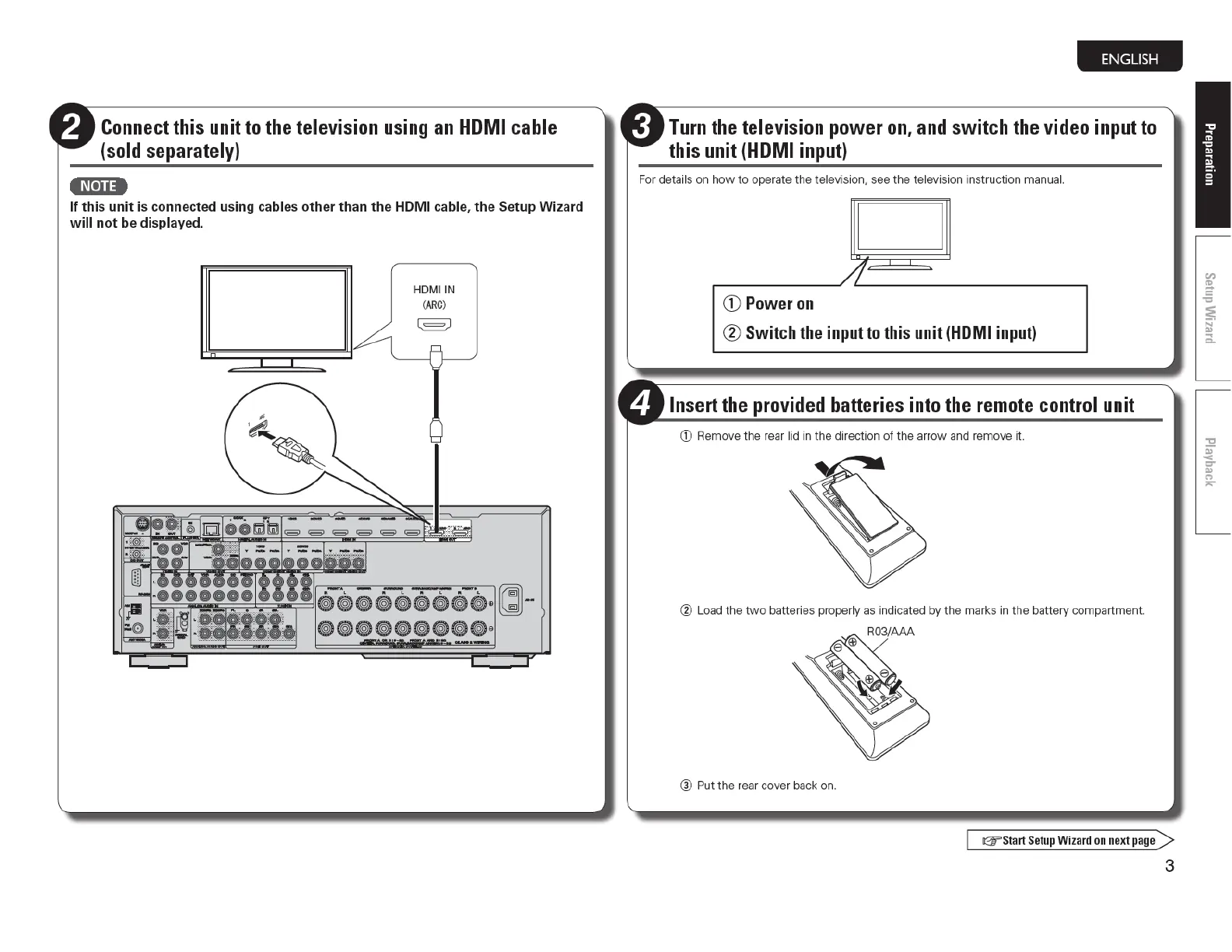
Connect
this unit
to
the
television
using
an
HOM
I cable
(sold separately)
4N•U4
If
thi
s
unit
is connec
ted
us
ing
ca
bl
es
other
than
the
HOM I cable,
th
e Setup
Wi
za
rd
w
ill
not
be
di
s
pl
ayed.
HDMIIN
(
ARC
)
l = )
ENGLISH
Turn
the
television power
on
,
and
switch
the
video input
to
this unit
(HDMI
input)
Fo
r details on
how
to
operate
th
e
te
l
ev
ision, see t
he
television in
st
ructi
on
manual.
D
/J·
CD
Power
on
® Switch the input to this unit (HDMI input)
Insert the provided batteries into
the
remote
control unit
G)
Remove t
he
rear lid in
th
e directi
on
of
the arrow and remove it.
@ Load
the
two
batte
ri
es proper
ly
as i
nd
i
ca
t
ed
by the marks in
the
battery compartment.
® Put
the
rear cover back on.
G"'
Sta
rt
Se
tup
Wi
z
ard
on next page >
3

Table of Contents

Other manuals for Marantz SR6006

Related product manuals