ENGLISH
Preparing
the
Setup
Wizard
This
section
describes
how
to
prepare
the
Setup
Wizard
before
use.
0
Do
not plug the power plug
of
the main unit into the
wall
socket until these preparations are complete.
0 Speaker connections are performed using the Setup Wizard.
Do
not connect the speakers yet.
(
2
What you need
for
this step
Spe
a
ker
(sold
sepa
rately)
Subwoofer
(w
it
h built-
in
amplifier)
(so
ld
separately)
TV
(sold
sepa
rately)
t:J
Remote
control
unit
I
R03/AAA
batteries
(s
upplied)
Speaker
c
able
(sold
sepa
ratel
y)
• Pr
epa
re enough for
th
e
nu
mber of speakers
yo
u
will u
se.
Audio
cable
(sold
sepa
ratel
y)
HDMI
cable
(sold
sepa
ratel
y)
Setup
microphone
(su
pp
lied)
Power
cord
(supplied)
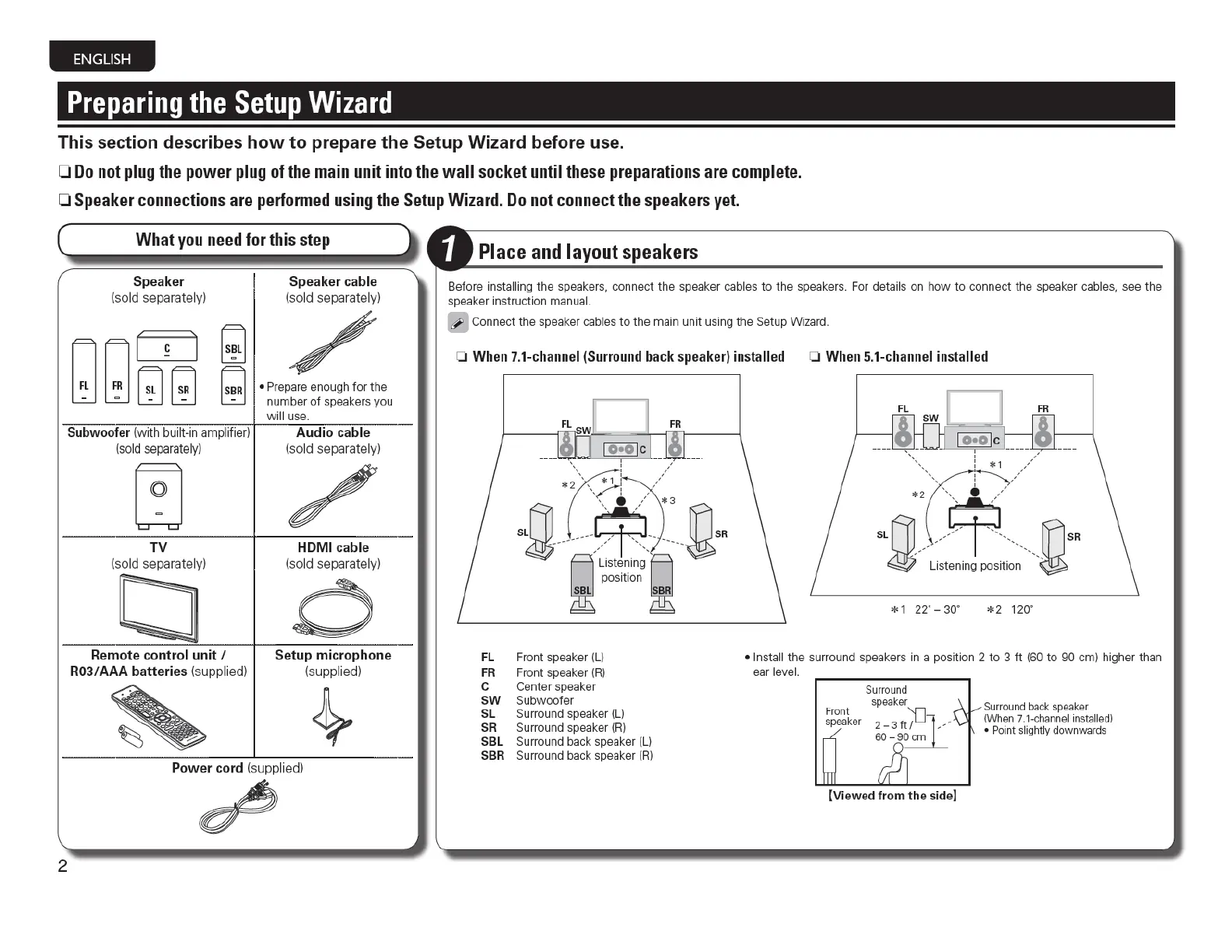
Place and layout speakers
Before i
ns
talling the speaker
s.
conn
ec
t the speaker cabl
es
to the speakers. For details
on
h
ow
to connect the speaker
cab
l
es,
see the
speaker inst
ru
ction m
an
ua
l.
Con
n
ec
t the speaker
ca
bles
to
the
ma
in unit using the
Se
tup Wi
zard.
0
When
7.1-channel
(
Surround
back
s
peaker)
installed 0
When
5.
1-channel
installed
FR
~
gt
~~$U
'©
~
Li
s
t
en
in
g~
pOS
iti
On
SBR
FL
Front speaker (L)
FR
Fro
nt
speaker
(RJ
C
Cen
ter speaker
SW
Subwoofer
SL Surround speaker (L)
SR
Surround speaker
(RJ
SBL Surround back speaker (L)
SBR Surround back speaker (RJ
* 1 22' -
30'
*2
1
20'
• Insta
ll
the
su
rro
und
speakers
in
a position 2
to
3
ft
(60
to 90
em)
higher than
ea
r level.
f-
ront
speake
r
Surrou
nd
spea
ker
2 - 3
ft
f]-1
__
_
60 - 9
~
[Vi
ew ed
from
th
e s
ide]
Surroun
d back speaker
(Wh
en
7.1-ch
an
nel
in
sta
ll
ed!
•
Point sli
gh
tly d
ow
nwards



 To Next Page