EasyManua.ls Logo

Marantz SR6006 - Page 8

Marantz SR6006
175 pages
Print Icon
To Next Page IconTo Next Page

To Previous Page IconTo Previous Page
Loading...
(
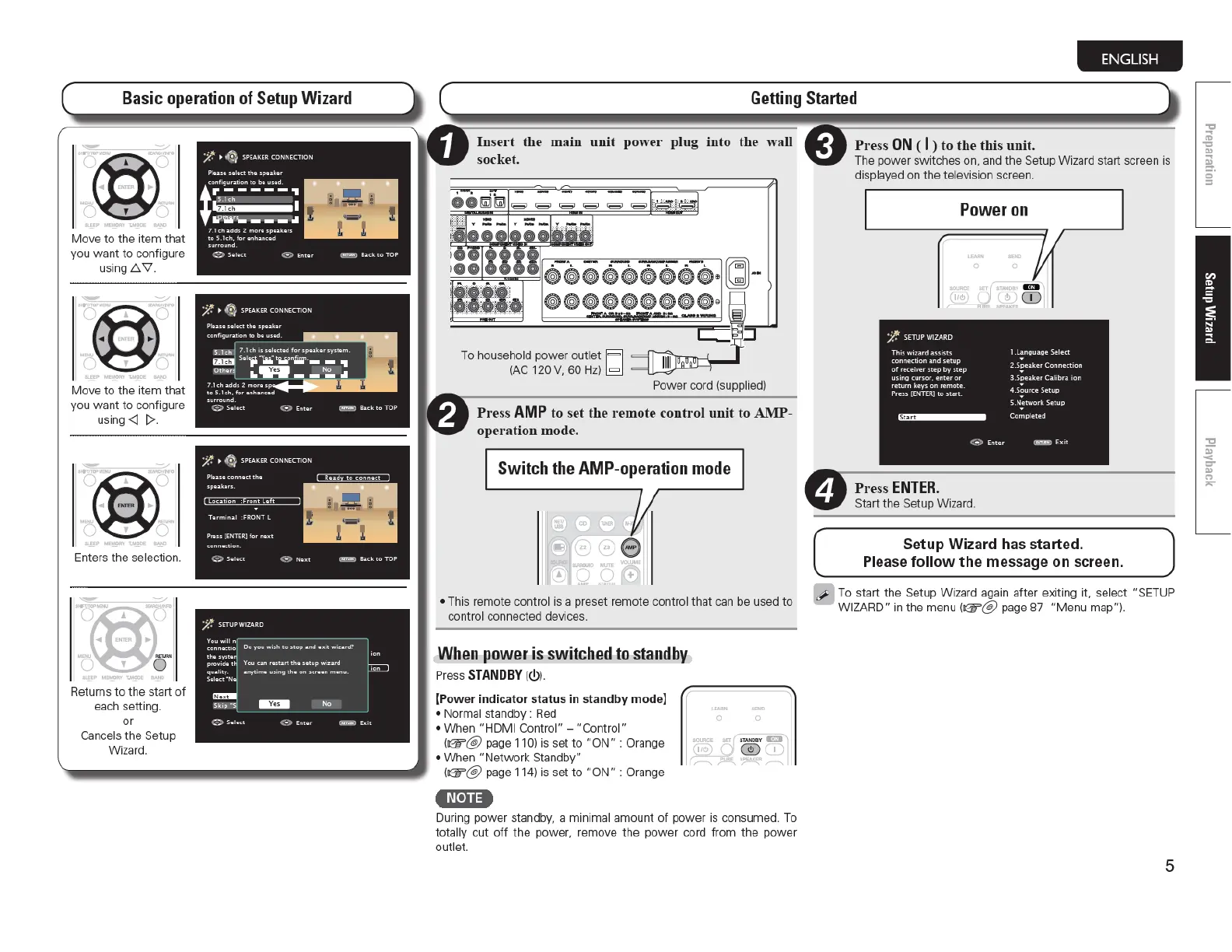
Basic
operation
of
Setup
Wizard
tr
~
-
.
-&
..
"""' ~
""" -
r-.. " r-..
Move
to
the item that
yo
u
want
to
conf
ig
ure
us
in
g£:::.
\1.
yo
u
wa
nt
to
configure
us
in
g<]
1>.
1)
~
(5-
...
"""'
~
">'\ f
~
Returns
to
t
he
start of
each setting.
or
Cancels
th
e Setup
Wizar
d.
ENGLISH
Getting
Started
main
unit
power
plug
into
th
e
wall
Power co
rd
(suppli
ed)
Pre
ss
AMP
to
se
t
the
remote
contr
·ol
unit
to
AMP-
operation
mode.
Switch
the
AMP-operation
mode
This remote control is a preset remote cont
ro
l that
ca
n be used to
cont
ro
l connected devices.
When
power is switched
to
standby
Press
STANDBY
(<!)).
[Power indicator status
in
standby mode]
Normal standby :
Red
When " HD
MI
Co
nt
rol"-
"Control"
(G'r@
page 11
0)
is set
to
"ON"
: Orange
When
"Netwo
rk Standby"
(G'i'"@ page 11
4)
is set
to
"ON"
: Orange
•n·n•
During power standby, a minimal amount
of
power is consumed. To
totally cut
off
the
power, remove
the
power cord
from
the
powe
r
outlet.
4
Pre
ss
ON
( I )
to
the
this
unit.
The power
sw
itches on. and the Setup Wizard start screen is
displayed on the television screen .
Power
on
ll1i)
D
;it.
SETUP
WIZARD
Th
is wi
zard
ass
i
sts
l .L
aoguage
Se
le
ct
connect
i
on
and
setup
2-S,eeaker
Co
nn
ect
i
on
of
re-ceiv
er
step
by
step
us1
ng
cursor.
enter
or
3.Speaker
CaJ
i
bra
on
return
keys
on
re
mot
e.
4.S~urce
Se
t
up
Press
[[NTERJ
to
s
tart
.
S.N;tv.tOrk
Setup
Comple
te
d
<
::>
Enter
~~
Ex
it
Start
the
Setup Wizard.
Setup Wizard has started.
Please
follow
the
message on screen.
To start t
he
Setup W
iz
ard again after
ex
iting it, select "SET
UP
W IZARD"
in
th
e
me
nu
(G'i'"@ page 87
"Menu
map").
5

Table of Contents

Other manuals for Marantz SR6006

Related product manuals