ENGLISH
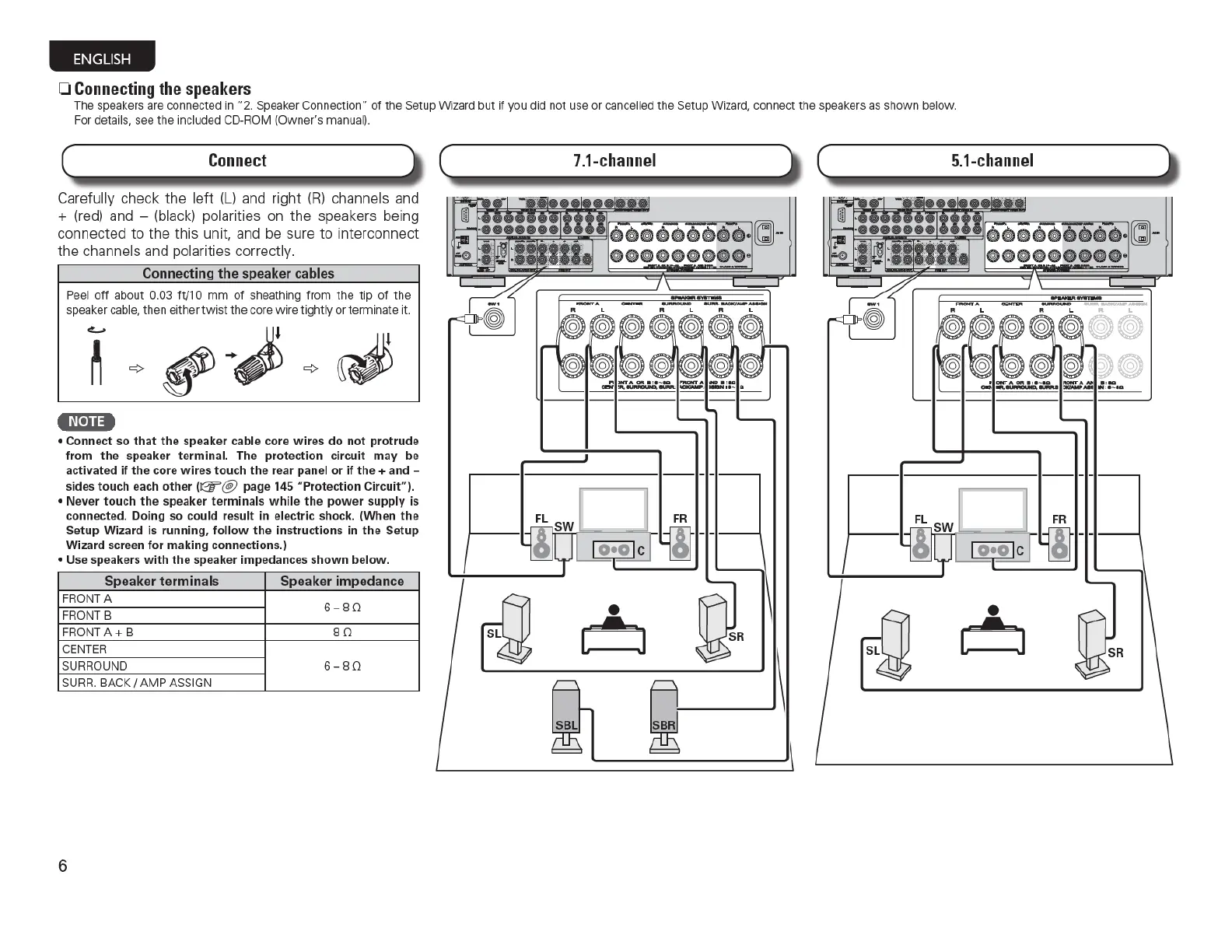
0 Connecting the speakers
The speakers are
co
nnected in
"2.
Speaker Connection"
of
the Setup Wizard
but
if
you did not use or cancell
ed
th
e Setup Wizard, connect
th
e speakers as sh
own
below.
For details, see
the
i
nc
luded CD-ROM (
Owner's
manu
al).
Ca
refully check the left (L)
and
right
(R)
channels and
+
(red)
and - (black) polarities on the speakers being
connected
to
the this unit, and be sure to interconnect
the channels and polarities correctly.
Connecting
the
speaker cables
Peel o
ff
about 0.03 ft/1 0
mm
of sheathing
fr
om
the t ip
of
the
speaker cabl
e,
th
en eith
er
t
wis
t t he
co
re
wire
tightly
or
term
inate it.
c:.....
•N•Ii•
• Connect
so
that
th
e speaker cable core
wires
do
not
protrude
from
the
speaker terminal. The protection circuit
may
be
activated
if
the core
wires
touch
the
r
ea
r panel
or
if
the
+ and -
s
ides
touch each
other
(~
@
page 145 "Protection Circuit").
• Never touch
the
speaker terminals
while
the
power
supply is
connected. Doing
so
could res
ult
in
electric shock. (
Wh
en
the
Setup Wizard
is
running,
follow
th
e instructions
in
the
Setup
Wizard screen
for
making
connections.)
• Use speakers
with
the
speaker impedanc
es
shown
below.
Speaker terminals Speaker impedance
FRONT A
6-
BO
FRONT B
FRONT
A+
B
BO
CEN
TE
R
SURROU
ND 6-
BO
SURR.
BACK I
AMP
ASSIGN
6
•
~



 To Next Page