16
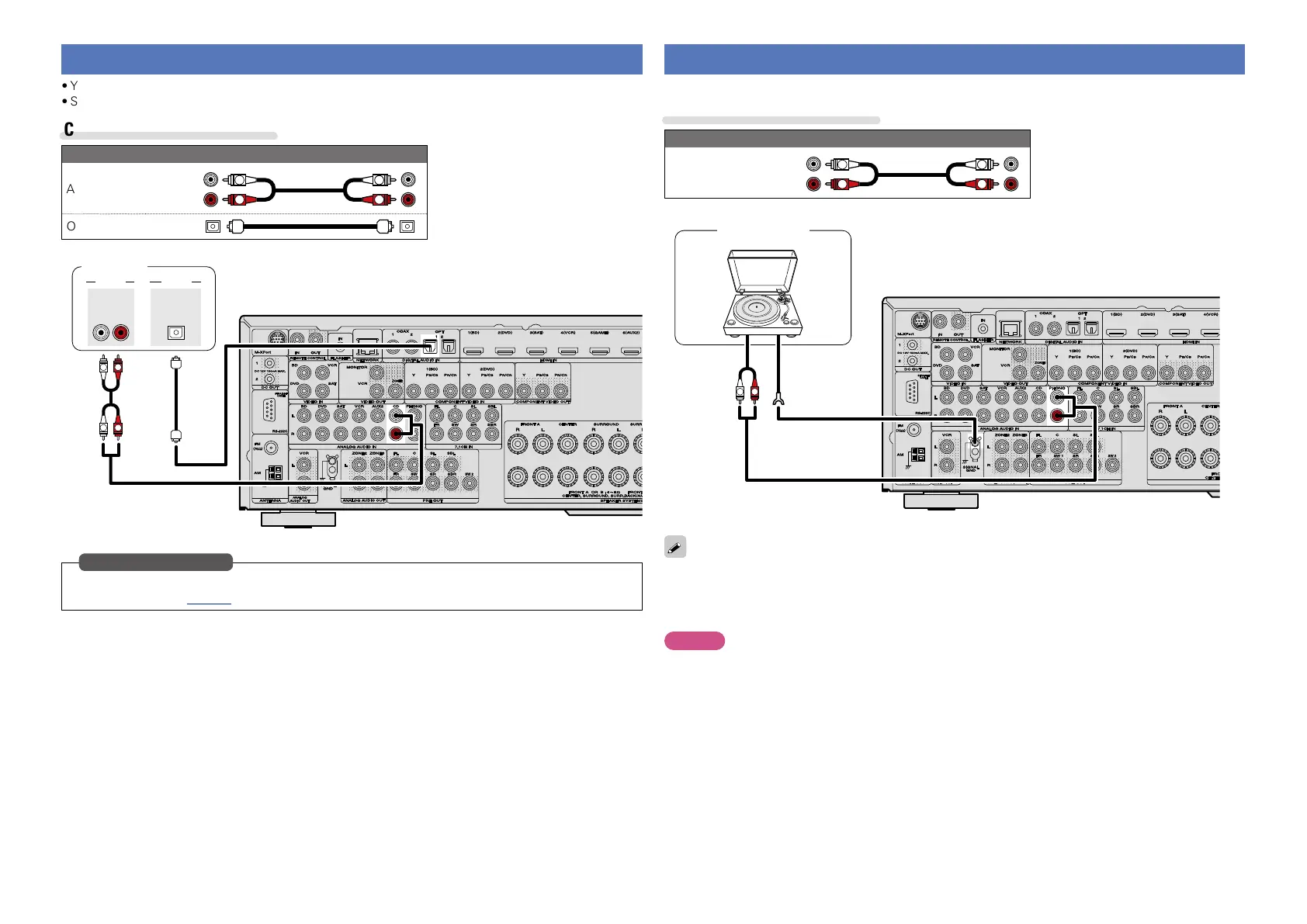
Connecting a CD player
•You can enjoy CD sound.
•Select the connector to use and connect the device.
Cables used for connections
Audio cable (sold separately)
Audio cable
R
L
R
L
Optical cable
L
L
R
R
AUDIO
AUDIO
RL
OUT
AUDIO
OPTICAL
OUT
CD player
Set this to change the digital input connector to which the input source is assigned.
“Input Assign” (vpage88)
in Set as Necessary
Connecting a record player
You can enjoy playing records.
Cables used for connections
Audio cable (sold separately)
Audio cable
R
L
R
L
GND
AUDIO
OUT
L
R
Turntable
(MM cartridge)
•This unit is compatible with record players with an MM cartridge. When you connect to a record player
with an MC cartridge, use a commercially available MC head amp or a step-up transformer.
•When you increase the volume without connecting the record player, there may be “booming” noise
from the speakers.
NOTE
The SIGNAL GND terminal of this unit is not a safety ground connection. Connect it to reduce noise when
noise is excessive. Note that depending on the record player, connecting the ground line may have the
reverse effect of increasing noise. In this case, it is not necessary to connect the ground line.



 To Next Page