22
ENGLISH
SETUP
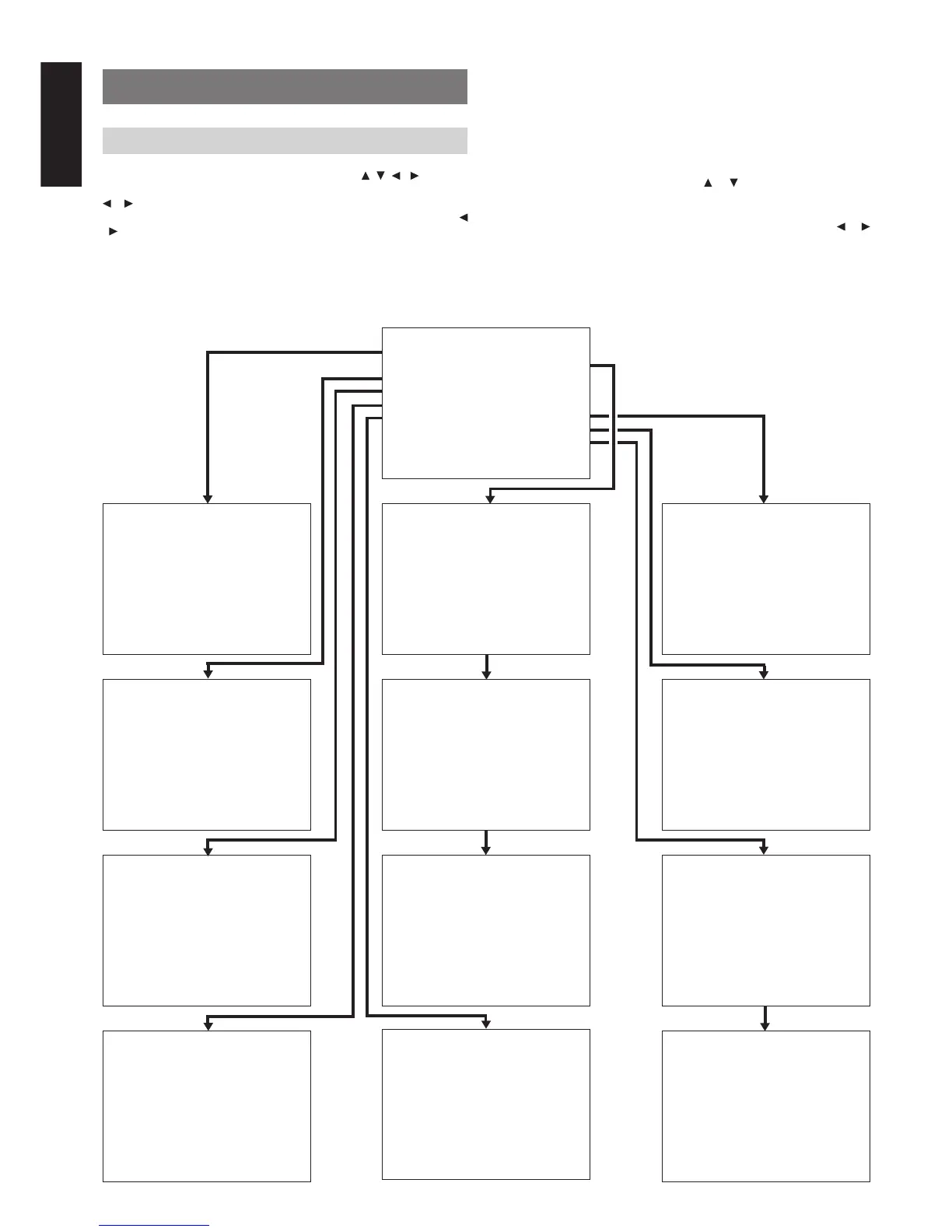
After all components are connected, initial setup must be performed.
ON SCREEN DISPLAY MENU SYSTEM
The SR7300 incorporates an on-screen menu system, which makes
various operations possible by using the cursor ( , , , ) and OK
buttons on the remote control unit or MULTI FUNCTION dial, TUNING
/ button and ENTER button on the front panel.
Use MULTI FUNCTION dial as Up/Down button in remote, TUNING
/ button as Left/Right button in remote, ENTER button as OK button
in remote.
Note:
• To view the on-screen displays, make certain you have made a
connection from the Monitor Out jack (VIDEO or S-VIDEO )
on the rear panel to the composite, S-Video input of your TV or
projector. (see 18 page)
SETUP MA I N MENU
1.INPUT SETUP :UNLOCK
2.SPEAKER SETUP:UNLOCK
3 . PREFERENCE : UNLOCK
4 . SURROUND : UN LOCK
5.PRO LOGIC II :UNLOCK
6.CS II :UNLOCK
7.MULTI ROOM :UNLOCK
8.7.1 CH IN :UNLOCK
9.DC-TRIG SETUP:UNLOCK
EX I T
1INPUTSETUP
CD : D6 - AT TV : D4 - AT
TAPE :ANA DVD :D5 -AT
CD - R : D1 - AT VCR1 : ANA
DSS : D2 - AT
AUX 1 : D - AT
MA I N EX I T
2-1 SPEAKERS SIZE
SUBWOOFER : YES
FRONT L/R : LARGE
CENTER : SMALL
SURROUND L / R : SMAL L
SURR . BACK : 1CH
SURR . BACK S I ZE : SMAL L
LPF/HPF : 100 HZ
BASS M I X : BOTH
MA I N NE X T E X I T
2 - 2 SPEAKERS D I STANCE
FRONT L : 10 f t 3 . 0 m
FRONT R : 10 f t 3 . 0 m
CENTER : 1 0 f t 3 . 0 m
SURR . L : 1 0 f t 3 . 0 m
SURR . R : 1 0 f t 3 . 0 m
SUB W : 10 f t 3 . 0 m
SURR . BACK : 1 0 f t 3 . 0 m
MA I N RE TURN NE X T E X I T
2 - 3 SPEAKERS LEVEL
T EST MODE : MANUAL
FRONT L : 0 dB
CENTER : 0 dB
FRONT R : 0 dB
SURR . R : 0 dB
SURR . BACK : 0 dB
SURR . L : 0 dB
SUB W : 0 dB
MA I N RE TURN E X I T
3 PREFERENCE
STANDBY MODE : ECONOMY
TV-AUTO : DISABLE
OSD I NFO : ENABLE
MA I N E X I T
4SURROUND
SURR . MODE : AUTO
HT -EQ : OFF
LFE LEVEL : 0 dB
CENTER : 0 dB
SURR L : 0 dB
SURR R : 0 dB
SURR BACK : 0 dB
SUB W : 0 dB
MA I N E X I T
7MULTI ROOM
MU L T I ROOM : OF F
VIDEO : DVD
AUD I O : DVD
VOLUME SETUP : VAR I ABLE
VOLUME LEVEL : - 9 0 dB
SLEEP TIMER : OFF
- - - -MA I N - ROOM STATUS - - - -
V I DEO : DVD AUD I O : DVD
MA I N EX I T
5PL II MUS I C PARAME T ER
PARAMETER : DEFAULT
PANORAMA : OF F
DIMENSION : 4
CENTER WI DTH : 0
MA I N E X I T
9-2 DC TRIGGER SETUP
DC TR I G - 2 : D I SABLE
CD : OFF TV : OFF
TAPE : OFF DVD : OFF
CD- R : OFF VCR1 : OFF
TUNER: OFF DSS : OFF
AUX1 : OFF
AUX2 : OFF
MA I N RETURN EX I T
9-1 DC TRIGGER SETUP
DC TR I G - 1 : D I SABLE
CD : OFF TV : OFF
TAPE : OFF DVD : OFF
CD- R : OFF VCR1 : OFF
TUNER: OFF DSS : OFF
AUX1 : OFF
AUX2 : OFF
MA I N NE X T E X I T
87.1CHINPUTLEVEL
FRONT L : 0 dB
CENTER : 0 dB
FRONT R : 0 dB
SURR . R : 0 dB
SURR . B R : 0 dB
SURR . B L : 0 dB
SURR . L : 0 dB
SUB W : 0 dB
MA I N E X I T
1.
Select the AMP mode in remote control unit.
2.
Press SETUP button on the remote control unit to display the
“SETUP MAIN MENU” of the OSD menu system. There are 9
items in the SETUP MAIN MENU.
If you enter to this menu by MULTI dial on the front panel.
Press SELECT to show “SETUP MENU” in FL display and press
ENTER button.
3.
Select a desired sub-menu with or cursor button, and press
the OK button to entry.
The display will change to selected sub-menu.
You can lock the condition of setup to each sub-menu with or
cursor buttons.
Note: If you desire to adjust any sub-menu, you need to set
UNLOCK.
4.
If you desire to exit from this menu system, press EXIT button (or
SELECT button on the front panel), or move the cursor to EXIT
and press the OK button.
6CSII PARAMETER
TRUBASS : 0
SRS D I ALOG : 0
MA I N EX I T



 To Next Page