EasyManua.ls Logo

Marantz SR8000 - Service Manual

Marantz SR8000
59 pages
Print Icon
To Next Page IconTo Next Page
Loading...
AV Surround Receiver
SR7000 / SR8000
320J855010 MIT
3120 785 22280
First Issue 2000.02
Service
Manual
SR7000 /K1G, /N1G, /U1G
/K1B, /N1B, /U1B
SR8000 /K1G, /S1G, /U1B
R
SR7000/SR8000
Please use this service manual with referring to the user guide ( D.F.U. ) without fail.
TABLE OF CONTENTS
SECTION PAGE
1. TECHNICAL SPECIFICATIONS ................................................................................................................. 1
2. WIRING DIAGRAM ..................................................................................................................................... 3
3. BLOCK DIAGRAM ....................................................................................................................................... 5
4. SCHEMATIC DIAGRAM .............................................................................................................................. 7
5. PARTS LOCATION ................................................................................................................................... 31
6. IC DATA .................................................................................................................................................... 47
7. EXPLODED VIEW AND PARTS LIST ....................................................................................................... 53
8. SERVICE PROGRAM ............................................................................................................................... 56
9. ELECTRICAL ADJUSTMENTS ................................................................................................................. 58
10. ALIGNMENT PROCEDURES ................................................................................................................... 59
11. TROUBLE SHOOTING ............................................................................................................................. 61
12. TECHNICAL DESCRIPTION FOR DECODER ......................................................................................... 64
13. ELECTRICAL PARTS LIST ....................................................................................................................... 65
DIGITAL
DOLBY
LFE
LS
PEAK
S
RS
RCL
TAPE
TUNER
DSS/VCR2
6ch INPUT
MULTI
CDR/MD
A/D
S-DIRECT
VCR1
CLEAR
STANDBY
DOWN
SLEEP
S-VIDEO
VIDEO
L
AUDIO
R
AUX INPUT
DISPLAY OFF
MUTE
VOLUME
SURROUND
UP
POWER ON/STANDBY
PHONES
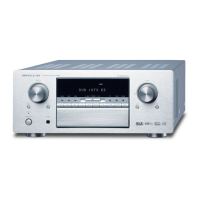
AV SURROUND RECEIVER SR7000
AUX
TV
DVD
LD
MEMORY
MODE
TUNING/PRESET
F/P
CD
SURROUND
DIGITAL
DIGITAL
DOLBY
LFE
LS
PEAK
S
RS
RCL
TAPE
TUNER
DSS/VCR2
6ch INPUT
MULTI
CDR/MD
A/D
S-DIRECT
VCR1
CLEAR
STANDBY
DOWN
SLEEP
S-VIDEO
VIDEO
L
AUDIO
R
AUX INPUT
DISPLAY OFF
MUTE
VOLUME
SURROUND
UP
POWER ON/STANDBY
PHONES
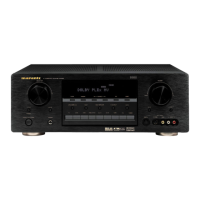
AV SURROUND RECEIVER SR8000
AUX
TV
DVD
LD
MEMORY
MODE
TUNING/PRESET
F/P
CD
SURROUND
DIGITAL
SR7000
SR8000


Other manuals for Marantz SR8000

Questions and Answers

  • N
    nicolestoneAug 21, 2025
    What to do if no sound and picture from Marantz SR8000 are output even when power is on?
    • K
      Kelly HolmesAug 22, 2025
      If no sound and picture are output even when the power is on, it might be due to several reasons. First, check if the mute function is activated and deactivate it using the remote control. Then, ensure that the input cables are correctly connected according to the connection diagram. Also, verify that the master volume is appropriately adjusted and that the correct function selector position is chosen.
  • C
    Christine MatthewsSep 4, 2025
    Why noise is heard during AM reception on Marantz Stereo Receiver?
    • C
      Carol HernandezSep 4, 2025
      If you're experiencing noise during AM reception on your Marantz Stereo Receiver, it could be due to interference from other electrical fields. Try changing the location where the AM indoor antenna is set up.
  • J
    Joseph ReedSep 2, 2025
    What to do if Marantz SR8000 Stereo Receiver plays sound from wrong source?
    • S
      Scott SingletonSep 3, 2025
      If your Marantz Stereo Receiver is playing sound and pictures from equipment other than what's selected with the function selector, the input cable may be connected incorrectly. Refer to the connection diagram and connect the cable correctly.
  • E
    Eric BrooksSep 1, 2025
    Why sound from the wrong channel is output from the speaker of Marantz Stereo Receiver?
    • E
      ellismichaelSep 1, 2025
      If your Marantz Stereo Receiver is outputting sound from the wrong channel, the speaker cable may be connected incorrectly. Refer to the connection diagram and connect the cable correctly.
  • H
    Hannah JonesAug 30, 2025
    Why control with the remote control unit of Marantz Stereo Receiver fails?
    • M
      morgan09Aug 31, 2025
      If the remote control is not working with your Marantz SR8000 Stereo Receiver, there are several potential causes. First, try replacing all the batteries with new ones. Also, make sure that the remote controller's function-key setting is correct. Ensure that you are not too far from the SR8000 and that there are no obstructions blocking the signal between the remote commander and the SR8000. Try moving closer to the device or removing any objects that might be interfering with the signal.
  • G
    Gabrielle BryantAug 29, 2025
    How to fix FM or AM reception failure on Marantz Stereo Receiver?
    • M
      Mark AdkinsAug 29, 2025
      If FM or AM reception fails on your Marantz Stereo Receiver, correctly connect the indoor FM and AM antennas to the FM and AM antenna outlets.
  • J
    Jeffrey RobertsAug 27, 2025
    How to fix noise produced during DTS-encoded CD or laser disc play on Marantz Stereo Receiver?
    • D
      Dr. Jasmine HaleAug 27, 2025
      To resolve the issue of noise during DTS-encoded CD or laser disc play on your Marantz Stereo Receiver, ensure that you perform a digital connection and select digital input before playing, as the problem may occur if analog input has been selected.
  • M
    Mrs. Anita Schwartz DDSAug 26, 2025
    Why no sound is output from the surround speakers of Marantz SR8000 Stereo Receiver?
    • S
      swoodAug 26, 2025
      If you're not getting sound from the surround speakers on your Marantz Stereo Receiver, first, ensure the surround speaker cables are correctly connected. If STEREO is selected for Surround mode, no sound will be output from the surround speakers, so try setting another Surround mode. Also, check that "Surround = NONE" has not been selected in SETUP mode, and correct the setting if needed.
  • S
    Summer LoveAug 25, 2025
    What to do if no sound is output from the center speaker of Marantz SR8000 Stereo Receiver?
    • D
      Dylan ClayAug 25, 2025
      If no sound is output from the center speaker of your Marantz Stereo Receiver, ensure the center speaker cable is correctly connected. Also, if STEREO is selected for Surround mode, no sound will be output from the center speaker; set another Surround mode. Verify that "Center = NONE" has not been selected in SETUP mode, and if it has, make the correct setting.
  • C
    Curtis TranAug 23, 2025
    How to fix no output to Sub Woofer Out on Marantz SR8000?
    • A
      amy38Aug 23, 2025
      If you are not getting any output to the Sub Woofer Out on your Marantz Stereo Receiver, check if "Sub-woofer = NO" has been selected in the SETUP mode. If it has, select "Sub-woofer = YES".

Summary

1. TECHNICAL SPECIFICATIONS

FM TUNER SECTION

Tuner specifications for FM band.

AM TUNER SECTION

Tuner specifications for AM band.

AUDIO SECTION

Audio performance and power ratings.

VIDEO

Video input/output specifications.

GENERAL

General unit specifications.

ACCESSORIES

Included accessories.

2. WIRING DIAGRAM

4. SCHEMATIC DIAGRAM

8. SERVICE PROGRAM

FACTORY Mode

Accesses tuner tracking memory and preset selection.

CPU and FLD Segment Check

Verifies microprocessor and display functionality.

Input and Output Test Mode

Tests various input/output signal paths.

9. ELECTRICAL ADJUSTMENTS

DC Offset Adjustment

Adjusts DC voltage at speaker terminals.

Idling Current Adjustment

Adjusts quiescent current in power amplifier stages.

11. TROUBLE SHOOTING

No Power Troubleshooting

Diagnoses issues when the unit does not power on.

13. ELECTRICAL PARTS LIST

Marantz SR8000 Specifications

General IconGeneral
BrandMarantz
ModelSR8000
CategoryStereo Receiver
LanguageEnglish

Related product manuals