EasyManua.ls Logo

Marantz SR8500 - Marantz Room Acoustic Calibration (MRAC)

Marantz SR8500
58 pages
Print Icon
To Next Page IconTo Next Page
To Previous Page IconTo Previous Page
Loading...
21
ENGLISH
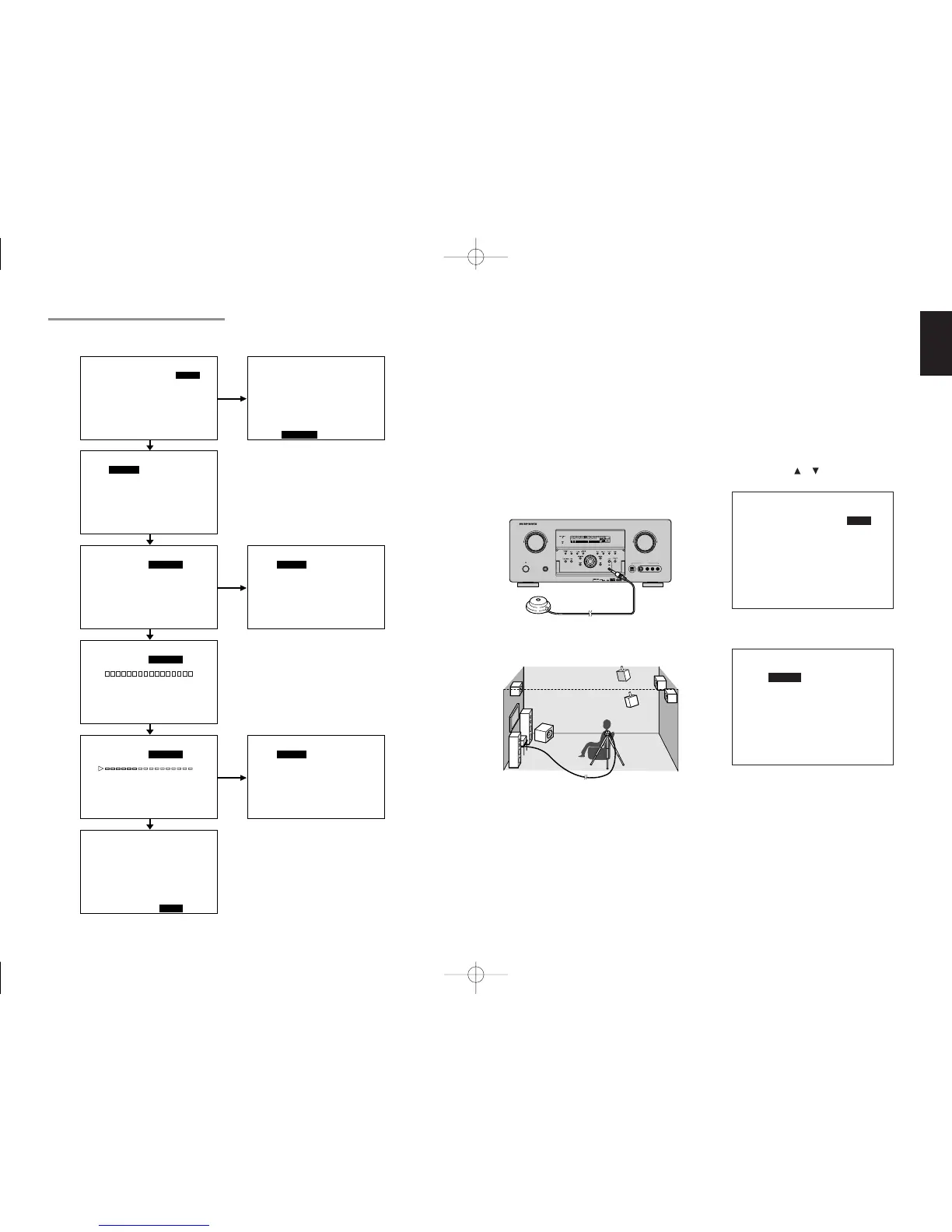
Measurement
During measurement, a test tone is output from the
speakers, which is then measured and analyzed
though the microphone. The measurement flow
and items are as follows.
Microphone connection check: MIC CHECK
Ambient noise measurement: AMBIENT NOISE
Speaker connected/not connected check:
SPEAKER CHECK
Speaker output level check: SPEAKER LEVEL
Distance from speaker (delay time) check:
SPEAKER DISTANCE
Speaker characteristics check: SPEAKER SIZE
How to Operate
Settings are displayed on the monitor during setup,
therefore turn the monitor on.
1.
Connect the included microphone to the
MRAC jack of the unit.
2.
Set the microphone at ear height as in the
actual listening position. Use a stand or tripod
to position the microphone.
Notes:
• Remove any obstructions between the speakers
and the microphone.
• Keep the room quiet during measurement.
• The test tone emitted during measurement is loud.
Take considerations for neighboring homes and
children.
• Step away from the listening position during
measurement and operate the unit with the remote
controller from outside the speaker path.
• About surround back speakers :
When the surround back speaker is set to NONE
in the SPEAKER SETUP, it is skipped in the
AUTO setup. To use the surround back speaker,
set it to YES by MANUAL setup before using the
MRAC feature.
• The MRAC feature is available except in the
following modes.
- 7.1 CH INPUT
- PURE-DIRECT
3.
Either press the MRAC button on the front panel
of the unit or select “2. SPEAKER SETUP” on
the SETUP MAIN MENU, then select AUTO for
2-1 SPEAKER SETUP”. Move the cursor to
“NEXT” with the
or cursor buttons and then
press the ENTER button.
4.
Select START on the AUTO SETUP display
and press the ENTER button to start
measurements.
5.
For measurement items, see “Measurement”.
6.
When measurements are completed,
“FINISHED” appears on the monitor.
7.
Once finished, disconnect the microphone
from the unit.
8.
Measurement results can be seen by
selecting “NEXT” and press the ENTER
button or selecting “2. SPEAKER SETUP” on
the SETUP MAIN MENU. Then select
MANUAL for “2-1 SPEAKER SETUP”.

2-1 SPEAKER SETUP
SPEAKERS SETUP : AUTO
SET MICROPHONE
MA I N N E X T E X I T
AUTO SE TUP
START CANCE L
SPEAKERS CHECK :
✽✽
SPEAKERS LEVEL : ✽✽
S PEAKERS D I STANCE : ✽✽
SPEAKERS S I ZE : ✽✽
MA I N RETURN NEXT EX I T
2-1 SPEAKER SE
SPEAKER SETUP
SET M I CROPHON E
MA I N
AUTO S ETUP
START CA
SPEAKERS CHECK
SPEAKERS LEVEL
SPEAKERS D I STA
SPEAKERS S I ZE
MA I N RE TURN
NCE L
:
✽✽
:
✽✽
NCE :
✽✽
:
✽✽
NEXT EX I T
AUTO S ETUP
START CA
AMB I EN T NO
SPEAKERS CHECK
SPEAKERS LEVEL
SPEAKERS D I STA
SPEAKERS S I ZE
MA I N RE T U RN
NCE L
ISE CHK
:
✽✽
:
✽✽
NCE :
✽✽
:
✽✽
NEXT EX I T
AUTO S ETUP
START CA
AMB I EN T NO
SPEAKERS CHECK
SPEAKERS LEVEL
SPEAKERS D I STA
SPEAKERS S I ZE
MA I N RE T U RN
NCE L
ISE OK
:
✽✽
:
✽✽
NCE :
✽✽
:
✽✽
NEXT EX I T
AUTO S ETUP
START CA
NOW ANA LY
SPEAKERS CHECK
SPEAKERS LEVEL
SPEAKERS D I STA
SPEAKERS S I ZE
MA I N RE TURN
NCE L
ZING
:
✽✽
:
✽✽
NCE :
✽✽
:
✽✽
NEXT EX I T
AUTO S ETUP
START CA
F I N I SHED
SPEAKERS CHECK
SPEAKERS LEVEL
SPEAKERS D I STA
SPEAKERS S I ZE
MA I N RE TURN
NCE L
:OK
:OK
NCE : OK
:OK
NEXT EX I T
TUP
: AUTO
NEXT EX I T
AUTO S ETUP
START CA
MIC SETUP
SPEAKERS CHECK
SPEAKERS LEVEL
SPEAKERS D I STA
SPEAKERS S I ZE
MA I N RET URN
NCE L
ERROR
:
✽✽
:
✽✽
NCE :
✽✽
:
✽✽
NEXT EX I T
AUTO S ETUP
START CA
AMB I NO I
SPEAKERS CHECK
SPEAKERS LEVEL
SPEAKERS D I STA
SPEAKERS S I ZE
MA I N RET URN
NCE L
SE ERROR
:
✽✽
:
✽✽
NCE :
✽✽
:
✽✽
NEXT EX I T
NG
NG
AUTO S ETUP
START CA
SPEAKER SE
SPEAKERS CHECK
SPEAKERS LEVEL
SPEAKERS D I STA
SPEAKERS S I ZE
MA I N RET URN
NCE L
TERROR
:
✽✽
:
✽✽
NCE :
✽✽
:
✽✽
NEXT EX I T
NG
MRAC (Marantz Room Acoustic Calibration)
Speaker settings that were difficult by MANUAL setup can now be made by automatically measuring
speaker characteristics using the including microphone.
AV SURROUND RECEIVER SR7500
POWER ON/OFF PHONES
STANDBY
L
C
R
SL S SR
LFE
DIGITAL
SURROUND
DISP MULTI AUTO TUNED ST SPKR A B V-OFF
NIGHT
PEAK ANALOG
DIGITAL
ATT
SLEEP
SURR DIRECT
AUTO
DISC 6.1 MTX 6.1
PCM
AAC
AUX 1 INPUT
AUDIOS-VIDEODIGITAL VIDEO L R
DOWN
UP
VOLUME
ENTER
INPUT SELECTOR
SR7500NDFU01ENG23 04.10.13, 5:14 PMPage 21 AdobePageMaker6.5J/PPC

Table of Contents

Other manuals for Marantz SR8500

Related product manuals