ENGLISH
32
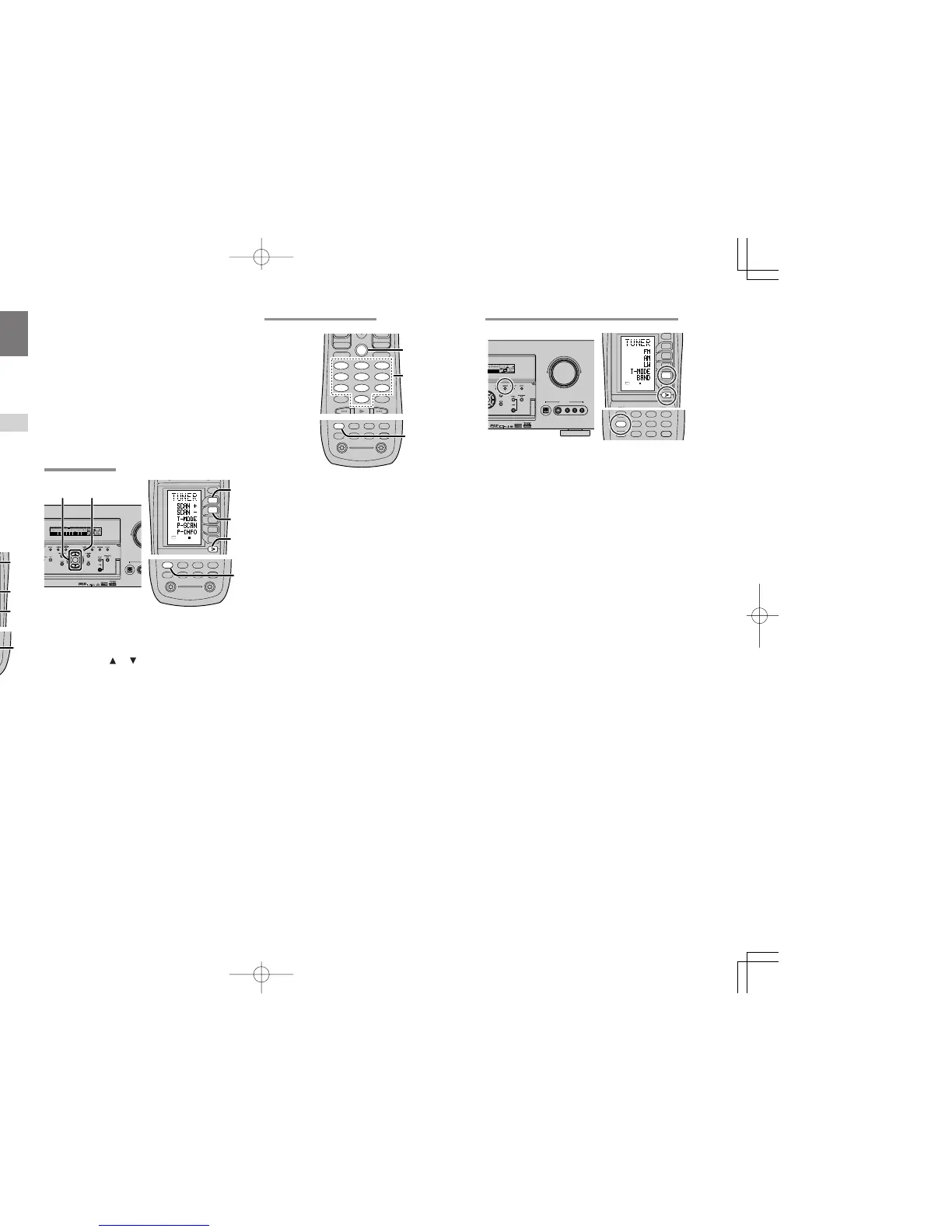
(FM) TUNING MODE (AUTO STEREO OR MONO)
When in the auto stereo mode, AUTO indicator will
be illuminated on the display.
The “ST” indicator is illuminsted when a stereo
broadcast is tuned in.
At open frequencies, the noise is muted and the
“TUNED” and “ST” indicators are not illuminated.
If the signal is weak, it may be difficult to tune into
the station in stereo. In such a case, press the
MODE button on the front panel.Or press the
TUNER button and press the > button until PAGE1
is displayed. Press the T-MODE (D4) button.
“AUTO” indicator is not illuminated, if FM stereo
broadcasts are received in monaural and the “ST”
indicator is not illuminated.
To return to auto stereo mode, press the MODE
button or press T-MODE button on the remote
again. AUTO indicator is illuminated the display.
BASIC OPERATION
(TUNER)
To operate the unit from the remote control, press
the TUNER button on the remote control so that
the tuner mode is engaged.
LISTENING TO THE TUNER
Frequency scan step for AM is selectable.
Default setup is 9 kHz step, if your country’s
standard is 10 kHz step, Press TUNER button on
the remote more than 6 seconds. Scan step will
change.
Note:
•
Preset memory for the tuner will clear by changing
this setup.
AUTO TUNING
(Using the SR7500)
1.
To select tuner and desired band (FM or AM),
press the BAND button on the front panel.
2.
Press the
or cursor buttons
on the front
panel for more than 1 second to start the auto
tuning function.
3.
Automatic searching begins then stops when
a station is tuned in.
(Using the remote control unit)
1.
To select tuner and desired band (FM or AM),
press the TUNER button twice within two
seconds on the remote.
2.
Press the > button until PAGE2 is displayed.
3.
Press and hold the SCAN+ (D1) or SCAN–
(D2) button for 1 second or more.
4.
Automatic searching begins then stops when
a station is tuned in.
If tuning does not stop at the desired station, use to
the “Manual tuning” operation.
MANUAL TUNING
(Using the SR7500)
1.
To select tuner and desired band (FM or AM),
press the BAND button on the front panel
2.
Press the
or cursor buttons
on the front
panel to select the desired station.
(Using the remote control unit)
1.
To select tuner and desired band (FM or AM),
press the TUNER button twice within two
seconds on the remote.
2.
Press the > button until PAGE2 is displayed
3.
Press the SCAN+ (D1) or SCAN– (D2) button
to tune in the deseired station.
DIRECT FREQUENCY CALL
1.
To select tuner and desired band (FM or AM),
press the TUNER button twice within two
seconds on the remote.
2.
Press the GUIDE on the remote, display will
show “FREQ - - - -”.
3.
Input your desired station’s frequency with the
ten numbered keypad on the remote.
4.
The desired station will automatically be
tuned.



 To Next Page