6
ENGLISH FRANÇAIS DEUTSCH
NEDERLANDS
ESPAÑOL ITALIANO
PORTUGUÊS
SVENSKA DANSK
Use of the remote control unit
1. Remove control unit
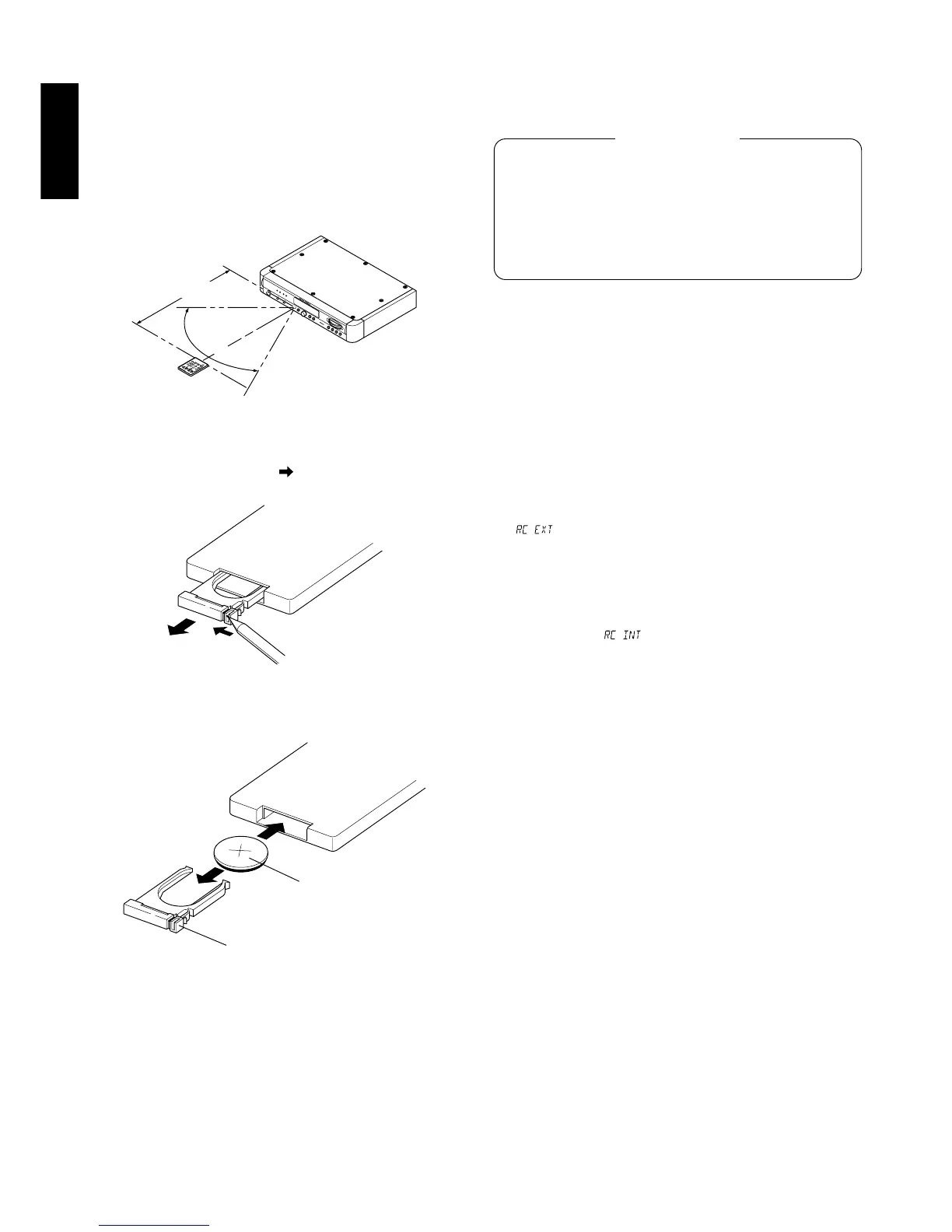
Use the remote control unit at a distance of less than about 5 meters
from the main unit.
To ensure remote control operation, do not point the remote control
unit to other direction that the IR sensor of the main unit and remove
obstacles between the remote control unit and IR sensor. Operation
may also become impossible when strong light is incident to the IR
sensor.
2. Operation range of the remote control unit
Tuner (ST-17)
Approx. 5m
Remote control unit (RC-17ST)
3. Loading battery
q Turn the remote control unit upside down and side open the
battery case in the direction of using a sharp such as the tip
of a ball-point pen.
w Load the battery case with the provided battery, insert the battery
correctly according to the “” indication on the battery case then
slide the battery case into the remote control unit it clicks.
Battery case
Battery (CR2025)
Insert the battery with the
positive ()side facing up.
The battery life is about 1 year under normal use.
The life is depended on the operating condition. Take the battery out
of the unit when it is not to be used for a long period of time.
Keep the battery out of reach of children.
If it is swallowed, immediately call the doctor.
Improper use of battery may lead to fluid leakage or battery
explosopn. Use special care in the following points when
handling a battery.
Insert the battery with correct position and negative polarity as
indicated on the equipment.
A used battery should be disposed of in the battery disposal
box installed in your dealer.
Caution on battery
Additional description on remote control bus terminal
If it is required to connect this unit to other MARANTZ equipment
equipped with REMOTE CONTROL terminals and control both pieces
of equipment as a system, change the remote control signal which
can operate this unit to the signal from the REMOTE CONTROL input
terminal by performing the following procedure before connecting
this unit with other equipment.
Without this procedure, the system control of this unit is impossible
even when it is connected through the REMOTE CONTROL terminal.
The following procedure is not required if the system connection
through the REMOTE CONTROL terminal is not used.
1. Set the POWER switch to the off position and, while holding the
BAND and DISPLAY buttons simultaneously, press the POWER
switch to ON.
2. “” blinks for 2 seconds on the display, indicating that the
remote control of this unit will thereafter be based on the external
signal input through the REMOTE CONTROL terminal. In this case,
the IR sensor of the main unit will no longer accept the signals from
the remote control unit. The remote control unit should be pointed
to the IR sensor of the equipment connected to this unit.
* To return to the initial condition, perform the same operation as
step 1 above. “” blinks for 2 seconds on the display and
the remote control condition returns to the initial condition.



 To Next Page