30
PARKING RECORDING GUIDE
Parking Recording Guide
Parking recording mode will be only activated when the device is connected by hardwire power cable.
Recording starts when there is an impact or movement.
Recording time
Parking file size is maximum 1min.
In case an impact is detected, it records upto 10seconds from an
impact. In case an movement in front or rear is detected, it keep
recording at 1min long till movement is ended
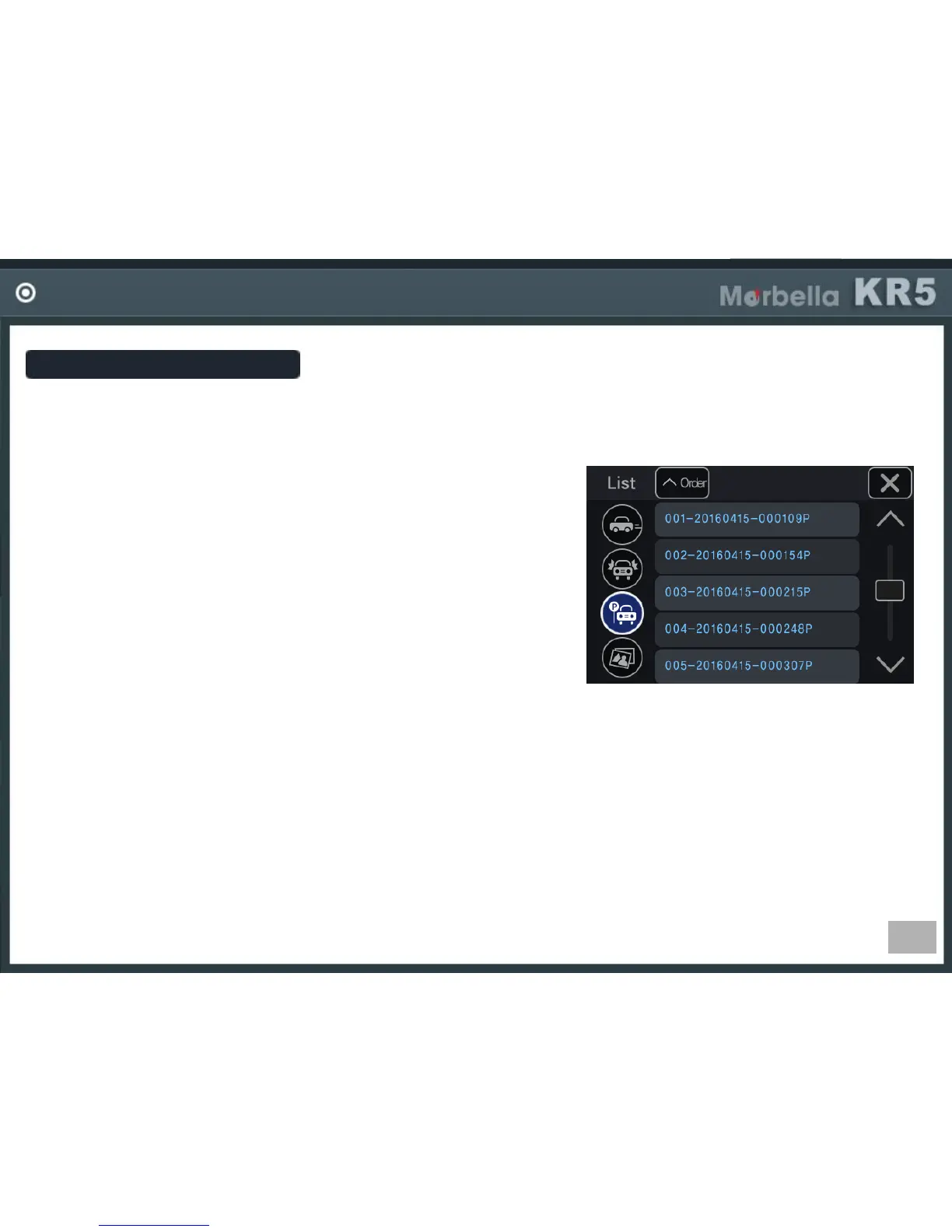
-Recording file
It is made in the format, Year/Mon/Day hour/min/sec.
ex) 001-20161009_103316P (in case of parking recording file)
001 : file index
20161009 : date (year 2016, Oct, 9
th
)
103316 : time (10oclock 33min 16sec)
I : driving REC, E: event REC, P : parking REC
A,B : photo, A-front, B-rear
If the SD card memory is full
The program will delete the oldest file in order, then create the new file by current date and time.
How to do parking recording.
Parking recording mode will be only activated when the device is connected by hardwiring. (Impossible
in cigar power connection)
In parking mode, if a movement in front or rear side (man, car, animal, etc), it keep recording at 1min long. If a
movement is not detected it stops recording.
If an impact is detected by car or man, the device detects and starts recording up to 10seconds from an
impact


 To Next Page