22
© 2017
Ma
k
a
T
e
c
hnologie
s
G
roup
. A
ll Righ
ts
Re
s
er
v
ed
.
Getting
Started
Installation
of APPS for your TX2
F
HD Digital
Roadcorder
TM
Setting Up Wifi Connection
The Apps connects to TX2 via Android and iOS platform. Connection require
device to be turn on in order to allow wifi connection setting up.
1. i. Andriod system – Open wifi connection on the mobile phone,
Select Wifi ID of the TX2 Recorder (Default name :
TX2_xxxxxxxxxxxx
*) *refer to MAC (media access control) of the
device connecting. Initial default password :
12345678
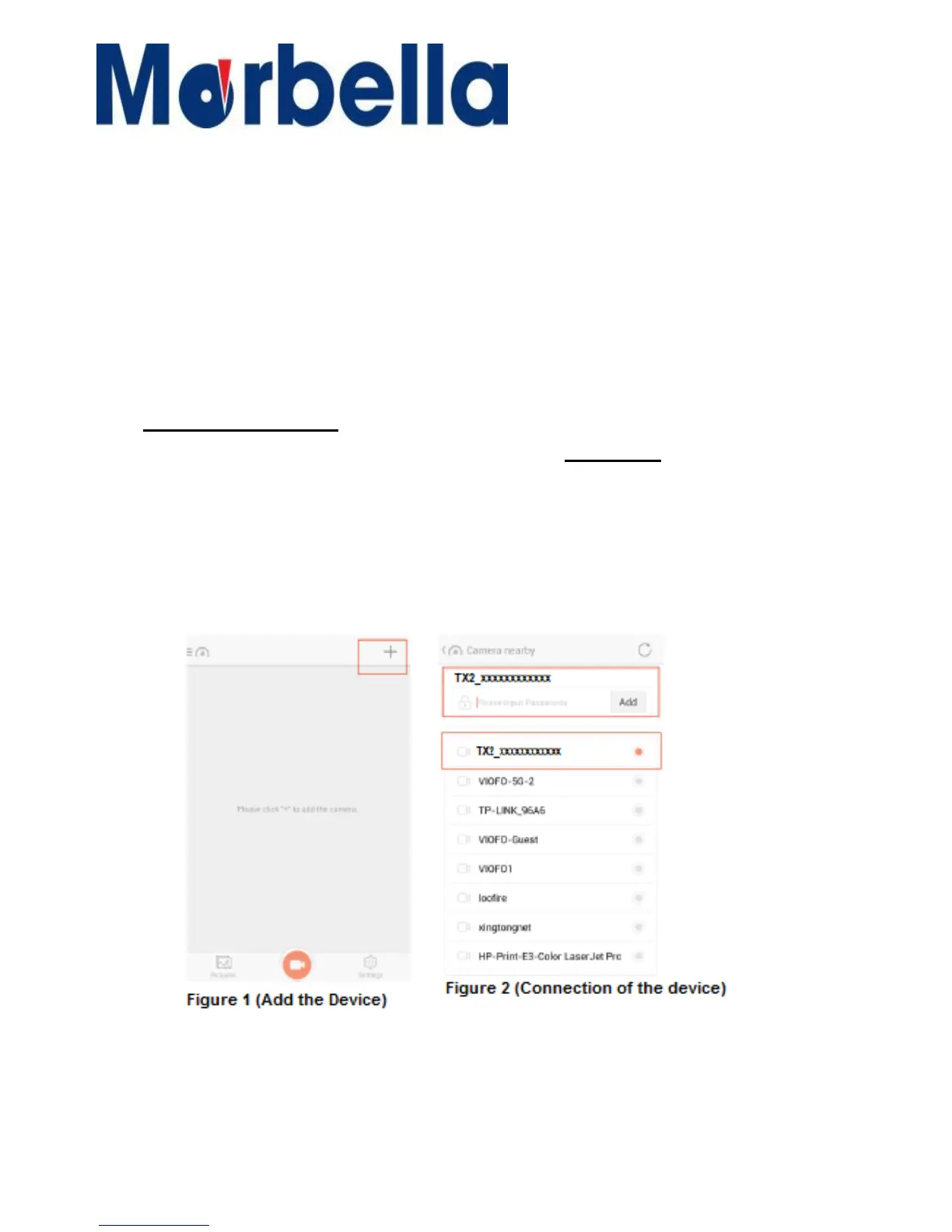
ii. Open the installed Apps downloaded and click on the “+” on the
top right corner. Refer to
Figure.1
below. The apps will connect to
the device Wifi automatically. Enter the password again to add. If
not, please select the Wifi ID manually
(as in figure 2)
and enter
password to add.



 To Next Page