4-13
Nº502 Media Console Troubleshooting & Maintenance
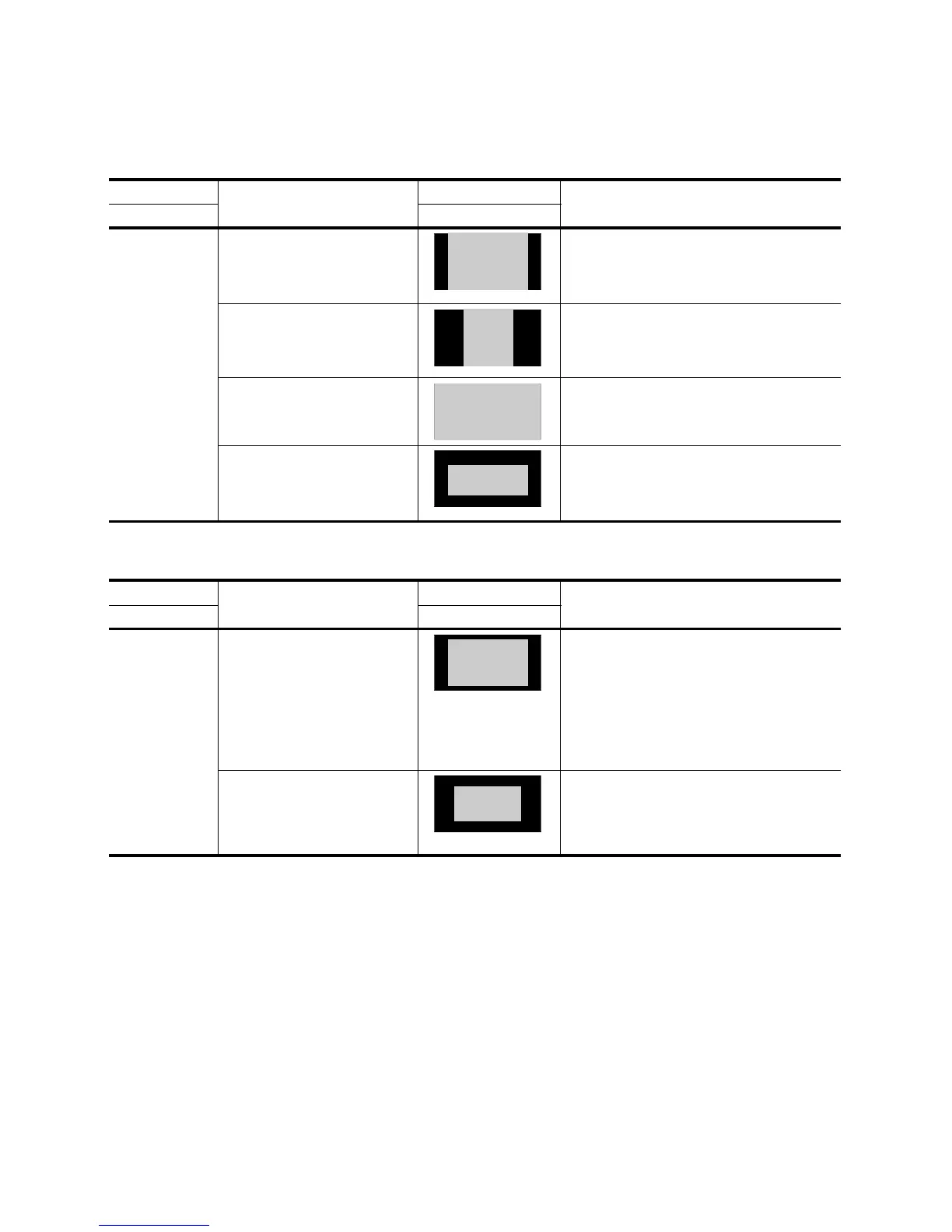
Input Source Symptoms Output Possible Solutions
DVD Format Output on Display
Fullscreen (4:3)
(typically TV shows
or movies
converted for TV)
• Black bars on the left & right sides
(pillarboxing)
• Image is not stretched or squashed
• Image is complete, no cropping at
the sides or top/bottom
• This is a correct image. All format settings are
correct as set.
• The black bars (pillarboxing) are added by the
display because there is literally more display than
image area available.
• Image is stretched horizontally, so
that people appear tall & thin
• Image has too much pillarboxing
on the right & left sides
• This image is NOT formatted correctly. For a
fullscreen source, the left & right bars should
ALWAYS be present and the image should not be
distorted.
• The display may be incorrectly set.
• Image fills the screen, but some of
the image is cropped or missing
• No black bars on the left & right
sides
• This image is NOT formatted correctly.
• A stretch mode or zoom mode may be set on either
the display, DVD player, or Nº502 setup. Verify all
stretch and zoom modes are set to normal.
• Image has black bars on the top &
bottom (letterboxing)
• Image is squashed vertically, so
that people appear short & fat
• This image is NOT formatted correctly. On a
fullscreen source, there should NEVER be black
bars on the top & bottom.
• The display may be set to the wrong aspect ratio.
• The Nº502 may be set to the wrong display format.
Input Source Symptoms Output Possible Solutions
DVD Format Output on Display
Letterbox
Non-
Anamorphic
(typically older or
low-budget
widescreen movie)
• Image fills the screen
• Image is not stretched or squashed
• Image has black bars on top &
bottom and left & right sides
• This is a correct image. All format settings are
correct as set.
• The black bars on the top & bottom (letterboxing)
are part of the DVD image.
• The black bars on the left & right sides
(pillarboxing) are added by the display because the
source is a full-screen format
• In this case, a Zoom mode could be used to fill the
screen to remove the black bars without distorting
the image
• Image is stretched horizontally,
making people appear tall & thin,
or squashed vertically, making
people appear short & fat
• Image has too much letterboxing
or pillarboxing
• This image is NOT formatted correctly.
• A stretch mode or zoom mode may be set on either
the display, DVD player, or Nº502 setup. Verify
that all stretch and zoom modes are disabled.


 To Next Page