A-6
Appendix Mark Levinson
Rack Mount Kit Instructions
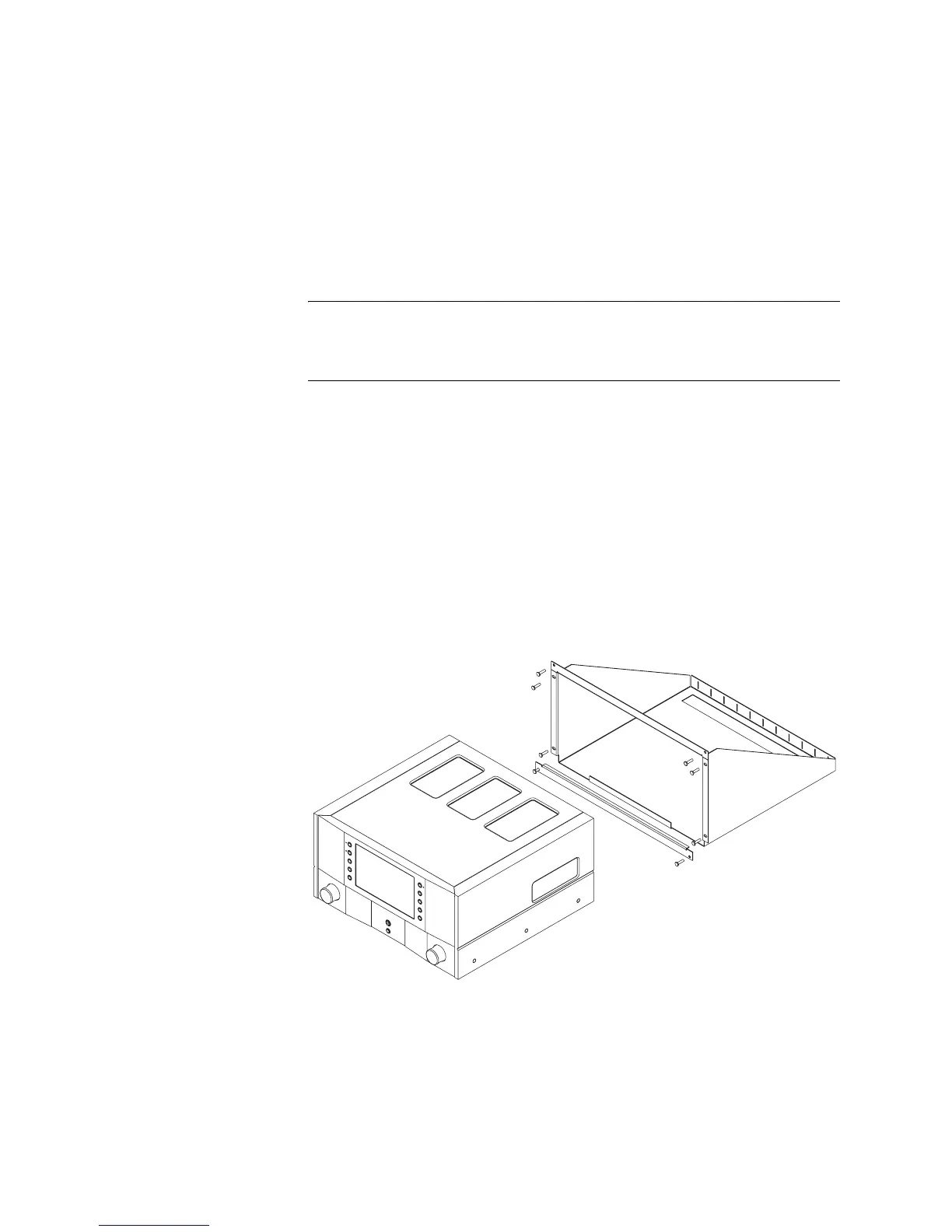
Follow these instructions to install the Nº502 Media Console into the
optional rack mount. To order a rack mount kit, contact an authorized
Mark Levinson dealer for availability and pricing.
1. Using a Phillips head screwdriver, install the rack shelf to the rack
using four of the screws included in the rack mount kit.
Note Be sure to tighten all screws so that they fit firmly. Ensure that you do NOT
overtighten the screws. Overtightening the screws may strip the threads,
thereby making the connection not secure.
2. Slide the Nº502 Media Console onto the rack shelf until the front
panel is flush with the edges of the rack.
3. Position one of the dress plates included with the rack mount kit
across the top of the Nº502 and screw to the rack using two of the
screws from the kit.
4. Position the second dress plate across the bottom of the Nº502 and
screw to the rack using the last two screws from the kit.
You have now completed the rack shelf installation. The finished
assembly occupies six rack units. The slots in the rear of the rack shelf are
designed for cable management.



 To Next Page