2-8
Basic Operation Mark Levinson
Remote Control Overview
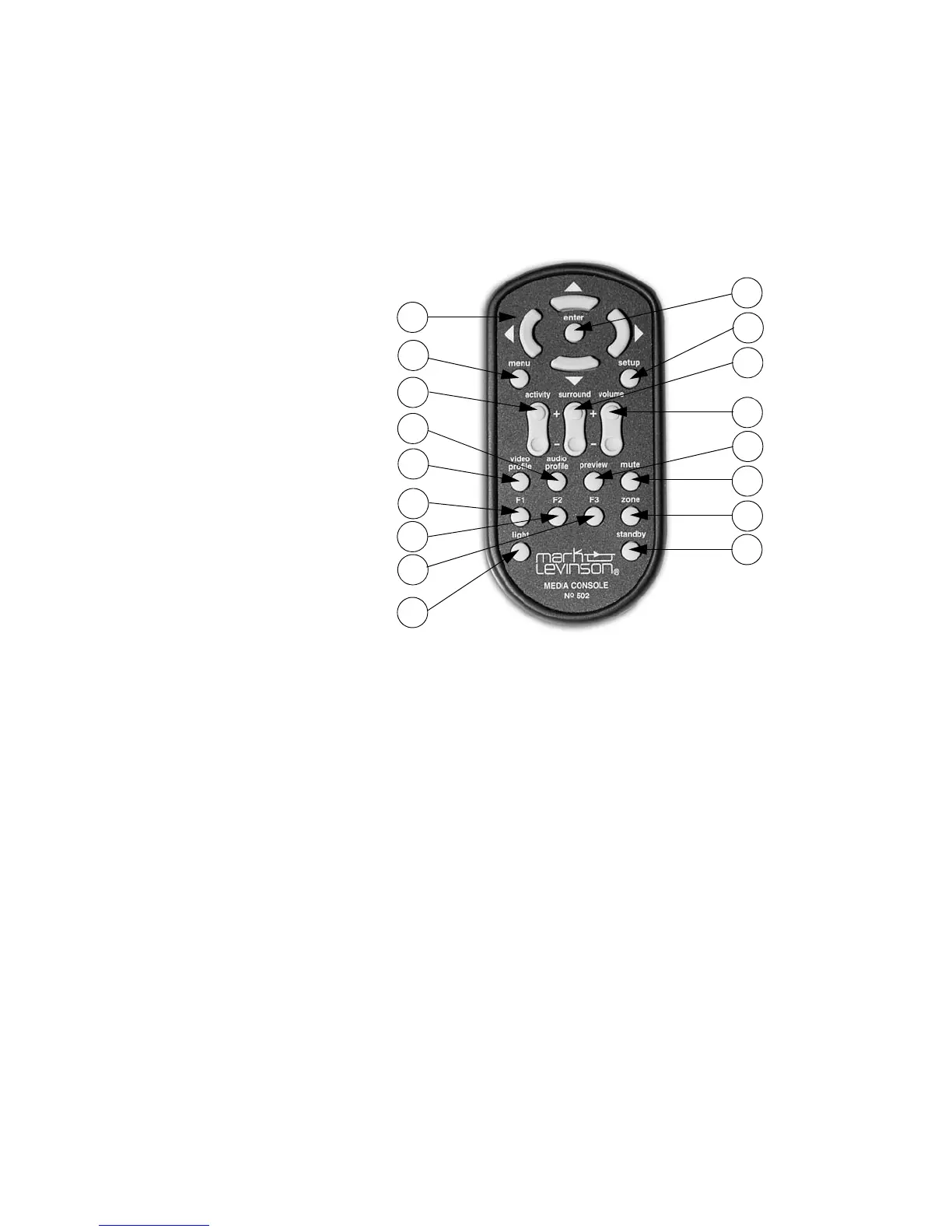
The numbers in the Remote Control illustration above correspond with
the summary list of items below.
1. Navigation buttons (, , , )
2. Menu button
3. Activity button
4. Audio Profile button
5. Video Profile button
6. Function F1 button
7. Function F2 button
8. Function F3 button
9. Light button
10. Enter button
11. Setup button
12. Surround button
13. Volume button
14. Preview button
15. Mute button
16. Zone button
17. Standby button
1. Navigation
buttons
The , , andbuttons provide basic navigation within the menu
system of the Nº502. The navigation buttons:
• highlight a new option from a list using the and buttons.
• select a new parameter value using the button.
• adjust an adjustment bar using the and buttons.
• exit a submenu using the button.
• enter a submenu using the button.
11
14
16
17
12
13
15
10
1
5
8
9
2
3
4
7
6



 To Next Page