15
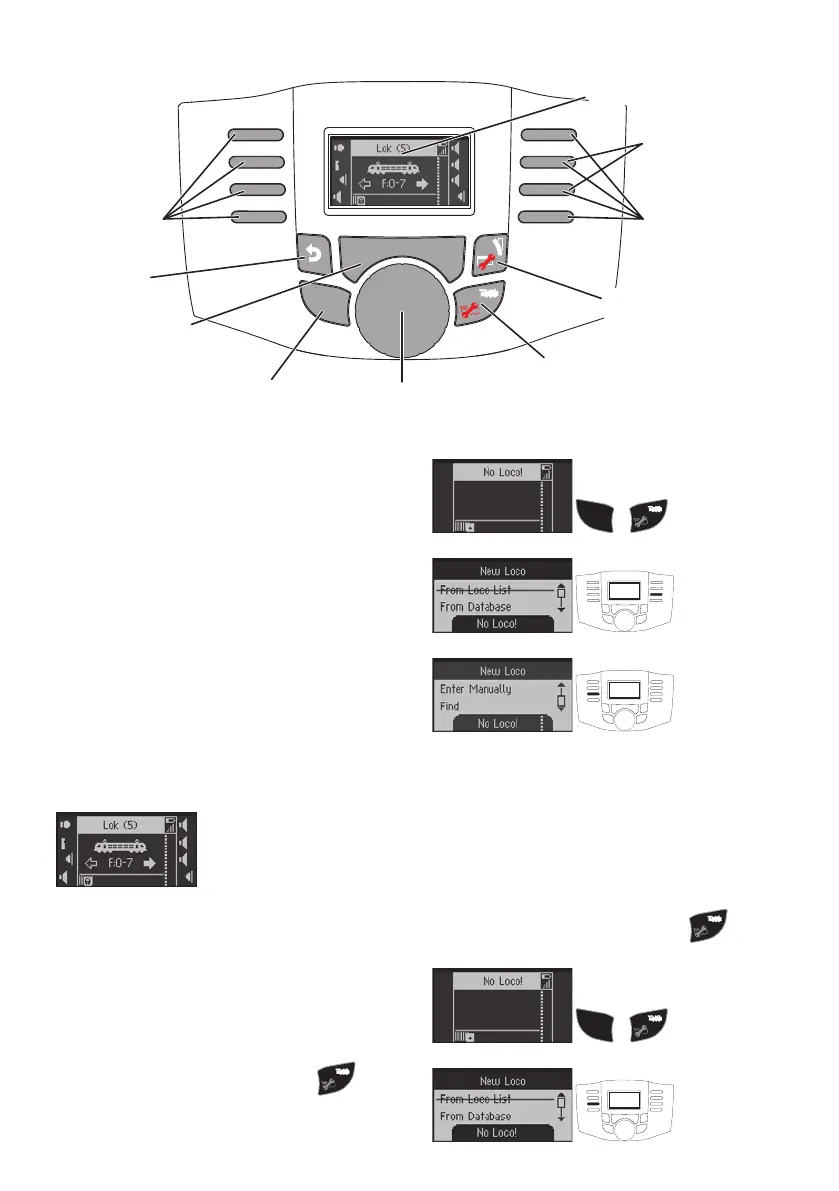
Setting up a Locomotive
Locomotives must be set up in the Mobile Station
WLAN in order to be able to control them. Locomo-
tives, which have been set up, are displayed in the
locomotive list. You can select among locomotives
displayed in the locomotive list by using SHIFT + the
control knob. Up to 40 locomotives can be set up in the
locomotive list. Additional locomotives overwrite the
respective oldest one already set up.
There are several ways to set up locomotives. These
are described as follows.
Registering an mfx Locomotive
Place the locomotive (with mfx decoder) on the track.
The locomotive registers itself on its own after a short
time. The newly registered locomotive is displayed,
added to the locomotive list, and it is immediately
ready to run.
Recognizing a Locomotive
The Mobile Station WLAN can nd a locomotive (fx
(MM) or DCC) standing on the track and recognize it.
To do this, only this one locomotive may be standing
on the track.
Also, mfx locomotives, which are not automatically
registered, can be registered by recognizing the
locomotive.
Searching for an open storage location:
S H I F T
+
If a locomotive has not been recognized several times,
then check to make sure that there is clean contact
between the locomotive and the track.
Setting up a Locomotive from the Database
The Mobile Station WLAN has a database from which
a locomotive can be selected. The settings for the
locomotive must then however be the same as when
the locomotive came from the factory.
Searching for an open storage location:
S H I F T
+
S H I F T
S T O P S T O P
loco control
rev ersing direction
„OK“
Shift
b ack
1 step
Solenois accessories
+ Shift menue
scroll
screen
Selection Selection
Loco selection
+Shift conf. loco
Stop
loco-I con & name


 To Next Page