17
Solenoid Items
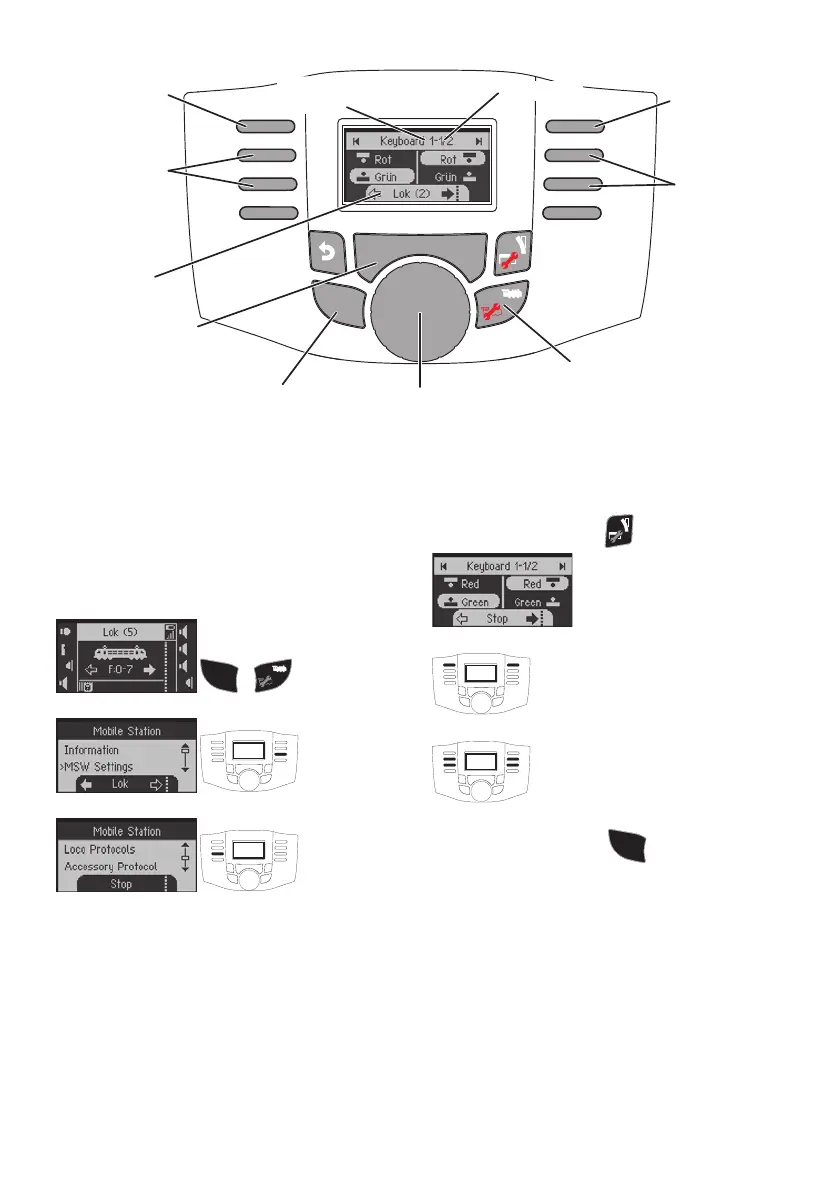
Solenoid items can be switched in the Keyboard.
Solenoid items do not need to be set up. They can be
switched immediately using the address.
Turning Protocols On/Off
The protocols for switching solenoid items are inde-
pendent of the protocols for running a locomotive.
S H I F T
+
Switching Solenoid Items
320 addresses (MM or DCC) are displayed with stan-
dard symbols for solenoid items.
When the Mobile Station is connected to a Central
Station, the solenoid items are displayed with the sym-
bols used there (exceptions: turntable and color light
signals. Color light signals are shown as semaphore
signals, the turntable with the standard symbols for
solenoid items).
The last locomotive called up will continue to be
displayed on the lower edge of the display. You can
continue to control it. You must change to the locomo-
tive mode again in order to change the locomotive or
to call up other locomotive functions.
Changing to the Keyboard:
Browsing:
Switching:
Tip:
When you press the button
S H I F T
and hold it pressed
down, you can browse faster through the Keyboard.
Web-Interface
When the Mobile Station WLAN is not connected to
a router or the 60117 WLAN Box, you can access the
Mobile Station from a PC (with WLAN) or a Smartphone.
Address: 192.168.1.1
or: msw.local
Several settings can be done on the device in the user
interface shown in the browser. Among other things, a
previously downloaded update for the Mobile Station
WLAN can also be recorded here.
Even if the WLAN mobile station is connected to a
S H I F T
S T O P S T O P
Switch
Switch
Key b oard
scroll
forward
Keyb oard
scroll
b ackward
Key b oard
no.
address
loco control knob
rev ersing direction
Shift + control knop = fast Key b oard selection
Shift
active
loco
loco control mode
Stop


 To Next Page