Home
Marshall Amplification
Speakers
ACTON
Page 213
Marshall Amplification ACTON - Page 213
240 pages
Manual
Save Page as PDF
To Next Page
To Next Page
To Previous Page
To Previous Page
Loading...
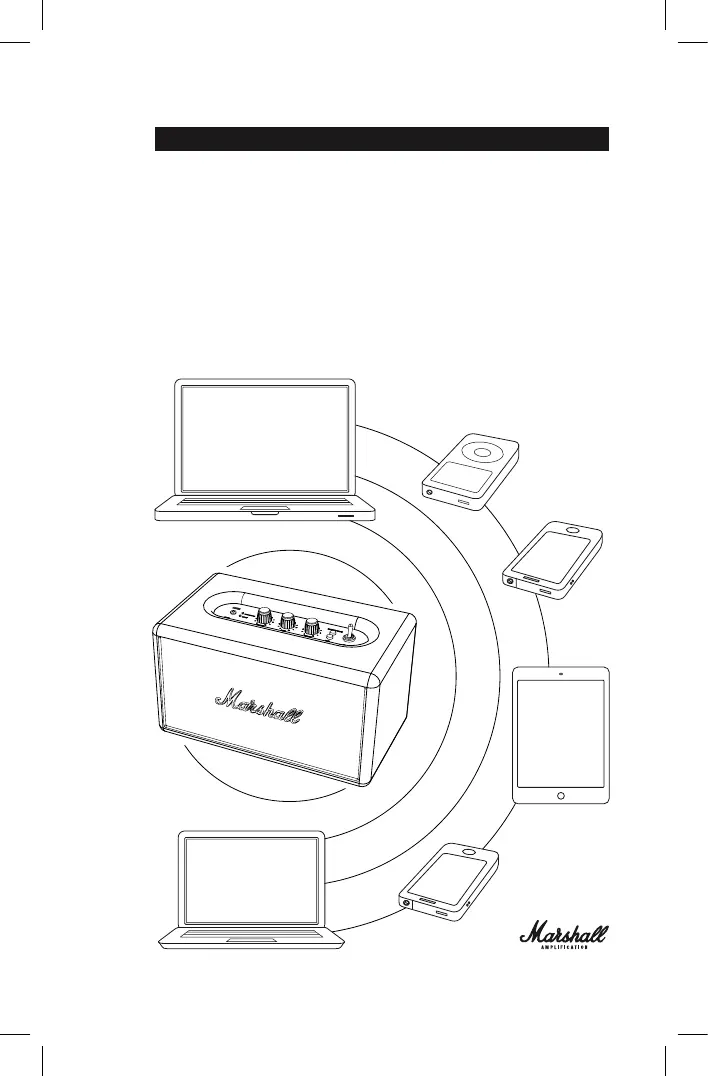
藍牙自動連接
如果將藍牙設備移到
ACTON
音箱接收範圍外(無障礙物的情況下大
約
10
米),該藍牙設備會斷開連接。將藍牙設備移回音箱接收範圍內
時,則會再次自動連接該設備。ACTON
音箱最多可記憶六個藍牙設備並
先搜尋已連接的最後一個設備。如果已將
ACTON
音箱連接至
設備
A–B–C–D–E–F,依此順序將先搜尋設備
F,最後搜尋設備
A。每次
ACTON
啟動時,會在其範圍內執行設備的自動連接。
212
214
Table of Contents
Main Page
English
3
Important Safety Instructions
1
Compliance Marks
2
Table of Contents
3
The Acton
5
Box Contents
6
General Description
8
Turning the Power On/Off
10
Using the Acton with
12
Choosing Your Source
13
Standby Modes
20
Technical Information
23
Trouble Shooting
24
Bluetooth Connection
26
Français
29
Consignes de Sécurit
30
Étiquettes de Sécurit
31
Contenu du Carton
34
Description Générale
36
Allumer/Arrêter L'appareil
38
Utilisation du Acton
40
Connexion Bluetooth
42
Le Acton
45
Entrée - Prise Stéréo 3,5 MM
47
Modes Veille
48
Informations Techniques
51
Dépannage
52
Deutsch
85
Wichtige Sicherheitshinweise
86
Sicherheitslabel
87
Der Acton
89
Paketinhalt
90
Allgemeine Beschreibung
92
Ein-/Ausschalten
94
Verwendung des Acton mit anderen Geräten
96
Auswahl der Quelle
97
Verbindung über Bluetooth
101
Standby-Modi
104
Technische Daten
107
Fehlerbehebung
108
Instrucciones Importantes de Seguridad
114
Warranty Info
225
Related product manuals
Marshall Amplification ACTON III
24 pages
ACTON II VOICE
21 pages
Acton Bluetooth
24 pages
Acton Multi-Room
33 pages
Marshall Amplification AST2C
31 pages
ACTON II Bluetooth
21 pages
Marshall Amplification WILLEN
219 pages
Marshall Amplification WOBURN
414 pages
Marshall Amplification KILBURN
404 pages
Marshall Amplification STANMORE
24 pages
STANMORE II
12 pages
STOCKWELL II
17 pages



 To Next Page