EasyManua.ls Logo

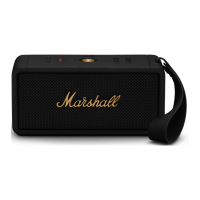
Marshall Amplification MIDDLETON - User Manual

Marshall Amplification MIDDLETON
13 pages
Print Icon
To Next Page IconTo Next Page
Loading...
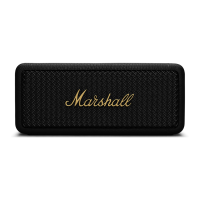
MIDDLETON – PORTABLE LOUDSPEAKER
FULL ONLINE MANUAL

Questions and Answers

  • B
    brownericJul 29, 2025
    Why won't my Bluetooth connect to my Marshall Amplification Speaker?
    • R
      roberto34Jul 29, 2025
      If your Bluetooth device isn't connecting to your Marshall Amplification Speaker, it could be due to several reasons. First, ensure that Bluetooth is enabled on your device. If it is, check that the speaker is in pairing mode by pushing the Bluetooth button until the Bluetooth LED pulses red. Also, push and hold the speaker for seconds to turn on the speaker before setting it in pairing mode.
  • A
    Alicia JimenezAug 6, 2025
    What to do if Bluetooth connection drops out on Marshall Amplification MIDDLETON Speakers?
    • O
      ojordanAug 7, 2025
      If your Marshall Amplification Speaker's Bluetooth connection keeps dropping, the issue might be distance or interference. Try moving the two Bluetooth devices closer to each other, ensuring there are no obstacles like walls or doors between them. Alternatively, a strong electric field could be interfering; try moving the speaker away from other electronic devices or turning them off.
  • K
    Kenneth FowlerAug 13, 2025
    How to turn on a Marshall Amplification Speaker?
    • A
      April RamirezAug 14, 2025
      If your Marshall Amplification Speaker isn't turning on, the battery might be dead. Plug the speaker into a USB power source to charge it. If that doesn't work, push and hold the speaker for seconds until the speaker turns on.
  • K
    Kristen NguyenAug 21, 2025
    What to do if Marshall Amplification Speaker behaves erratically?
    • D
      Donald SmithAug 22, 2025
      If your Marshall Amplification Speaker is acting erratically, there are a few things you can try. First, download the Marshall Bluetooth app and connect to the speaker to ensure it is using the latest Bluetooth firmware. If that doesn't resolve the issue, perform a factory reset by pressing the Bluetooth button for 7 seconds. The speaker may also need to be set up again.

Marshall Amplification MIDDLETON Specifications

General IconGeneral
BrandMarshall
ModelMiddleton
CategorySpeakers
TypePortable Bluetooth Speaker
Frequency Range50 Hz – 20 kHz
Battery Life20+ hours
Bluetooth Version5.1
Water ResistanceIP67
MicrophoneNo
Bluetooth Range10 meters
Weight1.8 kg
Charging Time5 hours
Quick Charging20 minutes charging gives 2 hours of playtime
ControlsMulti-directional control knob, Bluetooth pairing button
ConnectivityBluetooth
Color OptionsBlack
Dimensions109 x 230 x 95 mm (4.29 x 9.06 x 3.74 in)
Drivers2 x 3" 15W Woofers, 2 x ¾" 10W Tweeters
Amplifiers2 x 15W Class D amplifiers for the woofers, 2 x 10W Class D amplifiers for the tweeters

Related product manuals