18/61
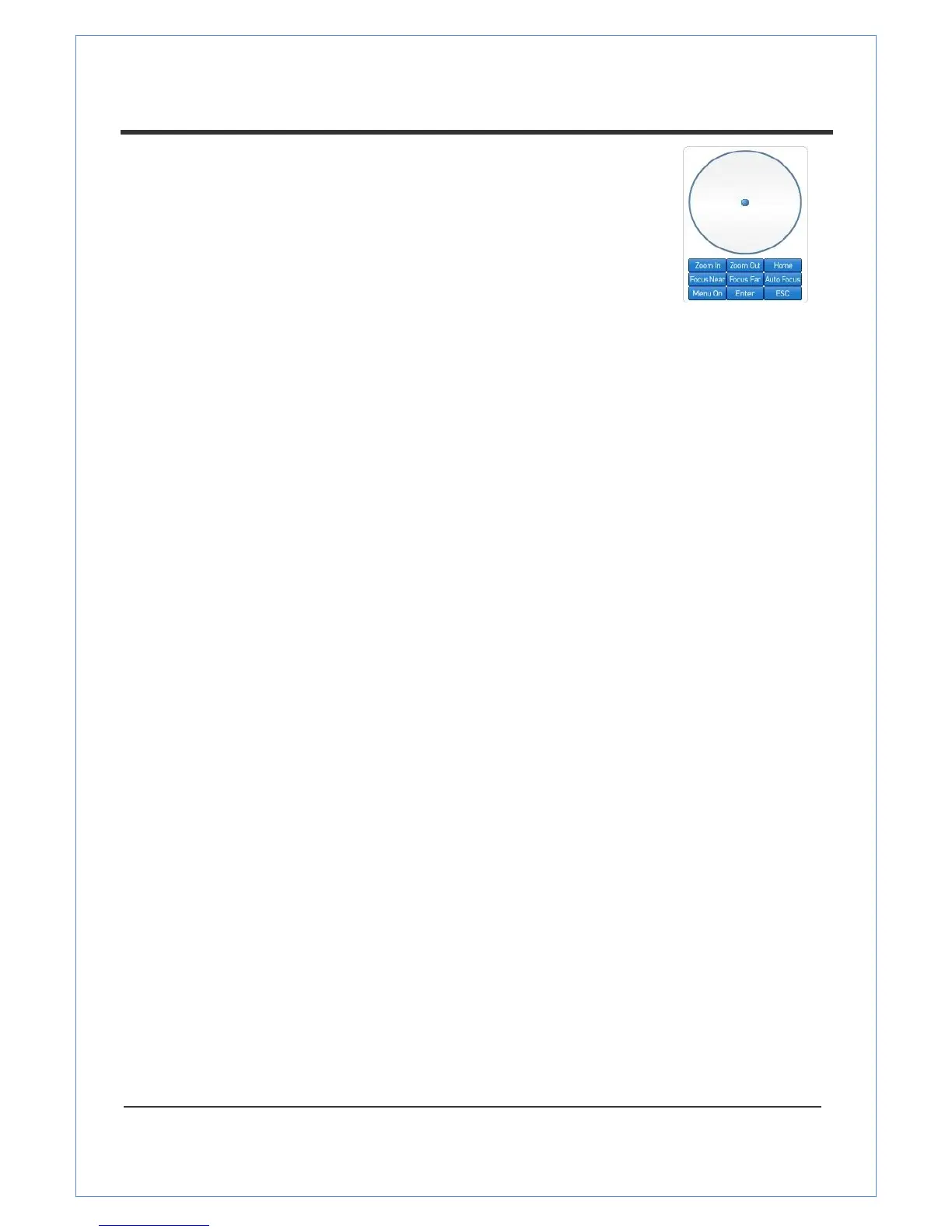
PTZ Control Panel (Optical Zoom)
The PTZ Control Panel is used for controlling external PTZ devices
when the external PTZ devices are connected through serial port.
When using VS Cameras that include optical zoom capability, it is
possible to control the amout of zoom using the Zoom in/out
buttons of PTZ Control Panel.
Focus Near , Focus Far , Auto Focus
These buttons allow you to adjust the focus.
Menu On, Enter , ESC
These buttons display and control the OSD (On Screen Display ) menu if the SD menu is support-
ed. (VS-102-HDSDI does not support the OSD menu)
- Menu On: Displays OSD menu list.
- Enter: Select or operate menu items.
- ESC: Cancels or goes back to the previous menu.
Select Preset
This feature lets you preset the position and move to the specific preset position.
- Go to: Moves to the selected preset entry if the preset entry is set.
- Set: Sets the current position to the selected preset entry .
- Clear: Deletes the selected preset entry .
Sensor Input
Wh en the sensor on VD-102-HDSDI is working, the light turns red.
A larm Output
This feature operates the alarm device connected to VS-102-HDSDI.
Screen Capture
This feature capture pictures and stores them as BMP or JPEG files.
A udio T ransfer
This feature enables you t ransfer audio.


 To Next Page