Dual Encode
Use Dual Encode
1. Select the Off button on the Enable Preview to enable to use Dual Encode.
2. Select ON to enable to use Dual Encoding.
The secondary video can be viewed on Live View window by selecting Secondary on Video
selection.
Dual Compression Algorithm
The select Secondary Video compression between H.264 and MJPEG. Maximum resolution is
720 x 480. There are eight steps for adjusting. If MJPEG is selected, only Quality mode is
supported.
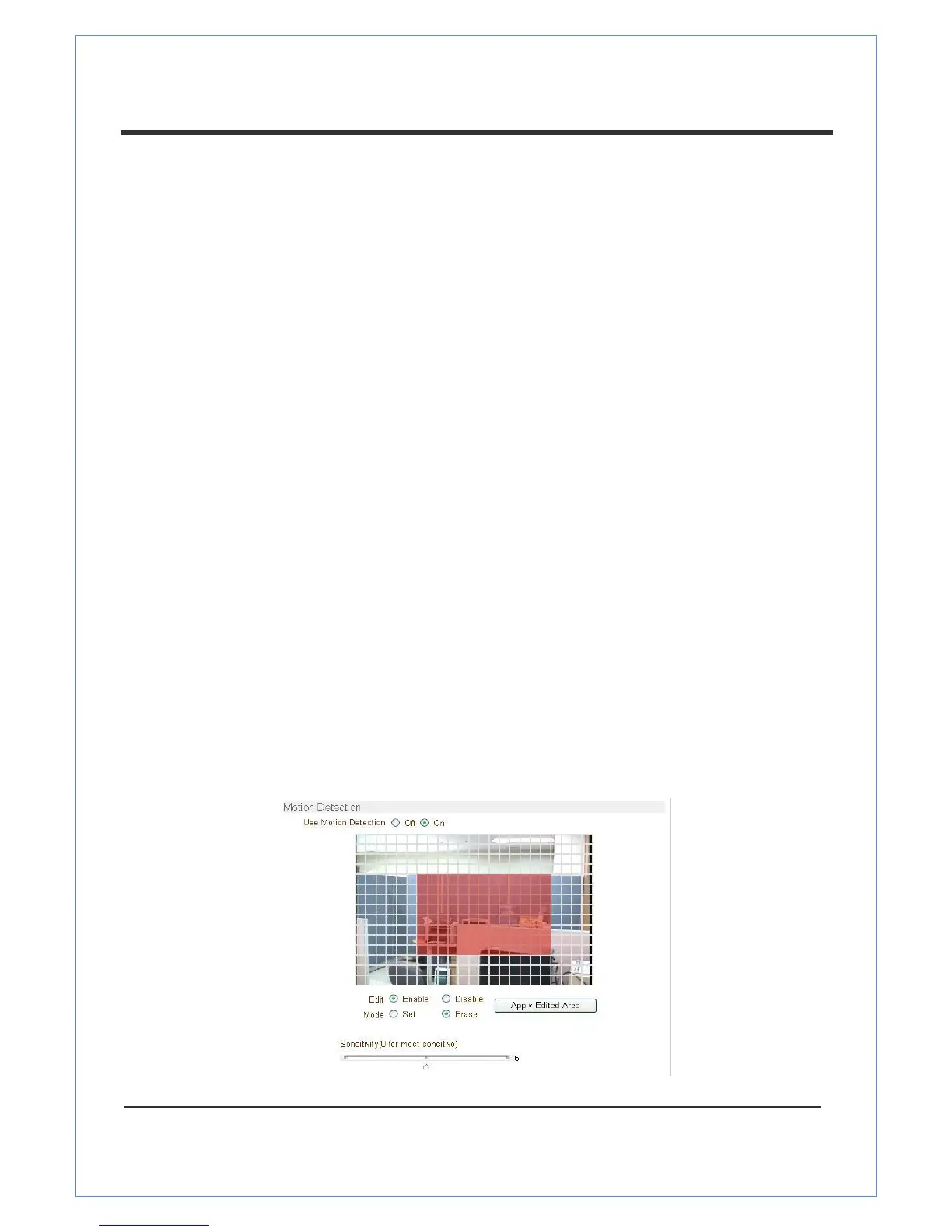
Motion Detection
Use Motion Detection
This option enables the Select Motion Detection function.
Motion Detection Area Editing
This feature lets you configure regions for motion detection. Regions of arbitrary shape can be
configured by doing the following steps:
Enable Edit item.
Select Editing Mode. Set is selected to include cells to motion detection region and Erase is for
excluding it.
Select cells using the right button of your mouse. Multiple cells can be selected conveniently
by pressing on the right button of your mouse and dragging it across the cells you want to select.
Press Apply Edited Area to save the editing


 To Next Page