25 26
5.2 Battery Replacement
To avoid false readings, which could lead to
possible electric shock or personal injury,
replace the battery as soon as the battery
indicator ( ) appears.
Before replacing the battery, disconnect test
leads and/or any connectors from any circuit
under test, turn the meter off and remove test
leads from the input terminals.
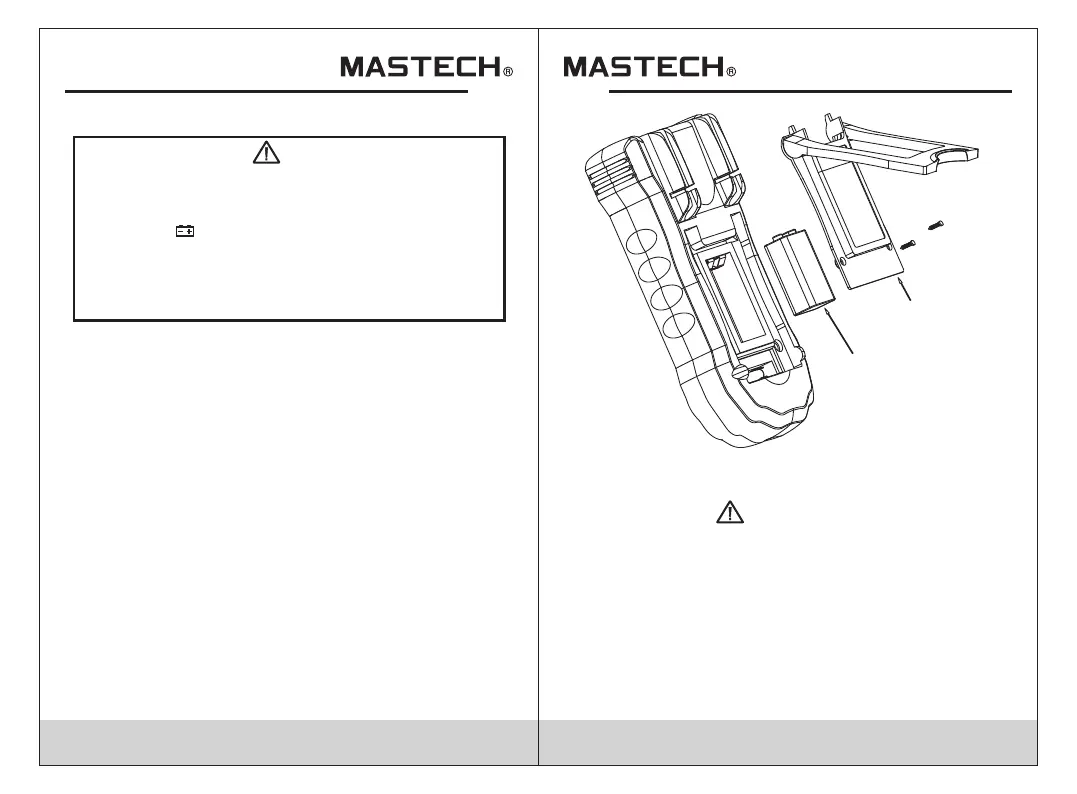
To replace the battery:
Turn the meter off.
Disconnect test leads and/or any connectors from
the terminals.
• Use a screwdriver to unscrew the two screws
secured on the battery cover.
Take out the battery cover from the meter.
Remove the used batteries.
Replace with the new 9V batteries (6F22).
•
•
•
•
•
• Rejoin the battery cover and secure by the two screws.
Using this appliance in an environment with a
strong radiated radio-frequency electromagnetic
field (approx. 3V/m), may influence its measuring
accuracy. The measuring result can be strongly
deviating from the actual value.
CAUTION
Battery cover
9V Battery
Figure 2. Battery and Fuse Replacement


 To Next Page