14
ASSEMBLY INSTRUCTIONS
11
BA
DI
DH
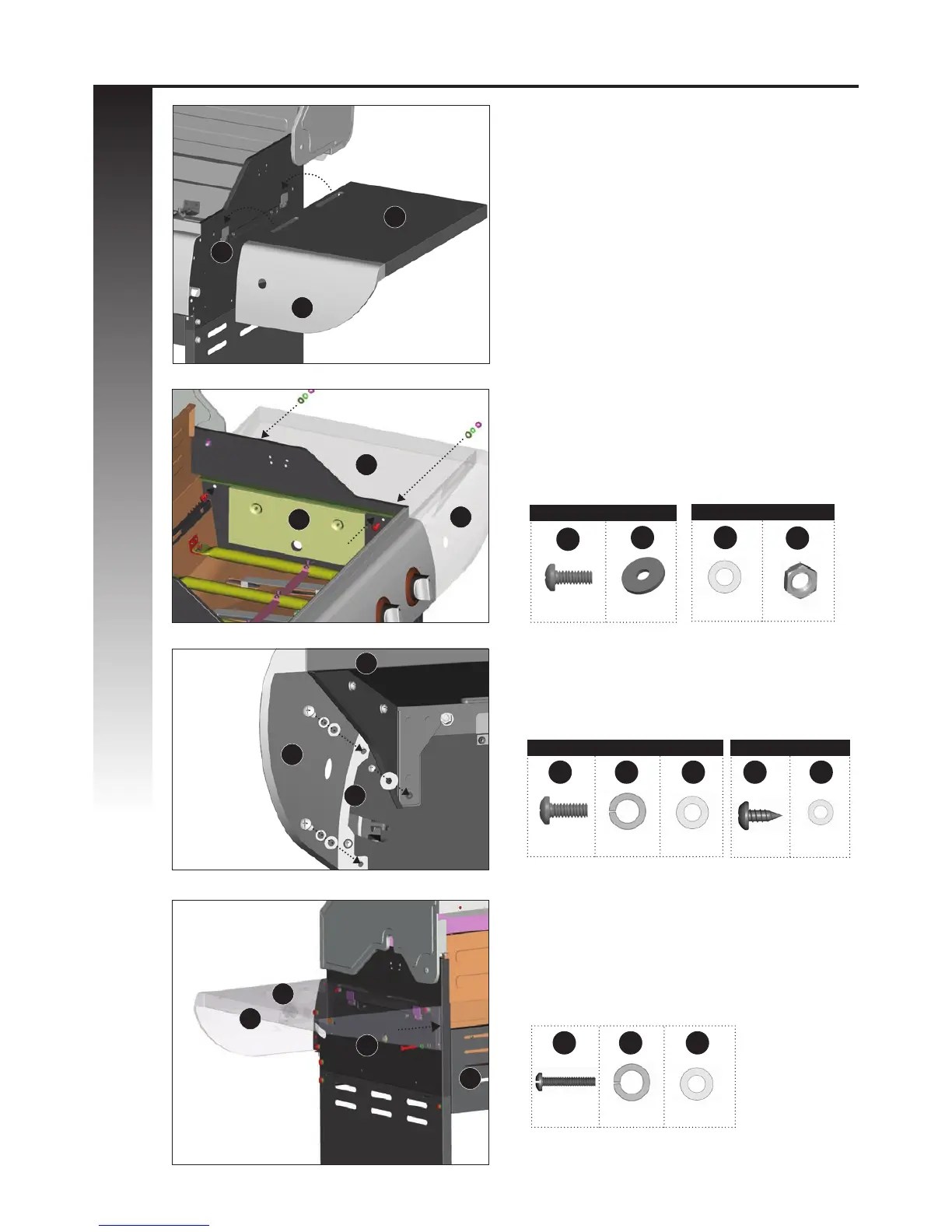
RIGHT SIDE SHELF ASSEMBLY
TIP: Do not tighten until all hardware is in place.
a. Mount the right side shelf (DH and DI ) onto
the two support brackets, located on the right,
upper side panel of the burner box (BA).
b. Assemble the right side shelf (DH and DI) to
the upper side panel of the burner box (BA), by
positioning hardware through the interior of
the burner box, as shown in gure B.
c. Assemble the front of the right side shelf
(DH and DI) to the control panel (CJ), as shown
in gure C.
A
DH
DI
BA
DI
CJ
DH
B
C
View, under right side shelf
Back, right side view
A1
B2
A1
B2
D1
C1
C1
YOU WILL NEED:
YOU WILL NEED:
YOU WILL NEED:
1 5 6
X 1 X 1 X 1
2
16
X 2
X 2
A1
4
X 2
B2
6
X 2
2 5 6 15 9
X 2 X 2 X 2 X 1 X 1
C1 D1
DH
BA
BH
DI
D
d. Complete the right side burner side shelf
assembly (DI and DH) by connecting the side
shelf, the rear of the Burner Box side panel (BA),
and the Upper Back Panel (BH), as shown in
gure D.
Front, right side view
View inside burner box





 To Next Page