BATTERY CHARGE STATUS
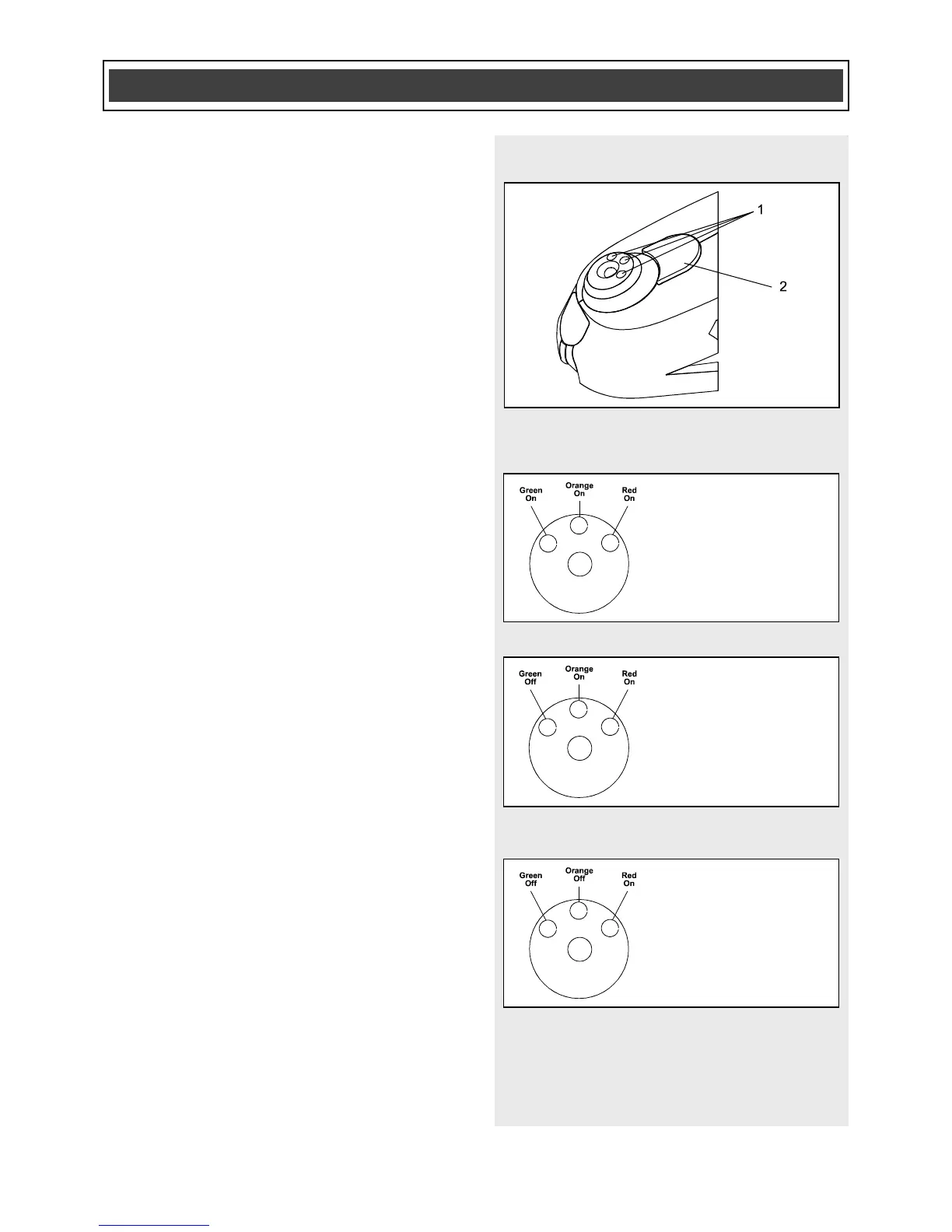
The battery status can be checked at any
time by pressing and releasing the battery
status button (2) located in the base of the
tool immediately above the LED status
indicators (1) (Fig. 4). The amount of
charge remaining in the battery will be
indicated by the LED’s.
NOTE: When the battery status button is
released, the battery status LED’s will
remain lit for approximately 10 seconds
and then they will automatically turn OFF.
When all three LED’s are ON, the battery
is between 2/3 and fully charged (Fig. 5).
When the green LED is OFF, and the
orange and red LED’s are ON, the battery
is between 1/3 and 2/3 charged (Fig. 6).
When the green and orange LED’s are
OFF and the red LED is ON, the battery is
less than 1/3 charged (Fig. 7).
NOTE: If the system detects a battery
defect, the red LED will flash at two
second intervals.



 To Next Page