EasyManua.ls Logo

Matco Tools MAXTPMS 2.0 - WiFi Update Process

Matco Tools MAXTPMS 2.0
50 pages
Print Icon
To Next Page IconTo Next Page
To Previous Page IconTo Previous Page
Loading...
MATCO TOOLS MAXTPMS 2.0 - User Guide
UM-MDMAX-MA2-01 User manual MATCO TOOLS MAXTPMS 2.0 Page 29/47
WIFI UPDATE
This section is to update the software of the TPMS tool to get new coverage and new
features.
First ensure to correctly setup your TPMS device WiFi connection before attempting
to wirelessly update. Go to WiFi settings section in this guide to check how to
proceed.
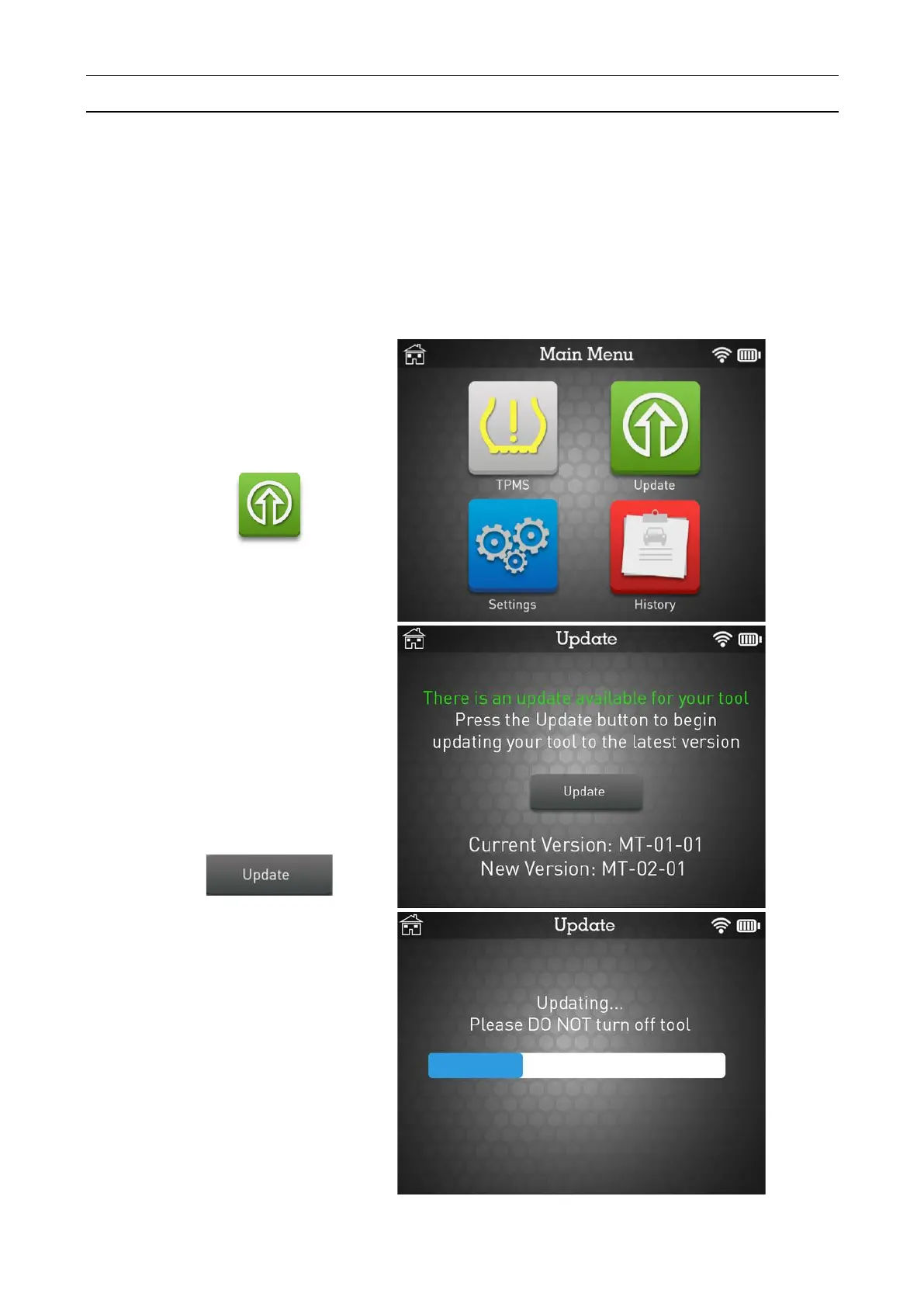
Click the Update icon.
You will be notified if a
new software update if
available for your tool.
Ensure your battery is at a
minimum of 50% charge.
When you are ready, click
the Update button to
proceed.
Please wait during the
update process and do not
turn off your tool.

Related product manuals