MATCO TOOLS MAXTPMS 2.0 - User Guide
UM-MDMAX-MA2-01 User manual MATCO TOOLS MAXTPMS 2.0 Page 31/47
SETTINGS
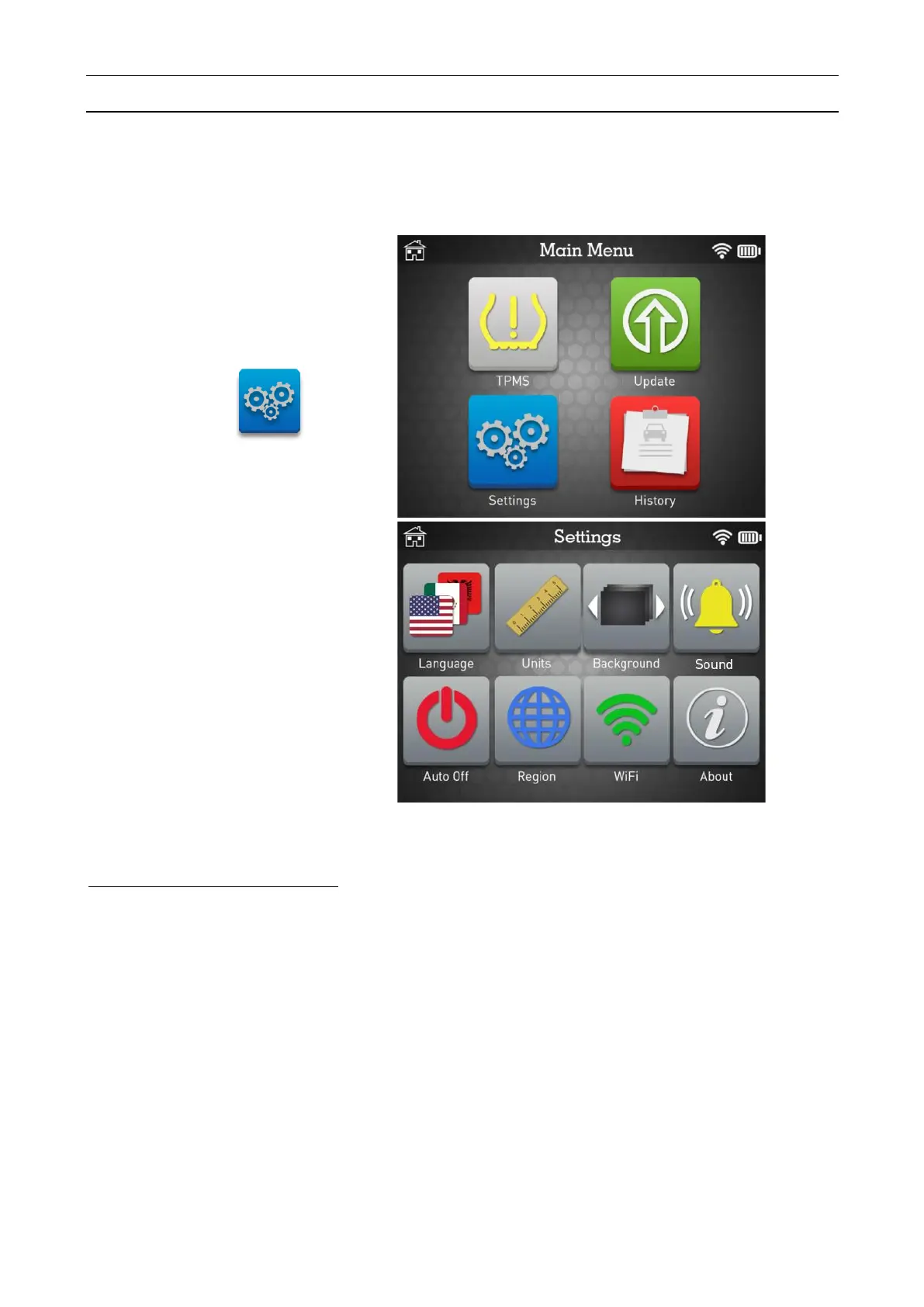
This section is to change multiple different settings such as language, units, region, WiFi
connectivity and to check software version.
Key functional descriptions:
LANGUAGE: change the language of the tool interface.
UNITS: change air pressure, temperature, tread depth and sensor ID display units.
BACKGROUND: change the background image.
SOUND: turn sound to ON or OFF.
AUTO OFF: time to turn off the device automatically after not being operated.
REGION: select the area of work, AMERICA, EUROPE, JAPAN, KOREA.
WIFI: configure WiFi settings to connect your TPMS tool to the Internet for wireless updates.
ABOUT: display the current software version and information about the device.


 To Next Page