Using the Scan Tool
ERASING DIAGNOSTIC TROUBLE CODES (DTCs)
21
To erase enhanced, ABS, SRS or Network DTCs: Press
SYSTEM MENU
to display the System Menu. Select the
desired option, then press ENTER
. Perform the appropriate
Code Retrieval procedure and then proceed to step 3.
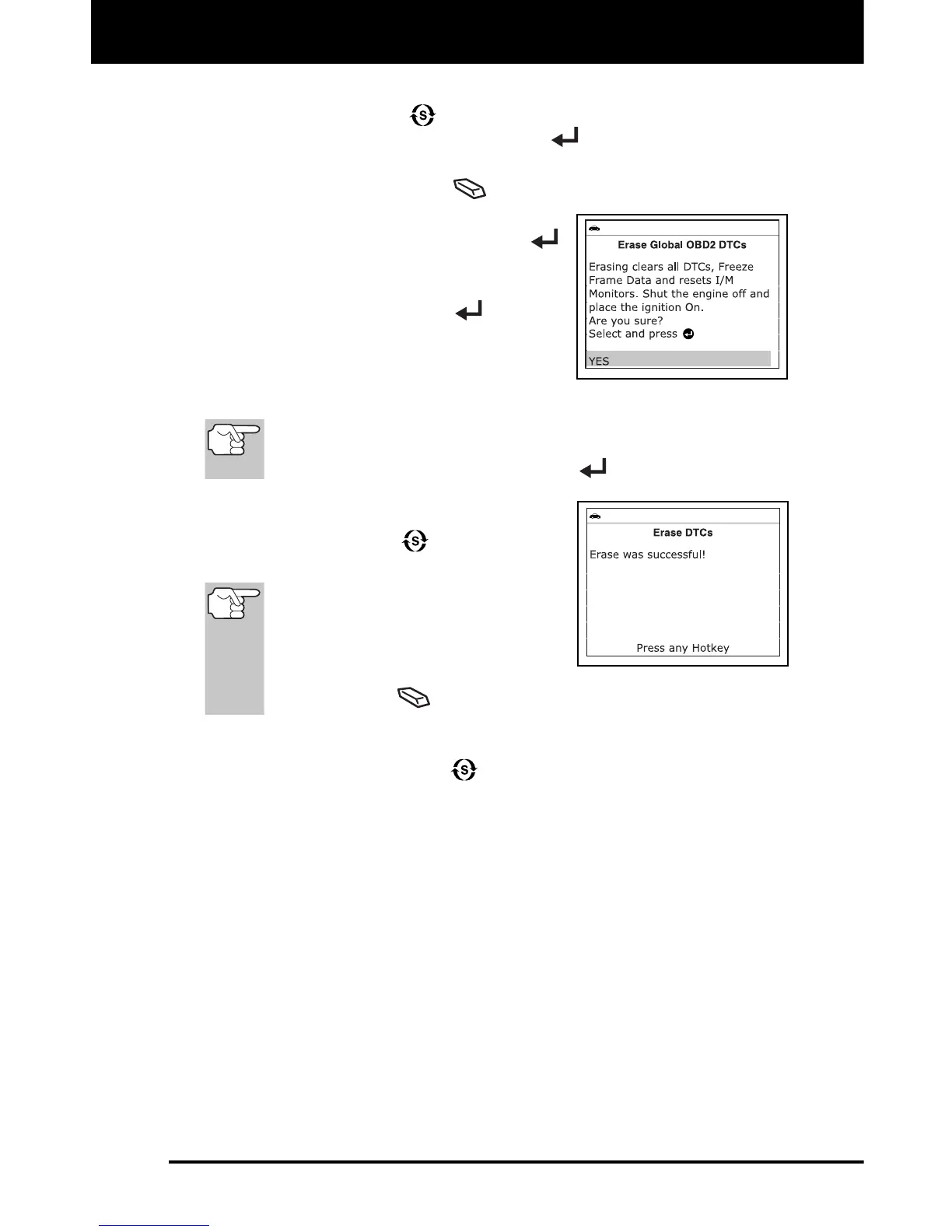
3. Press and release ERASE
. A confirmation message shows.
If you are sure you want to proceed,
select Yes, then press ENTER
to continue.
If you do not want to proceed, select
No, then press ENTER
button to
cancel the erase procedure.
4. If you chose to erase DTCs, a “One
moment please…” message displays
while the erase function is in progress.
If the vehicle’s engine is running, an advisory message shows.
Turn the engine OFF, then turn the ignition back to ON. DO
NOT start the engine. Press ENTER
to continue.
If the erase was successful, a
confirmation message shows. Press
SYSTEM MENU
to return to the
System Menu.
If the erase was not successful
and ECU error code $22 is
present, an advisory message
displays. Start the engine and
maintain vehicle speed at 0, then
press ERASE
to try again.
If the erase was not successful, an advisory message shows
indicating the erase request was sent to the vehicle’s computer.
Press SYSTEM MENU
to return to the System Menu.


 To Next Page