Scan Tool Controls
CONTROLS AND INDICATORS
3
CONTROLS AND INDICATORS
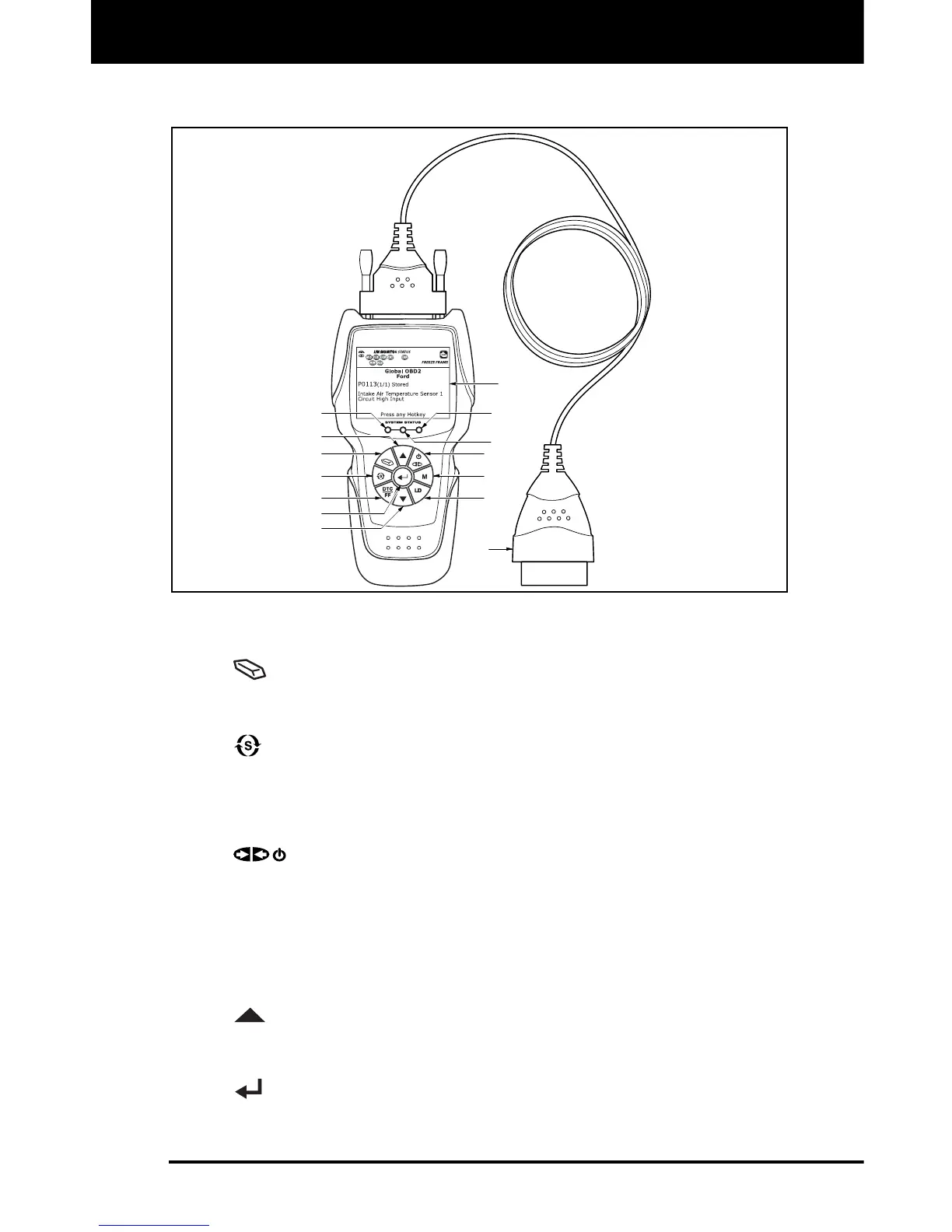
Figure 1. Controls and Indicators
See Figure 1 for the locations of items 1 through 14, below.
1.
ERASE button - Erases Diagnostic Trouble Codes (DTCs),
and “Freeze Frame” data from the vehicle’s computer, and resets
Monitor status.
2.
SYSTEM MENU button – When pressed, displays the System
Menu.
3. DTC/FF button - Displays the DTC View screen and/or scrolls the
LCD display to view DTCs and Freeze Frame data.
4.
POWER/LINK button - When not connected to a vehicle,
turns the Scan Tool “On” and “Off”. When connected to a vehicle,
links the Scan Tool to the vehicle’s PCM.
5. M button – When pressed, displays the Main Menu.
6. LD button – When pressed while linked to a vehicle, places the
Scan Tool in Live Data mode.
7.
UP button – When in MENU mode, scrolls UP through the
menu options. When LINKED to a vehicle, scrolls UP through the
current display screen to display additional data.
8.
ENTER button - When in MENU mode, confirms the selected
option or value.
2
14
1
7
8
9
3
5
13
11
12
4
6
10


 To Next Page