Additional Tests
SYSTEM TEST MENU
31
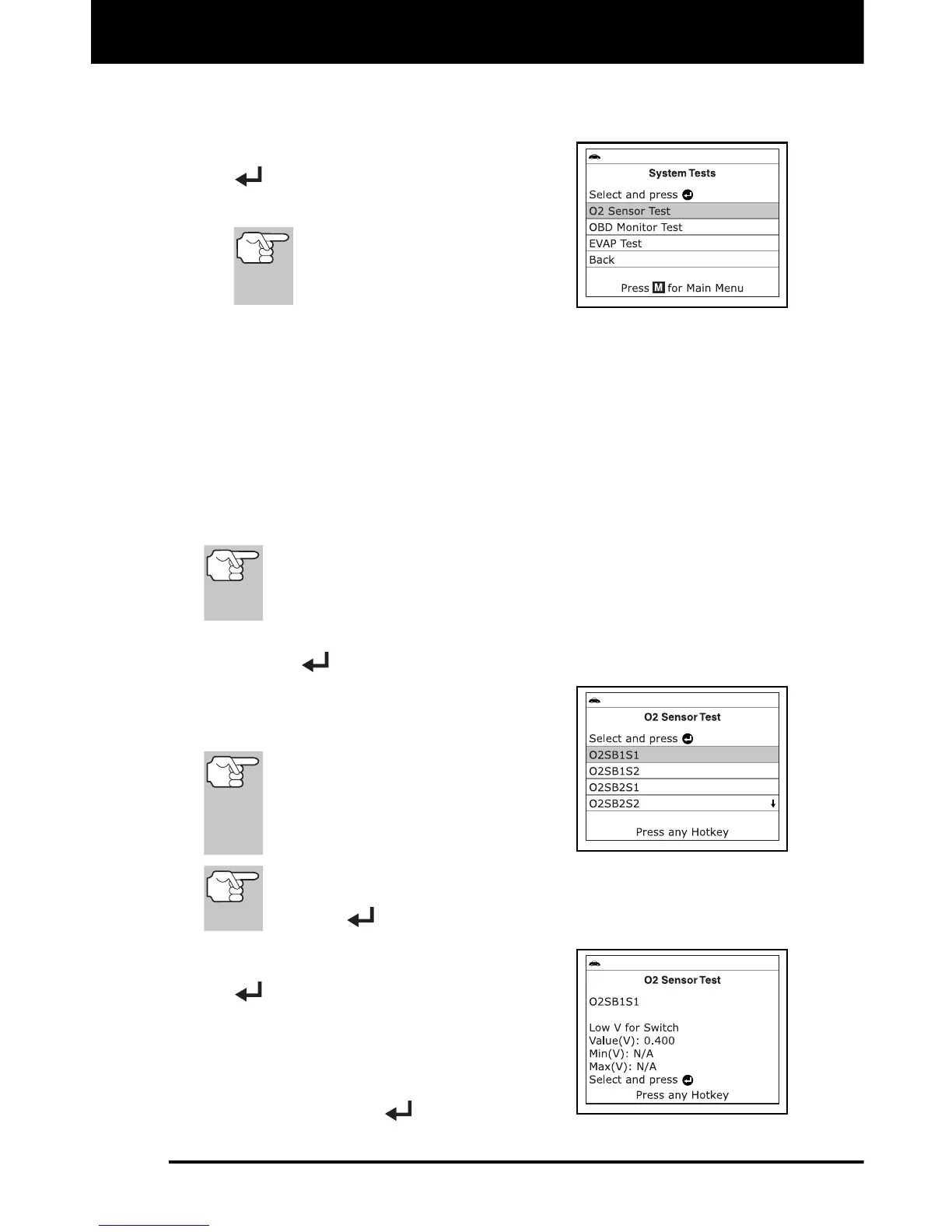
1. While linked to the vehicle, press M.
The Main Menu displays.
2. Select System Tests, then press ENTER
.
The System Test menu displays.
If System Tests is not shown
on the Main Menu, the
Systems Tests functions are
not available for your vehicle.
O2 Sensor Test
OBD2 regulations require that applicable vehicles monitor and test operation
of the oxygen (O2) sensors to identify problems that can affect fuel
efficiency and vehicle emissions. These tests are performed automatically
when engine operating conditions are within predefined limits. Results of
these tests are stored in the on-board computer's memory.
The O2 Sensor Test function lets you retrieve and view O2 sensor
monitor test results for the most recently completed tests from the
vehicle's on-board computer.
The Scan Tool does not perform O2 sensor tests, but retrieves
results from the most recently performed O2 sensor tests from
the on-board computer's memory. You may retrieve O2 sensor
test results for only one test of one sensor at any given time.
1. From the System Test menu, select O2 Sensor Test, then press
ENTER
.
2. A "One moment please..." message
displays, followed by the Select Sensor
screen.
If O2 sensor test data is not
presently stored in the vehicle’s
computer, an advisory message
displays. Press M to return to the
Main Menu.
If O2 sensor tests are not supported by the vehicle under test,
an advisory message displays. Select Back, then press
ENTER
to return to the Main Menu.
3. Select the O2 sensor for which you wish
to view test results, then press ENTER
to display the test results.
4. When you have finished viewing the
retrieved test data, select Next to view
test results for the next sensor, or select
Back to return to the Select Sensor screen,
then press ENTER
.


 To Next Page