Additional Tests
BATTERY/ALTERNATOR MONITOR
40
If the Scan Tool did not detect “cranking status” for the
vehicle’s engine, an advisory message shows. Press
ENTER
to repeat the battery check, or, press M to
return to the Main Menu.
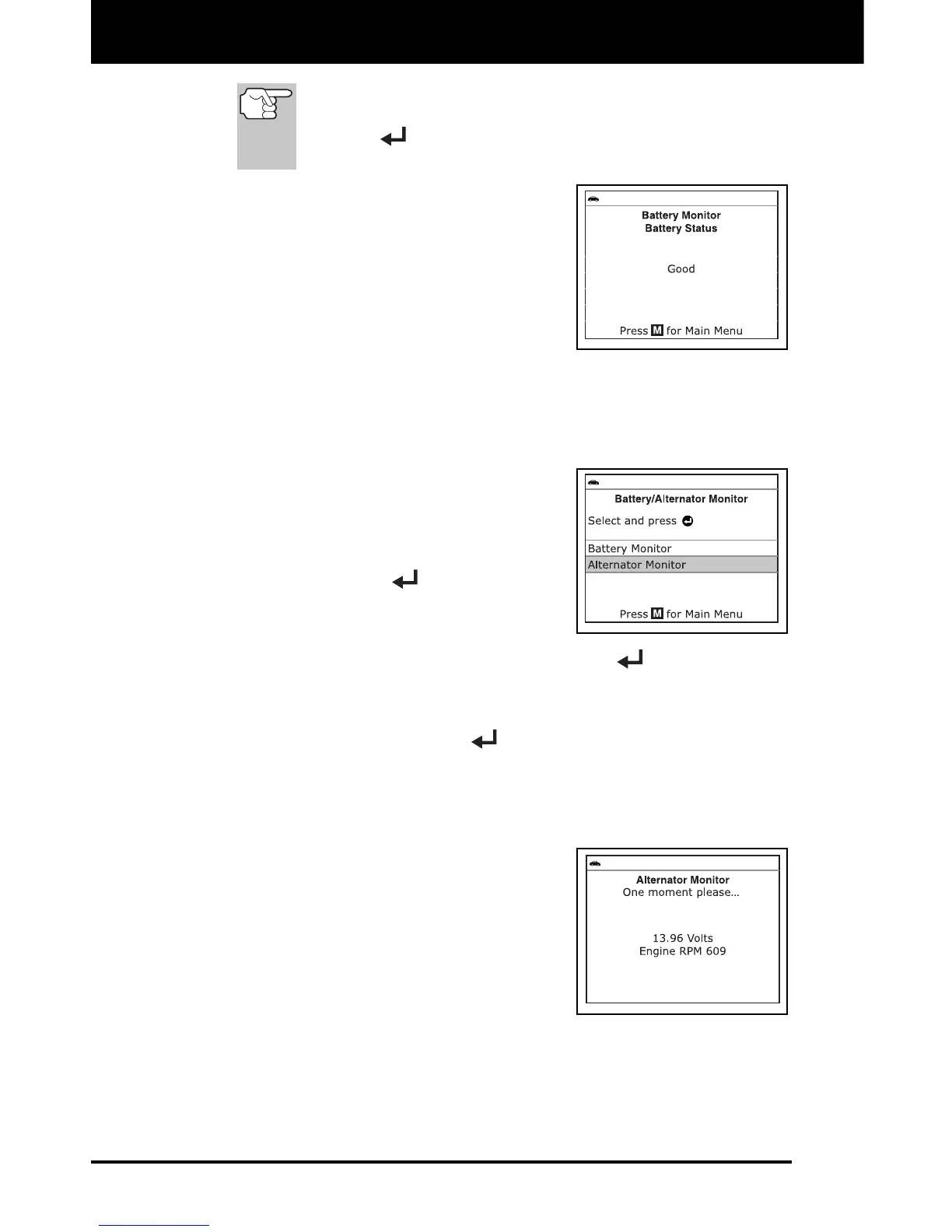
9. When the battery check is complete, a
results screen displays the battery
status. The System Status LEDs
provide a PASS/FAIL indication, as
follows:
Green = Good
Yellow = Normal
Red = Warning/Bad
10. Press M to return to the Main Menu.
To perform a charging system check:
1. With the Scan Tool on the Code
Retrieval screen, press and release M.
The Main Menu displays.
2. Select Battery/Alternator Monitor,
then press ENTER
.
The Battery/Alternator Monitor Menu
displays.
3. Select Alternator Monitor, then press ENTER
.
An “instructional” message shows.
4. Start and warm the engine to normal operating temperature. Turn on
the headlights. Press ENTER
to continue.
An “instructional” message shows.
5. Press the accelerator pedal to raise engine speed to 2000 RPM,
and maintain the engine speed.
When engine speed is within the
required range, the alternator test
begins. A progress screen shows.
When the “countdown” timer expires,
an “instructional” message shows.
6. Turn the vehicle’s headlights off, and
return the engine to idle speed.
A “One moment please…” message
displays while the test results are
retrieved.


 To Next Page