4
Ÿ A Stand-alone Computer
with a Web Browser to
change the Network
Settings of the Panel200
Ÿ Warranty Card
Ÿ Quick Start
Ÿ Mounting Template (Page-
13 of Quick Start)
Ÿ The Special Access Control features with infallible operation
are provided by COSEC Panel200. Few features are listed
below:
Why you need Panel200?
Ÿ Man Trap
Ÿ Dead Man Zone
Ÿ Time based Access
Ÿ Shift based Access
Ÿ Panel Route Access
Ÿ DND Zone
Ÿ IO linking
NOTE
The know more about above features, kindly refer the
Panel200 System Manual.
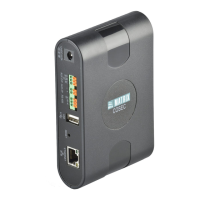
Ÿ COSEC Panel200
Ÿ Power Adapter
Ÿ Ethernet Cable
Ÿ Screws and Screw grip
Ÿ A Wire Stripper
Ÿ A Screw Driver Set
Ÿ Insulation Tape
Ÿ Access to the COSEC
Server
Prepare For Installation
Ÿ Unpack the Panel200 and check your package contents.
Ÿ Select a suitable location for Wall mounting. It must be a flat
surface such as inside an electrical gauge box. You can also
Table Mount it.
Ÿ Read the relevant sections on mounting and connecting the
Panel200 (recommended) before proceeding with installation.
WARNING
Ÿ Installation and Servicing should be done only by a qualified
technician.
Ÿ Make sure the Panel200 is at a minimum distance of 2m from high
voltage equipment or wiring.
What Your Package Contains
Things You Will Need
6
5


 To Next Page