EasyManua.ls Logo

MAXDATA M-BOOK 6000 G3 - System Map: Front, Rear, Bottom & Top Views

MAXDATA M-BOOK 6000 G3
194 pages
Print Icon
To Next Page IconTo Next Page
To Previous Page IconTo Previous Page
Loading...
7
English
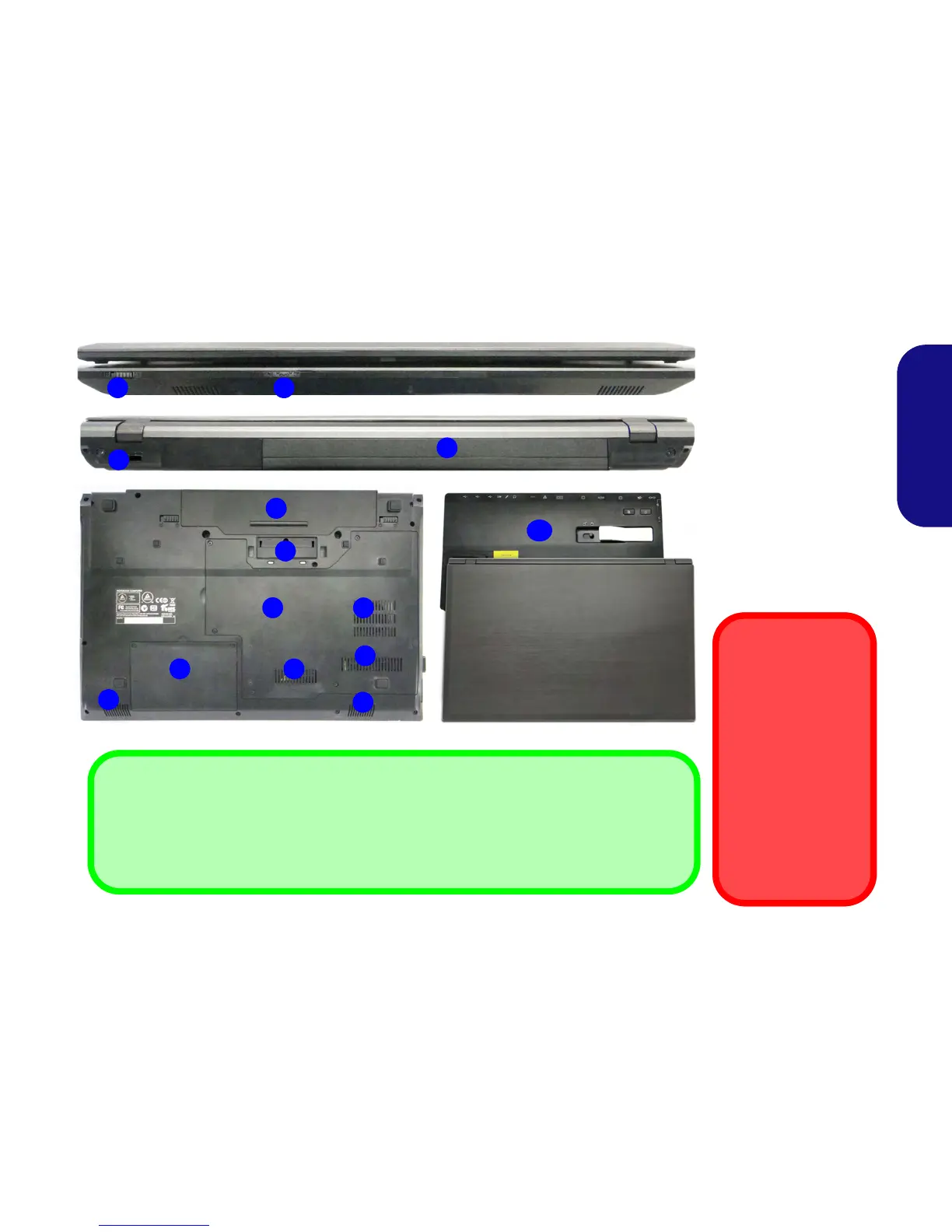
System Map: Front, Rear, Bottom & Top Views
3
5
1
2
Rear
Front
4
7
6
8
9
9
Figure 3
Front, Rear, Bottom &
Top Views
1. LED Indicators
2. WLAN Switch
3. Security Lock Slot
4. Battery
5. Docking Port
6. Vent
7. Component Bay Cover
8. Hard Disk Bay Cover
9. Speakers
10. Docking Station
(Optional)
WLAN Switch
Use the WLAN
Switch (for Wireless
LAN only) to toggle
power to the WLAN
module. The position
of the WLAN switch
governs the power
status of the WLAN
module at startup,
and upon resuming
from a power saving
state.
Docking
.If your purchase includes the docking station, open the docking port cover latch and align the
computer with the placeholder on the docking station (see the accompanying docking station for
full details of the docking procedure).
6
6
4
10

Table of Contents

Related product manuals