EasyManua.ls Logo

MAXDATA M-BOOK 6000 G3 - System Map: Front View with LCD Panel Open

MAXDATA M-BOOK 6000 G3
194 pages
Print Icon
To Next Page IconTo Next Page
To Previous Page IconTo Previous Page
Loading...
5
English
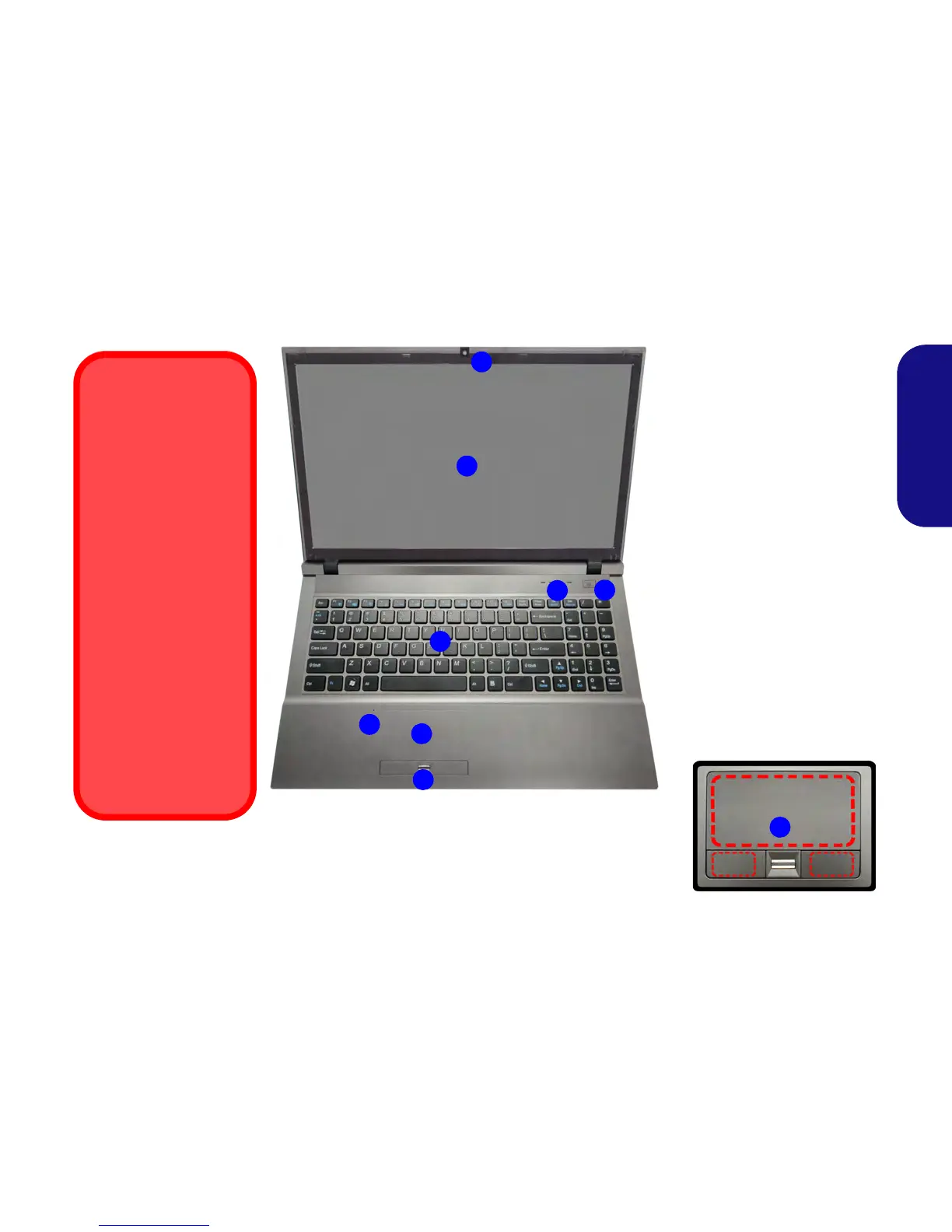
System Map: Front View with LCD Panel Open
Figure 2
Front View with LCD Panel
Open
1. PC Camera (Optional)
2. LCD
3. Power Button
4. LED Indicators
5. Keyboard
6. Built-In Microphone
7. Touchpad & Buttons
8. Fingerprint Reader
7
Wireless Device
Operation Aboard
Aircraft
The use of any portable
electronic transmission
devices aboard aircraft
is usually prohibited.
Make sure the wireless
modules are OFF if
you are using the com-
puter aboard aircraft.
Use the key combina-
tions (or WLAN Switch
for wireless LAN only)
to toggle power to the
3G/WLAN/Bluetooth
modules, and check the
LED indicator/visual in-
dicator to see if the mod-
ules are powered on or
not (see Table 2 on
page 6 and Table 3 on
page 9).
Note that the Touchpad and Buttons
valid operational area is that indicat-
ed within the red dotted lines above.
2
4
1
3
5
6
8
7

Table of Contents

Related product manuals