31
There are two options available when accessing the Diagnosis section:
1. Auto Scan – starts auto scanning for all the available systems on the
vehicle.
2. Control Units – displays a selection menu of all available control units of
the test vehicle.
After a section is selected and the tablet establishes communication with
the vehicle, the corresponding function menu or selection menu displays.
Auto Scan
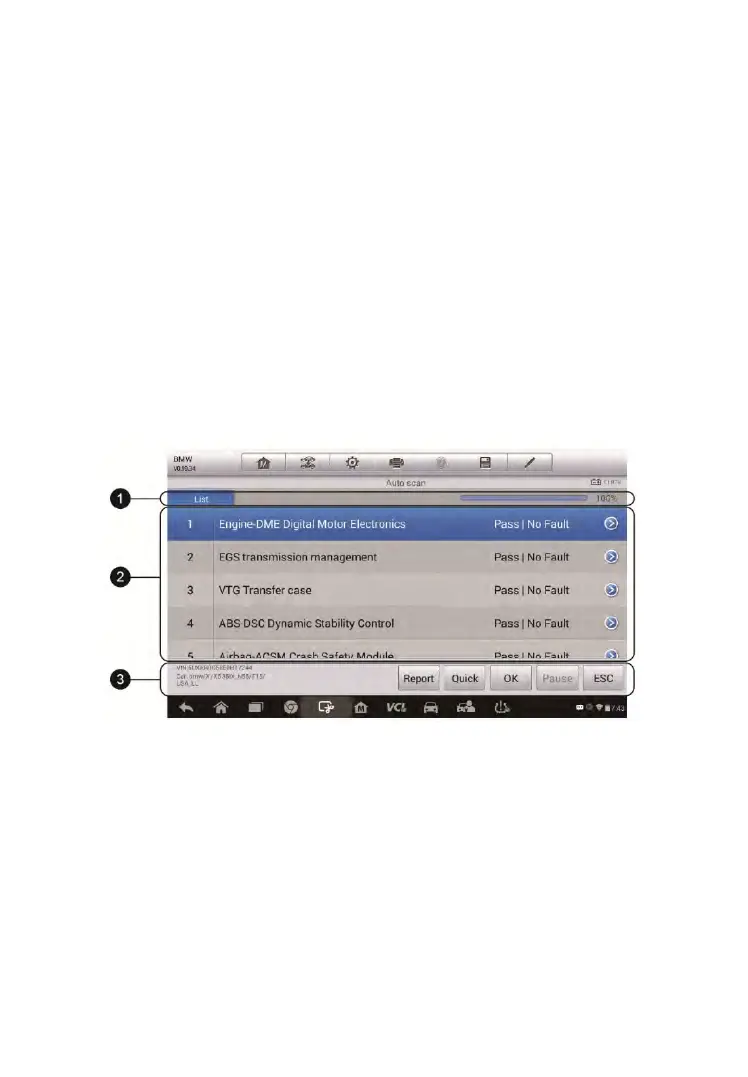
The Auto Scan function performs a comprehensive scanning over all the
ECUs in the vehicle’s systems in order to locate and retrieve DTCs. The
sample operation screen of Auto Scan displays as below:
Figure 4-9 Sample Auto Scan Operation Screen
1. Navigation Bar
2. Main Section
3. Functional Buttons
Navigation Bar
List Tab – displays the scanned data in list format.
Progress Bar – indicates the test progress.



 To Next Page