panel for more than 2 seconds while the UPS is in the off status. The UPS will now
enter parameter configuration mode.
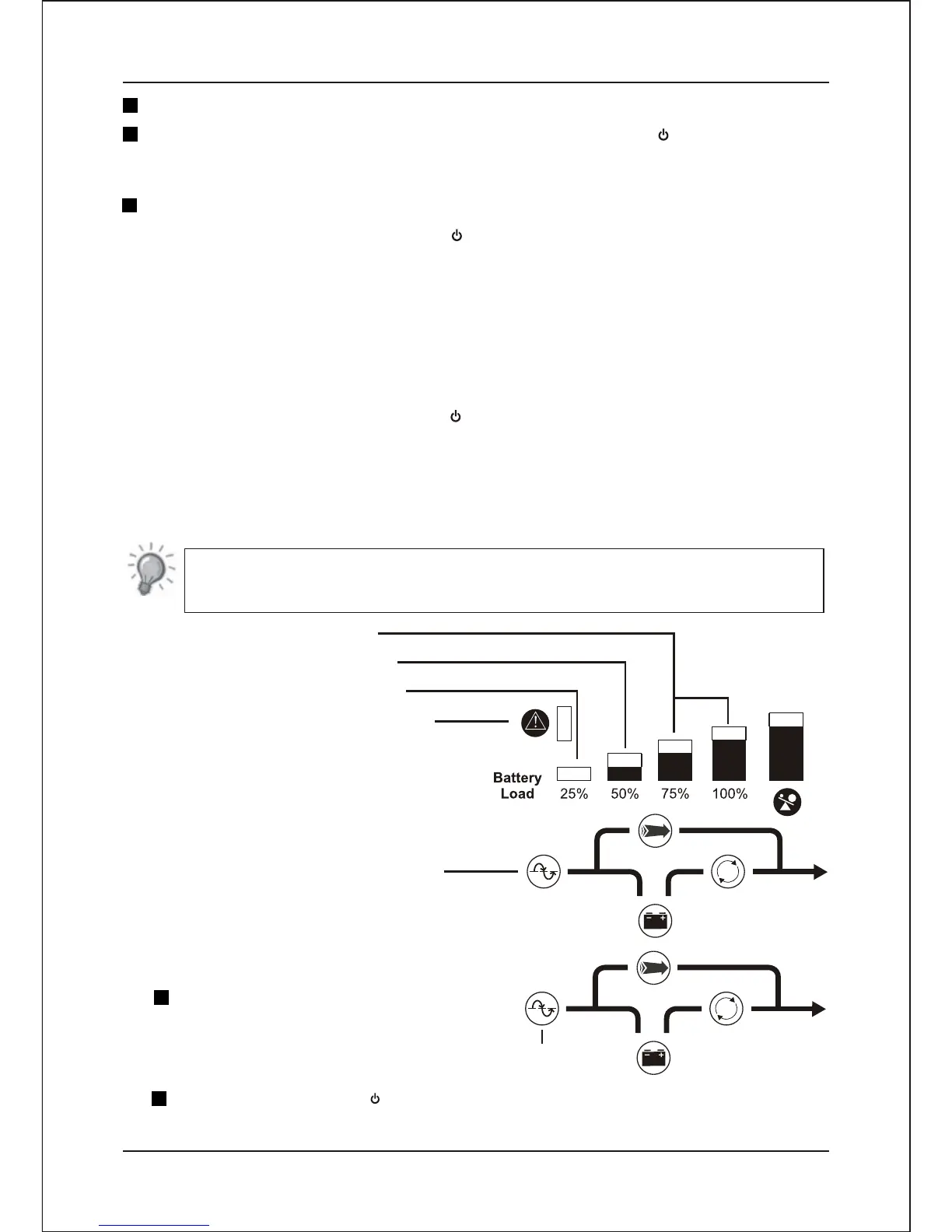
Now ,The battery LED of status indicator light up, Level indicator demonstrate
present establish state or dispatched from the factory and established the state
Please consult the following brief description of the drawings.
NOTE
UPS output voltage state
UPS output frequency state
Cold start lock function state
LED flashing is into setting mode
Selection setting state indicator
-LED light up
2.6.4.2 Cold Start Lock Setting
Press the “ Test / Silence “switch to
select the cold start lock setting mode.
Selection cold state lock indicator-Line LED light up
Press the main switch “ " to select cold start lock function Enable / Disenable.
- 11-
Installation and Operating Instruction
Different parameter can be selected by press the “ Test / Silence ”switch for 1 time.
Different settings can be selected by pressing the main switch “ ” for 1 time.
2.6.3 End of configuration mode
To exit the configuration mode:
Press and hold both the main switch “ ” and“ Test / Silence ” switch for more than 2
seconds.
*( If you need execute the end program, please make battery led getting light up with
the options button.)
2.6.4.1Display Parameter Configuration State
Press and hold both the main switch “ ” and“ Test / Silence ” switch on the front
2.6.4 Setting of Parameters


 To Next Page