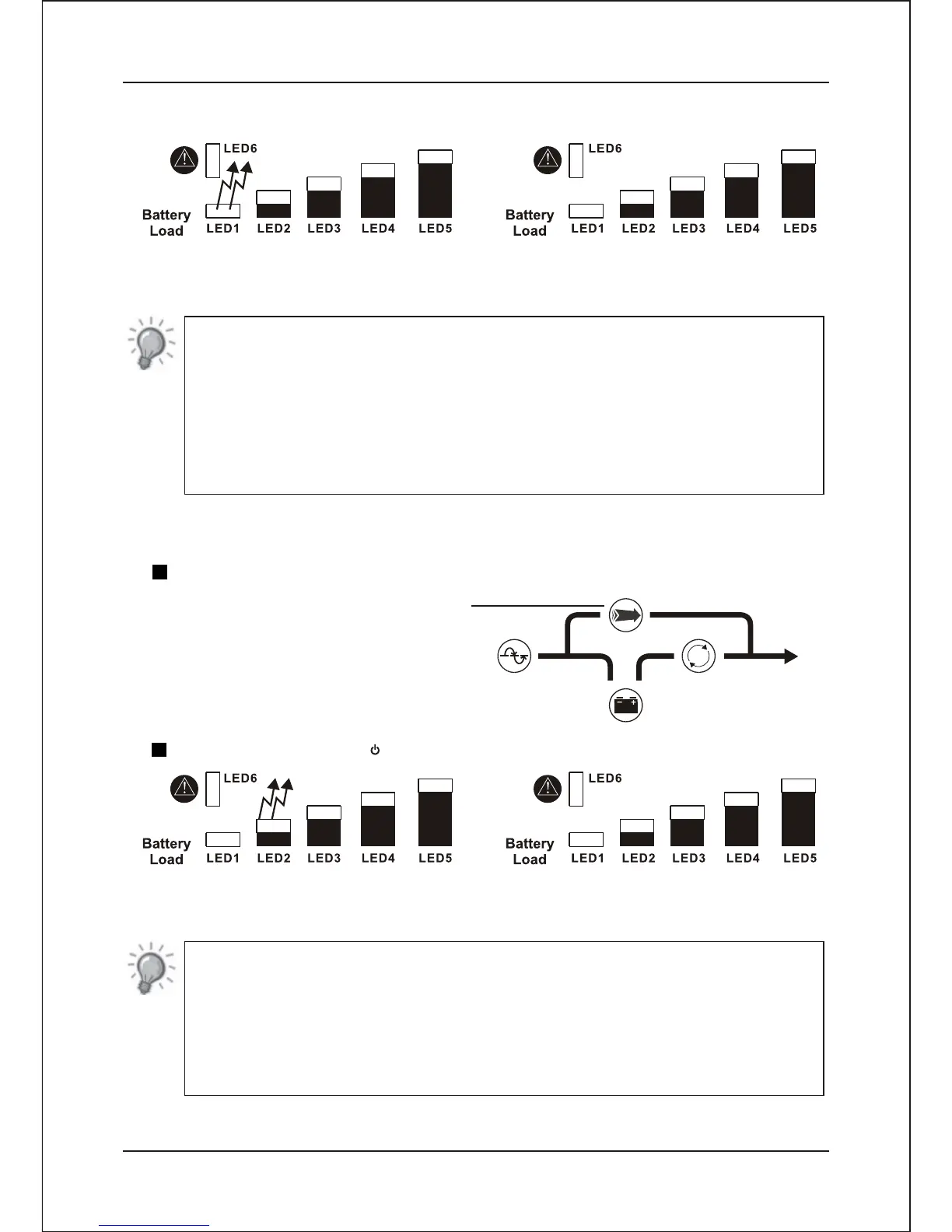
LED1 On (Ignore LED2,LED3,LED4,LED5)
Cold start Lock = Enable
LED1 Off (Ignore LED2,LED3,LED4,LED5)
Cold start Lock = Disable
NOTE
Accidental turn on during transportation may result in battery and UPS
damage. Therefore the feature of cold-start (boost by battery)is factory
defaulted to inactivation. To activate the cold-start feature, you can choose
the following a way among them.
1.Plug in AC power and turn on the UPS.
2.Manual setting
2.6.4.3 Output Frequency Setting
Press the “ Test / Silence “switch to select the UPS output frequency setting mode.
Selection output frequency indicator
-Bypass LED light up
Press the main switch “ " to select output frequency 50Hz/60Hz.
LED2 On (Ignore LED1,LED3,LED4,LED5)
Output Frequency = 60Hz
LED2 Off (Ignore LED1,LED3,LED4,LED5)
Output Frequency = 50Hz
NOTE
This UPS is with auto sensing feature which will automatically detect the
utility's frequency. The frequency setting parameter will be automatically
replaced by the UPS.
For example, the 50Hz was set as in the UPS, the setting will be changed to
60 Hz if the utility's frequency is 60 Hz.
- 12-
Installation and Operating Instruction


 To Next Page