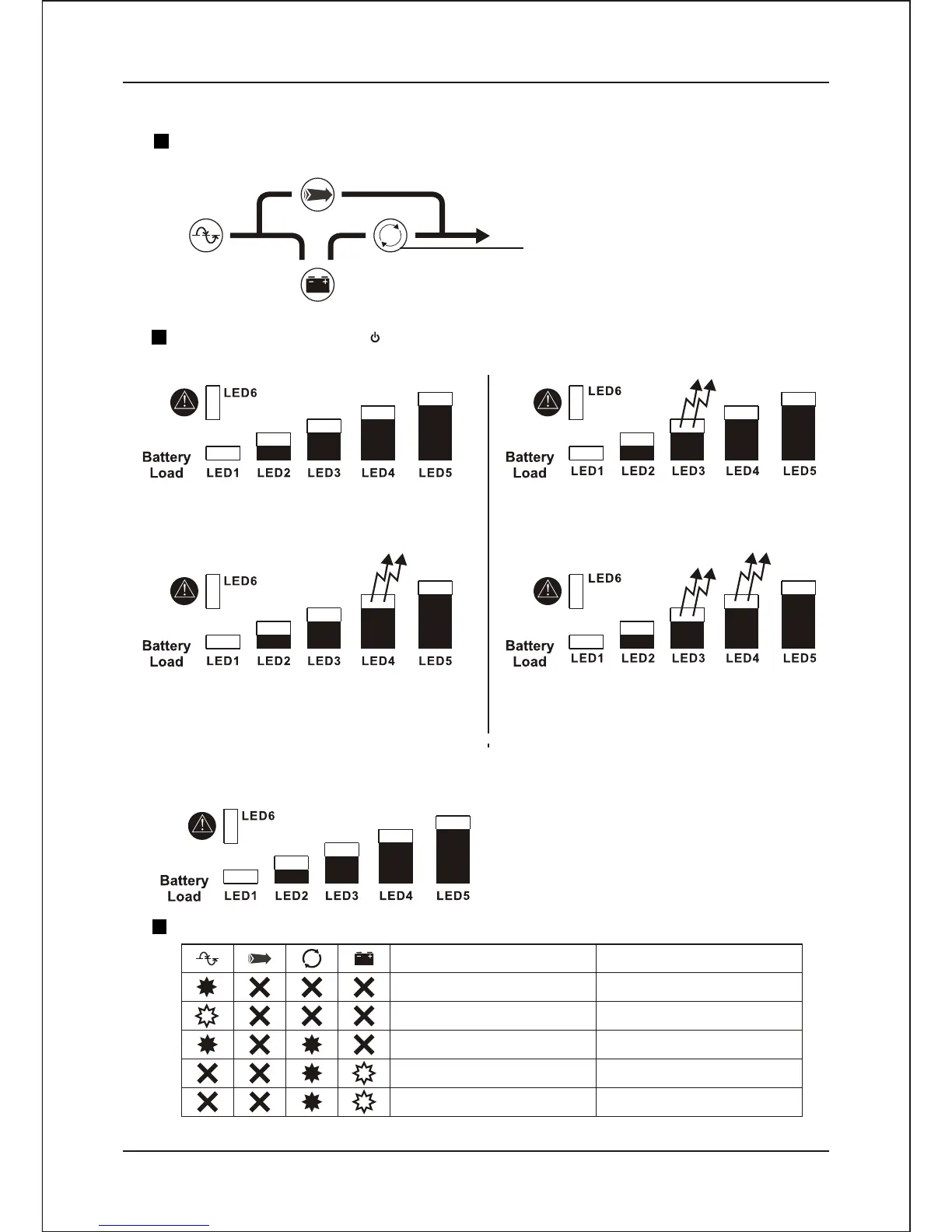
2.6.4.4 Output Voltage Setting
Press the “ Test / Silence “switch to select the UPS output voltage setting mode.
Selection output voltage indicator
-Inverter LED light up
Press the main switch “ " to select output voltage.
LED3/4 Off (Ignore LED1,LED2,LED5)
Output Voltage = 120V / 230V
LED3 On ,LED4 Of (Ignore LED1,LED2,LED5)
Output Voltage = 110V / 208V
LED3 Off, LED4 On (Ignore LED1,LED2,LED5)
Output Voltage = 115 / 220V
LED3/4 On (Ignore LED1,LED2,LED5)
Output Voltage = 127V / 240V
2.7 Audible / Visual Indicators
Audible / Visual Indicators
Operating Status
AC Input ( UPS Off )
Site Wire Fault (115 V)
AC Normal
Backup mode
Backup mode (Batty Low)
Buzzer
1 Beep / 4 Seconds
1 Beep / 1 Seconds
- 13-
Installation and Operating Instruction


 To Next Page