9XTend‐PKG‐R™RS‐232/485RFModem–ProductManualv1.2.4
©2005MaxStream,Inc.ConfidentialandProprietary 41
5. RFCommunicationModes
The XTend RF Modem can be configured to operate in any of several RF communication modes:
• Streaming
• Acknowledged
• Multi-Transmit
The mode is defined by parameters stored in the transmitting modem [see table below].
Receiving modems automatically adapt to the correct mode on a per-packet basis, based on the
contents of each received packet.
Table5‐01. ModeinRelationtoTransmittingModemParameterValues
RF Communication Mode RR Parameter Value MT Parameter Value
Streaming 0 0
Acknowledged >= 1 0
Multi-Transmit ignored >=1
5.1. Addressing Options
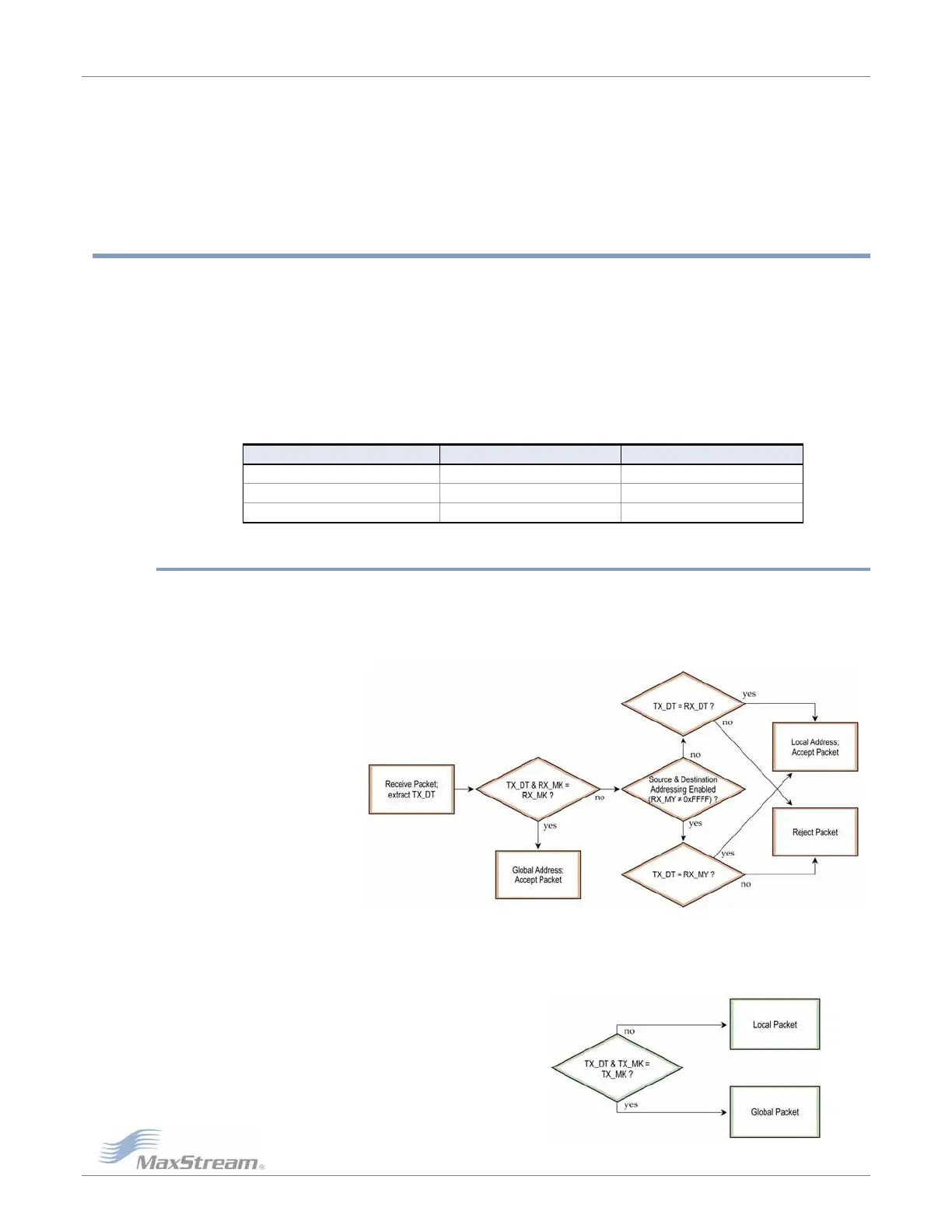
Transmissions can be addressed to a specific modem or group of modems using the DT
(Destination Address) and MK (Address Mask) commands. A receiving modem will only accept a
packet if it determines the packet is addressed to it, either as a global or local packet. The
receiving modem makes this determination by inspecting the destination address of the packet
and comparing it to its own address and address mask [Figure 5-01].
Figure5‐01. AddressRecognition(@RXModem)
The transmitting modem determines whether the packet is intended for a specific node (local
address) or multiple nodes (global address) by comparing the packet’s destination address (DT)
and its own address mask (MK) [Figure 5-02]. It is assumed that the address masks on the
transmitting modem and receiving modem have been programmed to the same value for proper
operation in each RF Communication Mode.
Figure5‐02. AddressingLogic(@TXModem)



 To Next Page