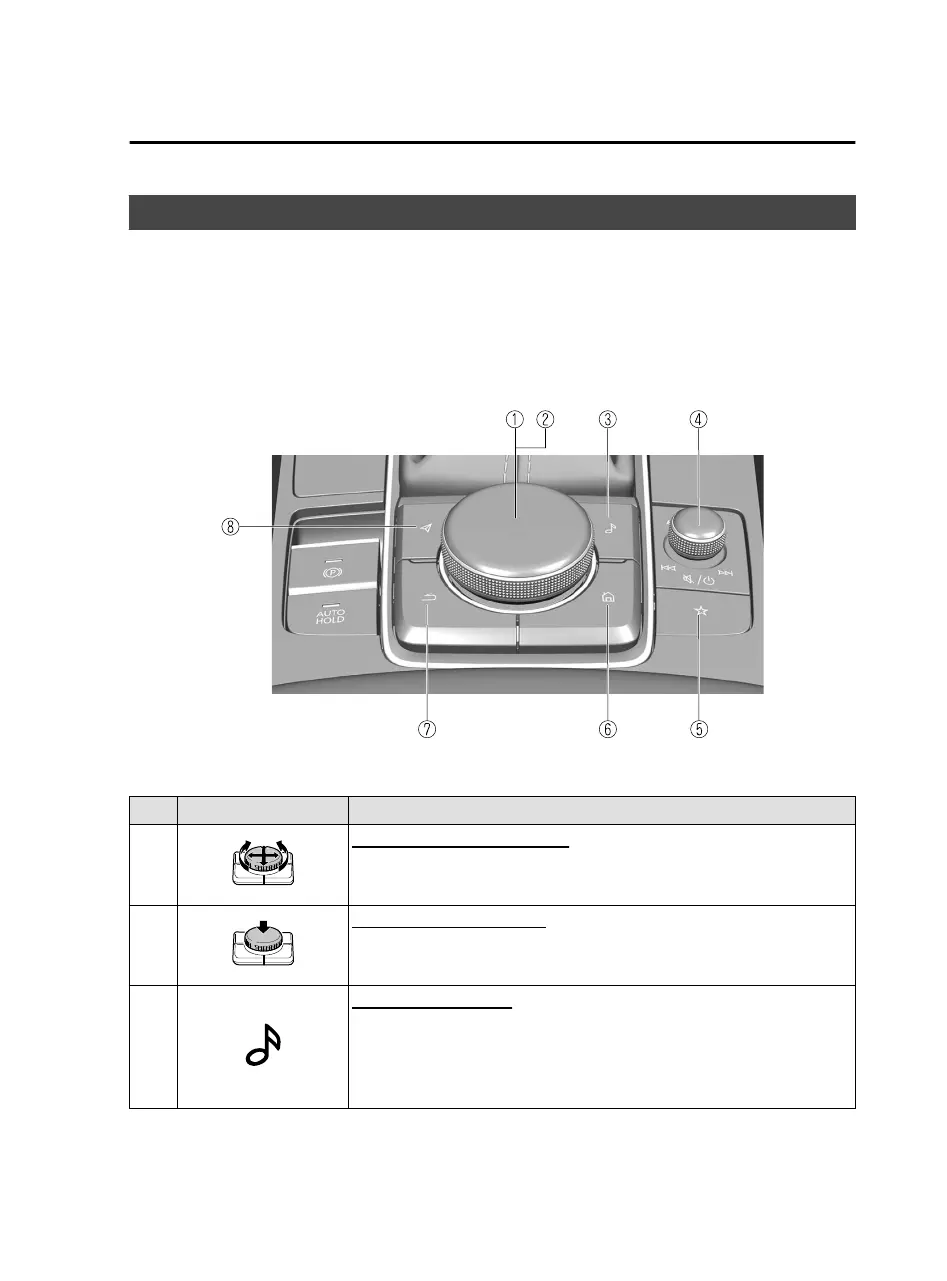
Commander Switch Operation
The commander switch can be used to switch to each function and to operate each
function.
Set the palm of your hand on the commander knob so that your
fingers
can touch
each of the switches.
You can switch the screens without having to look down at your hand.
NOTE
For safety reasons, some operations are disabled while driving the vehicle.
The shape of the switches varies depending on the vehicle model.
No. Item Explanation
1
Commander knob (selection):
Rotate or slide the commander knob to highlight/select the on-screen
functions you want to use.
2
Commander knob (select):
Depress the commander knob to select the desired on-screen function
you want to use.
3
Entertainment button:
The audio source screen last used is displayed.
(During Apple CarPlay™ or Android Auto™ music playback)
Displays the Apple CarPlay™ or Android Auto™ now playing screen.
Overview
Basic Operations
1-7
Mazda Connect_8JB9-EA19E_Edition1_new 2019-8-1 17:07:41



 To Next Page