Connectivity Settings
Connection settings can be configured for linking Bluetooth
®
and Smartphone
functions.
Bluetooth
®
Settings
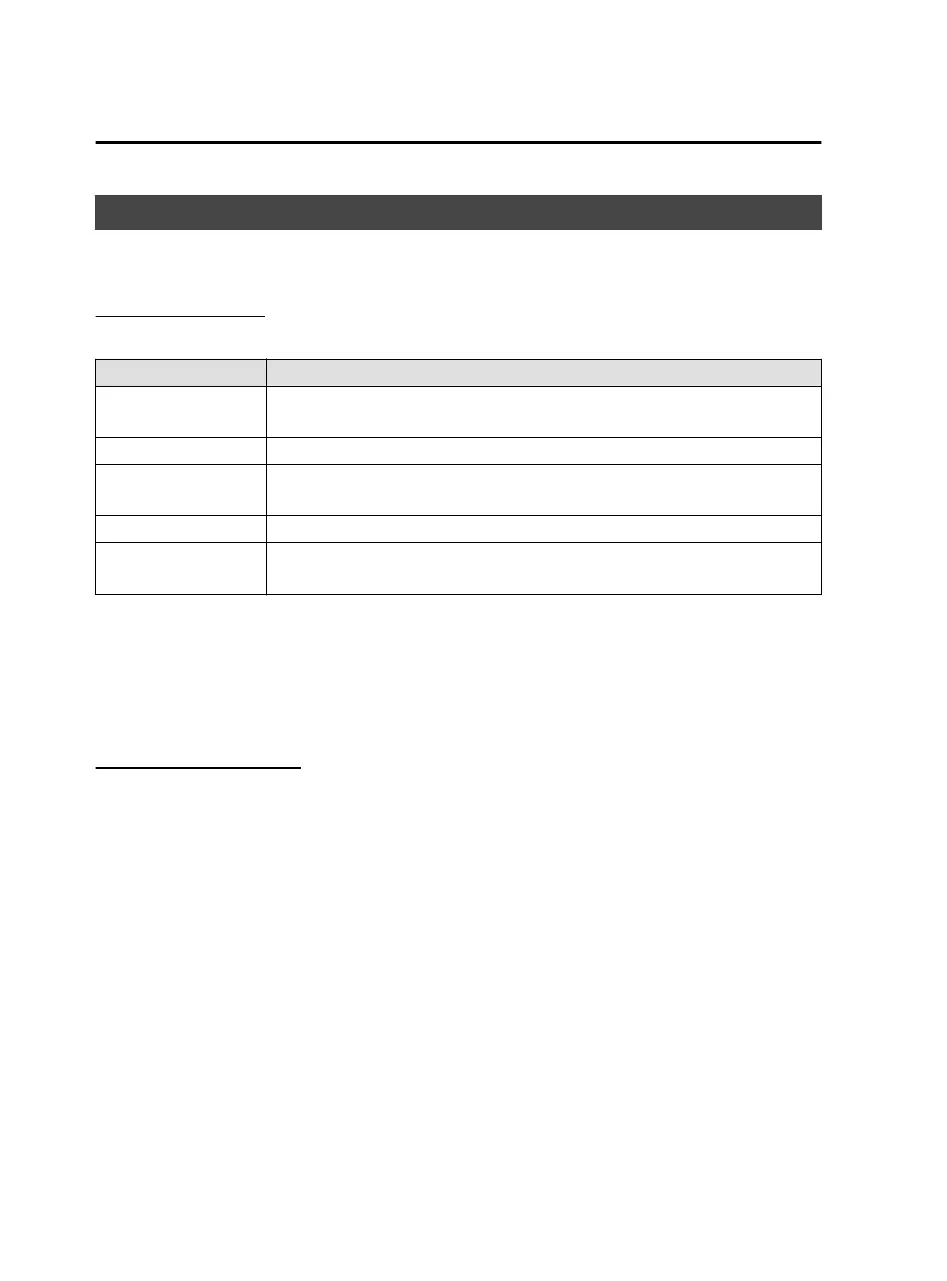
Configures Bluetooth connectivity and related settings.
Function Explanation
Bluetooth
®
Turns on when using Bluetooth
®
. When checked, the status is ON. When un-
checked, the status is OFF.
Pair New Device Establishes Bluetooth connectivity with a mobile device.
[Name of registered
Bluetooth
®
device]
Selects the connection type used for the device.
Delete Paired Device Terminates Bluetooth connectivity with a mobile device.
Advanced Settings
You can change the Bluetooth
®
automatic connection ON/OFF, set the con-
nection order, and reset the Bluetooth
®
settings.
NOTE
The Bluetooth
®
connection cannot be used while Apple CarPlay™ is connected. If
you want to connect to Bluetooth
®
, disconnect Apple CarPlay™.
If you want to register (pair) a device or change the connection device while
Android Auto™ is connected, disconnect Android Auto™.
Bluetooth
®
Registration
Device registration (pairing)
To use Bluetooth
®
Audio and Hands-Free, register a Bluetooth
®
device using the
following procedure. You can register up to 5 devices that are equipped with the
Bluetooth
®
communication function, such as mobile devices or mobile phones.
NOTE
Bluetooth
®
may not operate for 1 or 2 minutes after the ignition is switched to ACC
or ON. However, this does not indicate a problem. If the Bluetooth
®
device is not
connected automatically after 1 or 2 minutes have passed, make sure that the
Bluetooth
®
setting on the device is enabled and attempt to reconnect the Bluetooth
®
device from the Mazda Connect side.
Features
Settings
2-126
Mazda Connect_8JB9-EA19E_Edition1_new 2019-8-1 17:07:41



 To Next Page