Turn on the Advanced Threat Defense Appliance
The Advanced Threat Defense Appliance has redundant power supplies pre-installed.
The Advanced Threat Defense Appliance ships with two AC power cords
specic to your country or region.
Task
1
Plug one end of the AC power cord into the rst power supply module in the back panel, then plug the other
end into the power source.
2
Plug one end of the other AC power cord into the second power supply module in the back panel, then plug
the other end into the power source.
Advanced Threat Defense powers up without pressing the on/o button on the front panel.
To turn o the Advanced Threat Defense Appliance AC power, you must unplug both AC power cords from
the back panel or power source.
The on/o button on the front panel does not turn on/o the AC power.
To restart the Advanced Threat Defense Appliance, you must press the on/o power switch on the front
panel while the appliance is turned on.
To turn o the Advanced Threat Defense Appliance, use the shutdown CLI command, then press the on/o
power switch.
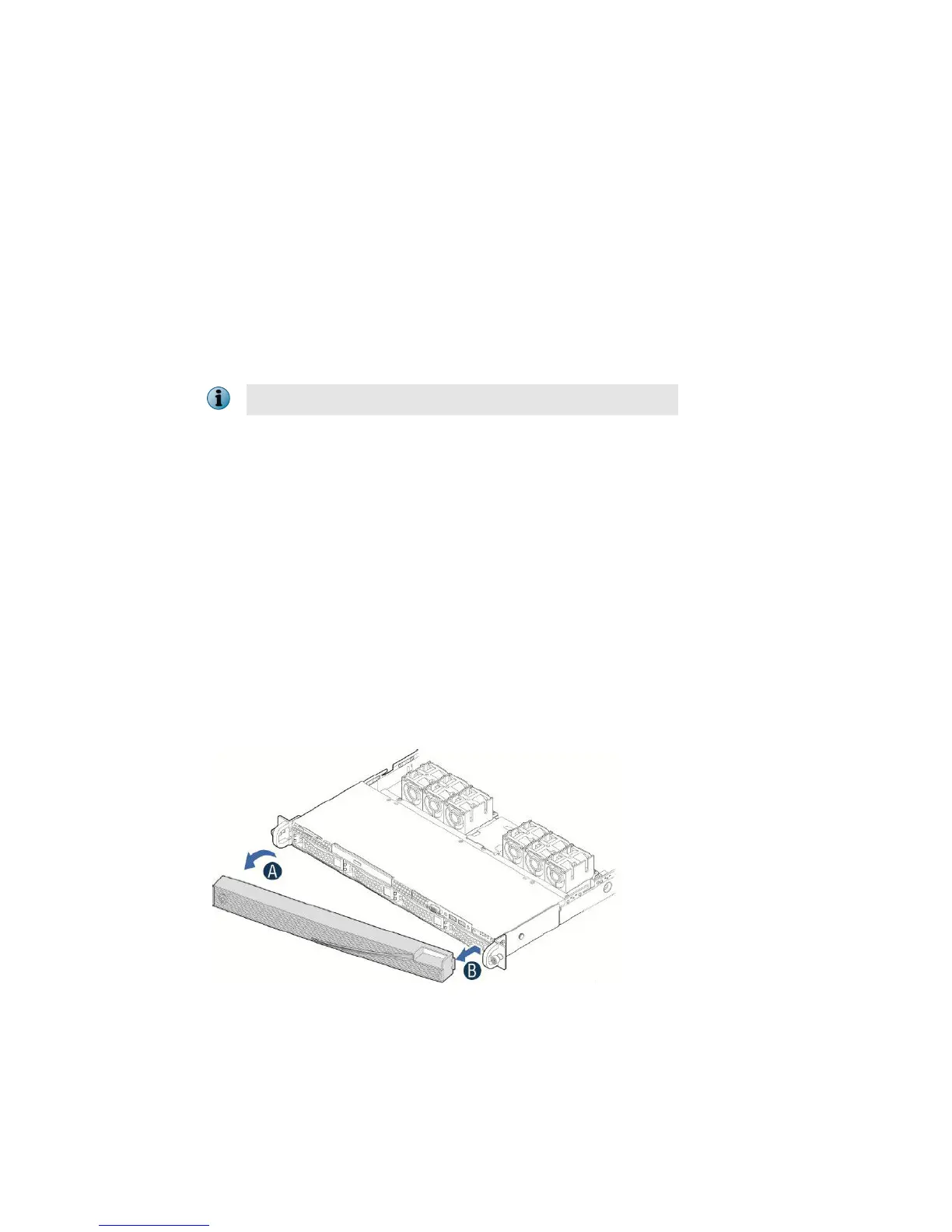
Handling the front bezel
You can remove the front bezel if required, and then re-install it. However, before you install the bezel, you must
install the rack handles.
Task
1
Remove the front bezel.
a
Unlock the bezel if it is locked.
b
Remove the left end of front bezel from rack handle.
c
Rotate the front bezel anticlockwise to release the latches on the right end from the rack handle.
14



 To Next Page