mcdsp.com
Page UMC25
McDSP 6060 Ultimate Module Collection
A Closer Look at the 6060 Plug-in
The 6060 Ultimate Module Collection has additional features to better manage
its module and processing options. These features are explained in the
following sections.
Module Section
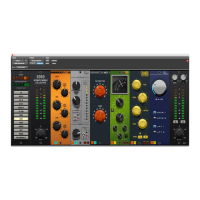
There are two methods for selecting a module in any of the six available module
slots - the Module Selector panel at the far left of the 6060 user interface, and
the upper right hand corner of any module.
The Module Selector panel shows the three groups of modules in the 6060 - EQ,
COMP, and MORE. As each group button is pressed, the list of available modules
below is updated. Clicking any one of these module buttons will immediately
update the module being used. To control which module is updated, there are
six orange Module Target buttons across the top of the Module Selector panel
numbered 1 through 6. These indicate which module is going to be updated
when selecting one of the module buttons. As module controls are updated the
Module Target buttons tracks the most recently adjusted module.
Another way to update the selected module is to click the module name in
the upper right hand corner of the user interface. A popup menu will appear
showing all the available modules.
Module Processing Order
The 6060 modules can be placed in any order by simply clicking and dragging
a module to a new location. Other modules will be moved accordingly. The
enable button located in the lower left hand corner of each module shows the
module number (1, 2, 3, 4, 5, 6) which corresponds to the Module Target button
on the far upper left of the user interface.
Module processing starts on the left hand side of the user interface at the input
section, and then progresses left to right, until reaching the output section.
Split Input Mode
Any combination of the 6060 modules can be split into two separate signal paths
and mixed together at independent levels.


 To Next Page