Page UMC26
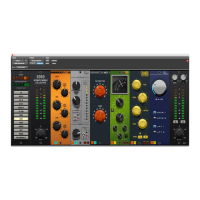
The Split Input Mode can be enabled from the yellow “I” button located in
the lower left corner of each module. Once pressed, modules to the left are
assigned channel “A”, and modules to the right are assigned to channel “B”.
The channel assignment is shown by the an “A” or “B” appearing in place of the
yellow Split Input “I” button on each module, except for the module where the
split input point was selected.
Split Input Mode can be disabled by pressing the yellow “I” button on the
module it was originally enabled on. Or a new split input point can be selected
by pressing on of the “A” or “B” buttons on another module.
The two Split Input channels “A” and “B” can be adjusted from two new knobs
that appear just above the output meters. These knobs operate more like
faders as their control range goes from -inf to +12 dB, with a default value of
0 dB. Either Split Input channel can be muted by pressing the “A” or “B” label
underneath the Split Input level knobs, and their label will change to “MUTE”.
Pressing this area again will toggle the mute behavior off. The mute function is
a great way to audition a Split Input channel individually.
Key Signal Options
Some 6060 modules can select a side chain signal as the key signal to trigger
a compressor (or other module functionality). There are two buttons on the
lower right corner of modules that support side chain input. The first button,
with a ‘key’ symbol, will enable side chain input. The second button, with a
‘speaker’ symbol, will allow the user to audition the side chain input.
Note the user must select a valid side chain input for the 6060 plug-in. If a a
valid side chain input is not selected, the side chain input signal is silent, and
will therefore not cause the compressor (or other module functionality) to be
triggered.


 To Next Page