SmarTraq
22 Manual # 42-02-D008 Rev. A2
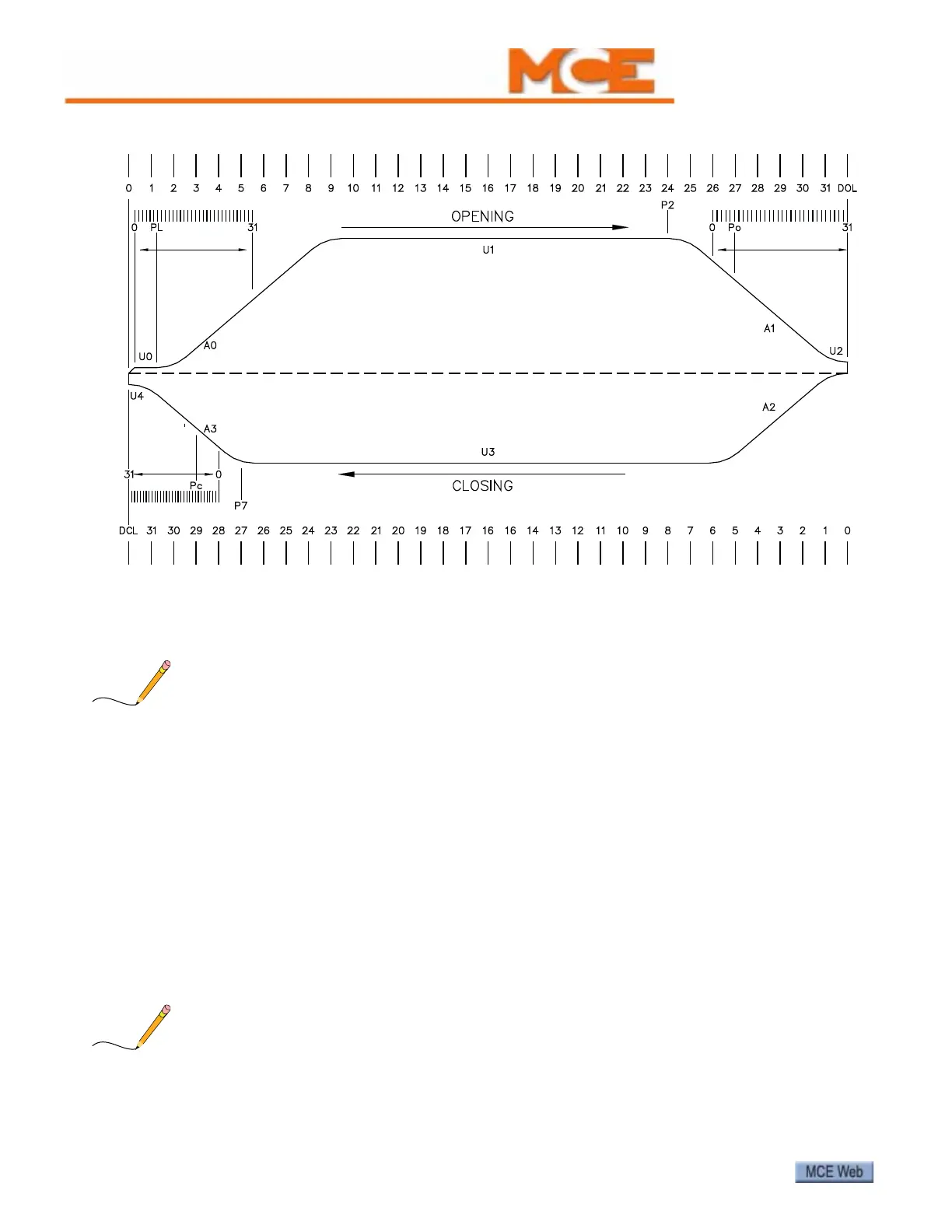
Figure 8. Motion Profile
Parameter Adjustment Example
To adjust a parameter (U1, high opening speed, in this example):
1. Check that the elevator doors are fully closed.
Parameter values can only be changed or viewed when elevator doors are Full Closed and Door
Close Limit LED is lighted.
2. Place the Local/Remote switch in the Local position.
3. If necessary, hold the Open/Close switch to Close until the alphanumeric display shows
“Lr” and DCL LED is illuminated.
4. Use the + and/or - buttons to toggle to the desired parameter (U1 in this example).
5. Press Enter. The current value of the parameter will be displayed (0 - 31).
6. Use the + and/or - buttons to change the value.
7. When the desired value is displayed, press Enter to hold it in local memory.
8. If desired, continue setting additional parameters.
9. When ready to save your changes, use the + and - buttons to change the display to “do”,
then press Enter.
10. Place the Local/Remote switch back to the Remote position.
After adjusting a torque parameter, always re-learn Open/Close limits. Please refer to “Learn-
ing Full Open and Full Close Positions” on page 17.



 To Next Page