13
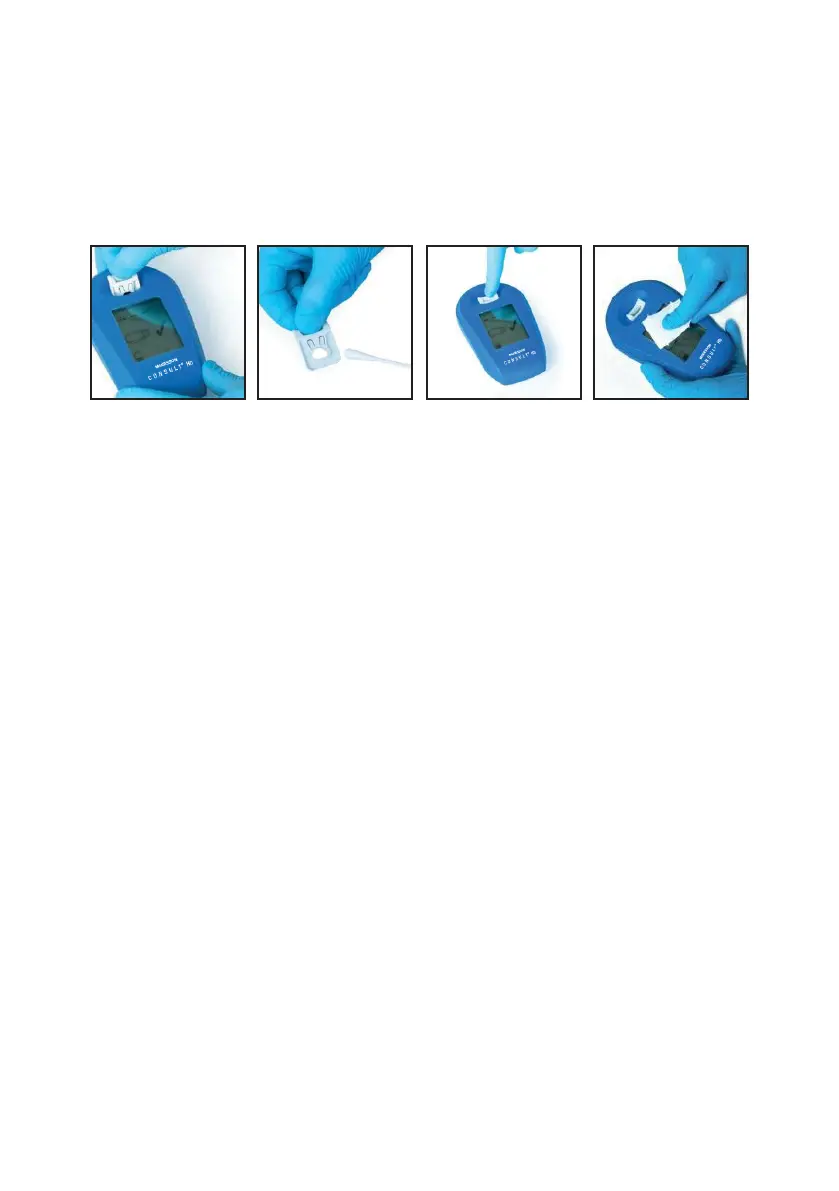
3. Reinsert the dry cuvette holder by pressing down until you feel a “click.”
4. Clean device with cold water or mild detergent, followed by disinfectant.
To disinfect the instrument, use conventional solvent-free surface disinfectants, disposable germicidal
surface wipes, or PDI Super Sani-Cloth
®
germicidal disposable wipes and follow labeling directions.
Do not spray the instrument when cleaning, as this will damage the instrument!
Only use wipes lightly dampened in water/detergent/disinfectant for cleaning and disinfection.
6.5 QUALITY CONTROL
The Consult
®
Hemoglobin Testing System is delivered factory-calibrated and requires no additional
calibration prior to operation.
The Consult
®
Hemoglobin analyzer will perform an automatic self-check after each measurement. Passing
the self-check verifies the measurement performance and is indicated by a check mark. An error code
is displayed if the self-check fails and the analyzer will cease measuring, so there is no risk of an incorrect
result being displayed.
The Consult
®
Controls Solution is available to facilitate compliance with local, state and/or federal
regulations or accreditation requirements.
Run the controls as described on page 13. Control values must fall within the ranges stated on the vial labels
and insert. If controls are not in range, repeat with a new cuvette. If values are still out of range, contact
Technical Support at: 1-800-531-5535.
CONSULT
®
HEMOGLOBIN TESTING SYSTEM USER MANUAL


 To Next Page