19
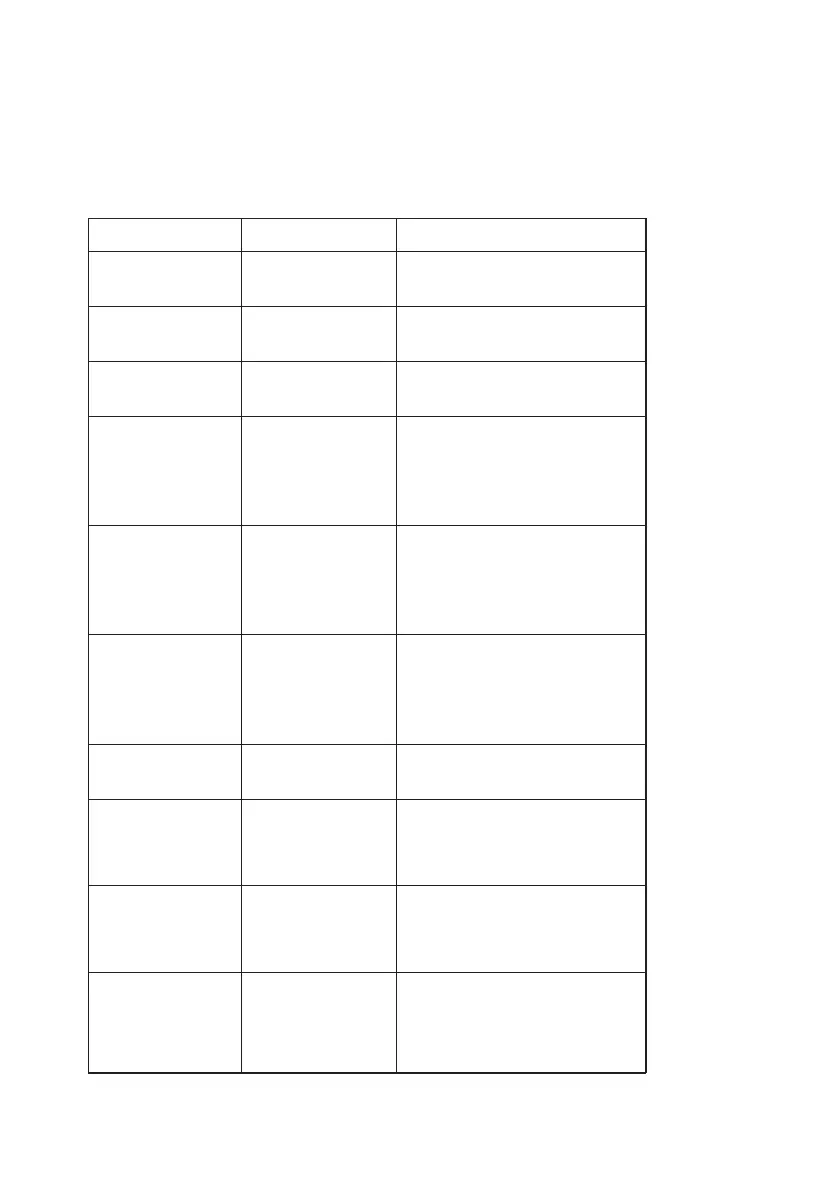
TROUBLESHOOTING GUIDE
Symptom
Unexpectedly hight /
low results
Error E01
Error E02
Error E03
Error E04
Error E05
Error E07
Error E08
Display blank, measuing
not possible
Possible Cause
Improper sample
Calibration lost
Sensor read error
Self-check failed
Light source too dark
Light source too bright
Battery too low to
perform measurments
Battery
completely discharged
Correction
Repeat the sampling. Make sure that the
sampling is done correctly. See pages
12 – 15 for more information.
Contact Technical Support at
1-800-531-5535.
Repeat measurement with the same cuvette.
If error persists, contact Technical Support at
1-800-531-5535.
E03 may be displayed if a filled cuvette is left
in the cuvette holder, or was removed too
slowly. In order to reset the self-check
function, press down on the empty cuvette
holder. The screen should display “---” and a
“ ”. If error persists, contact Technical
Support at 1-800-531-5535.
Remove cuvette from cuvette holder. Press
cuvette holder several times until the screen
reads “---” and a “ ” appears. If error
persists, contact Technical Support at
1-800-531-5535.
Remove cuvette from cuvette holder. Press
cuvette holder several times until the screen
reads “---” and a “ ” appears. If error
persists, contact Technical Support at
1-800-531-5535.
Recharge the battery.
To recharge the battery, connect with a power
outlet or computer and charge for a
minimum of 4 hours.If recharging fails,
contact Technical Support at 1-800-531-5535.
Measurement value
too high
Measurement value outside the
measuring range.
Hct -- %
Hemoglobin value
below 12.0 or above
18.0 g/dL
None. See section 6.2 for more
information.
CONSULT
®
HEMOGLOBIN TESTING SYSTEM USER MANUAL


 To Next Page