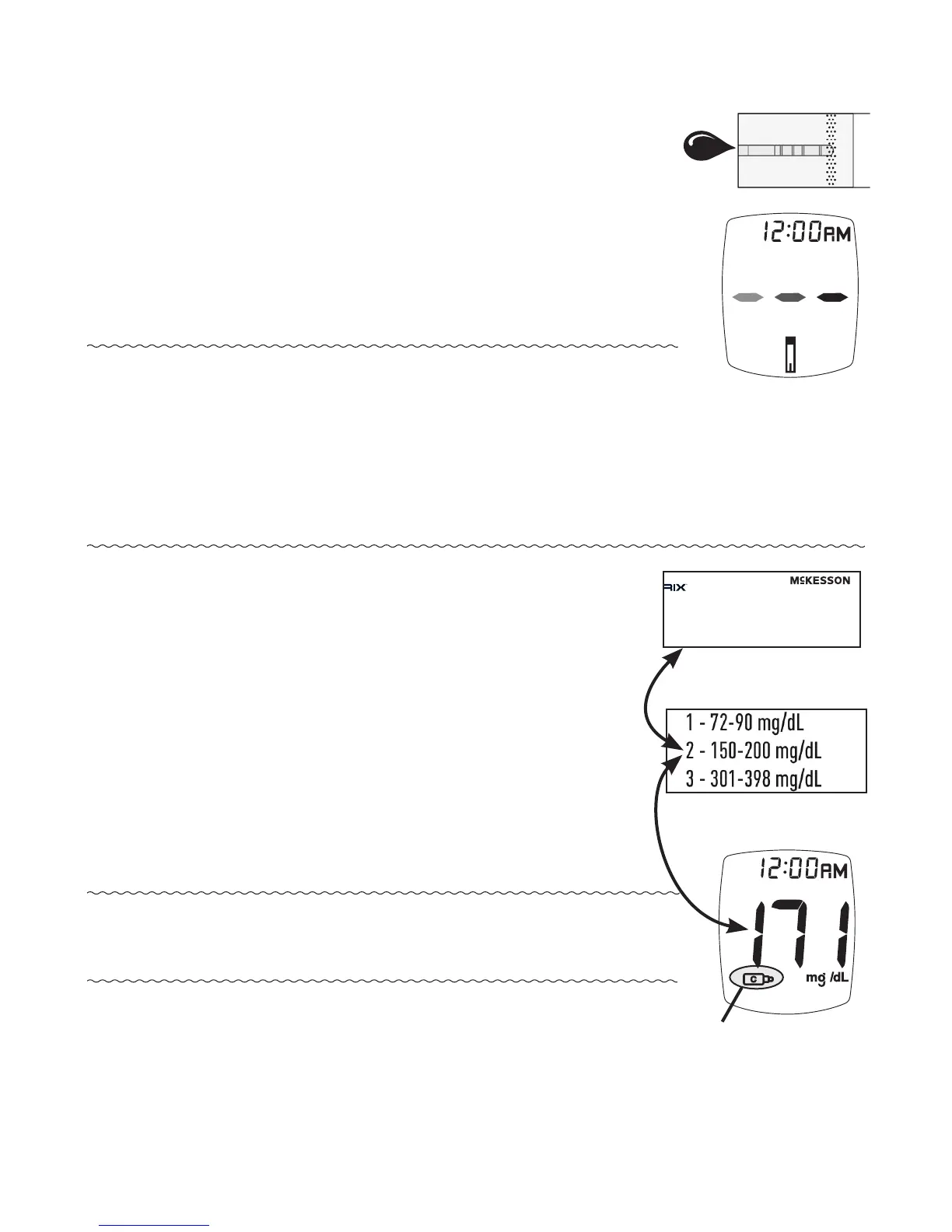
9. With test strip still in meter, touch
edge of Sample Tip to top of drop of
control solution. Allow drop to be
drawn into test strip. Remove test
strip from drop when meter beeps.
10. Dashes appear across the Display to
show meter is testing.
Note: If meter does not beep and begin
testing soon aer drawing up sample,
release and discard test strip. Repeat
test with new test strip. If problem
persists, see Troubleshooting.
11. Compare meter result to Control
Test range printed on test strip
vial label for level of control
solution you are using. If result
is in range, system can be used
for testing blood. If result does
not fall within range, repeat test
using a new test strip.
Note: Control Test result shows the
Control Symbol in the Display.
17
Meter testing
Control Symbol
Test Strip
Vial Label
Control Bottle
Label
• For use only with McKesson TRUE METRIX
®
and
TRUE METRIX
®
PRO Blood Glucose Test Strips
• Not intended for human consumption
• For in vitro diagnostic use only
Store at temperature range of 36-86°F (2-30°C).
DO NOT FREEZE.
Distributed By McKesson Medical-Surgical Inc.
Richmond, VA 23228 Rev. 00 03/15
Made in USA R5SUN01 rev 1
Control Solution LEVEL 2
MFR #
06-R5051-1
NET CONTENTS
3 mL
LOT 8LOA18
EXP 2015/10/31



 To Next Page