EasyManua.ls Logo

McQuay MicroTech 2000 - User Manual

McQuay MicroTech 2000
20 pages
Print Icon
To Next Page IconTo Next Page
Loading...
© 2005 McQuay International
MicroTech 2000™ Water Source Heat Pump Unit Controller
Installation and Maintenance IM 660-3
Group: WSHP
Part Number: 106018961
Date: May 2005

Table of Contents

Question and Answer IconNeed help?

Do you have a question about the McQuay MicroTech 2000 and is the answer not in the manual?

Summary

Introduction

General Information

Component Data

Overview of hardware components like microprocessor and sensors.

Yellow Status LED

Indicator for unit operating mode and alarm status.

Service Pin

Button for broadcasting Neuron ID for network commissioning.

Red Service LED

Indicator for Neuron chip status during network configuration.

Temperature Sensing

Details on NTC thermistors used for temperature measurement.

Standard Control Features

Compressor Short Cycle Protection

Prevents frequent compressor cycling with minimum on/off times.

Random Start

Prevents simultaneous compressor startups after power events.

Delayed Reversing Valve De-energization

Manages reversing valve state to prevent 'swishing' during mode changes.

Condensate Overflow Alarm

Detects and responds to condensate overflow, disabling the compressor.

Brownout Alarm

Protects against low voltage conditions by de-energizing the compressor.

High Pressure Refrigerant Alarm

Responds to overpressure by de-energizing the compressor and reversing valve.

Low Temperature Refrigerant Alarm

Handles low temp conditions by cycling to cooling or disabling the compressor.

Low Pressure Refrigerant Alarm

Responds to low pressure by de-energizing the compressor.

Change Filter Notification

Alerts when fan run time exceeds a set point, indicating filter replacement.

Configurable Relay Outputs

Boilerless System;Auxiliary Heat Relay

Controls electric heat based on loop temperature or space temperature.

Motorized Valve Relay

Controls motorized valve to shut off water when compressor is inactive.

Fresh Air Damper Relay

Controls fresh air damper operation based on fan status.

Timed Output Relay

Provides timed control for auxiliary loads based on schedules.

Interface Features

MicroTech Network

Network communication for control, monitoring, and fault resets.

Wall-Mounted Sensor

Details on optional sensors for room temperature and override functions.

Remote Room Set Point Adjustment

Allows adjustment of room set point via a potentiometer.

Tenant Override

Manual control to temporarily change operating mode or network address.

Commissioning

Pre-Start Procedures

Essential steps and tools required before initial unit startup.

Field Wiring Check

Verifying electrical connections against diagrams for proper installation.

Wall Sensor Packages

Checks for correct wiring and termination of wall sensor cables.

Network Communication Units

Verifying proper termination of network communication cables.

Set Points

How set points are stored and initially configured.

Start-up Procedure

Step-by-step process for powering up and verifying WSHP operation.

Description of Operation

Fan Operation

Describes how the fan operates in different modes.

Unoccupied Cooling Operation

Details cooling cycle operation when the unit is unoccupied.

Unoccupied Heating Operation

Details heating cycle operation when the unit is unoccupied.

Occupied Cooling Operation

Details cooling cycle operation when the unit is occupied.

Occupied Heating Operation

Details heating cycle operation when the unit is occupied.

Holding Mode

Unit state between heating/cooling modes with compressor off.

Tenant Override Mode

Manual activation of temporary occupancy or network functions.

Load Shed Mode

How the unit responds to network load shedding commands.

Optimal Start

System logic for determining the best time to reach occupied set points.

Faults

Describes the priority and handling of various fault conditions.

Diagnostic Service

Unit Identification (Wink) Command

Command to identify unit network address via status LED and fan.

Alarm Monitoring and Control

How the controller monitors and indicates alarm conditions.

Clearing Faults

Procedures for clearing automatically or manually reset faults.

High Pressure Fault

Response to high pressure switch activation, disabling the compressor.

Low Temperature Fault

Response to low temperature switch activation, potentially disabling the compressor.

Low Pressure Faults

Response to low pressure switch activation, de-energizing the compressor.

Condensate Overflow Fault

Response to condensate overflow sensor activation, disabling the compressor.

Brownout Fault

Response to low voltage conditions, disabling the compressor.

Change Filter Notification

Notification for fan run time exceeding hours, indicating filter replacement.

Service Information

Inputs and Outputs

Overview of controller input and output connections.

Analog Inputs

Details on analog sensors and their terminal connections.

Digital Inputs

Details on digital inputs and their voltage/current requirements.

Digital Outputs

Details on digital outputs and their switching capabilities.

Input;Output Tables

Reference tables for controller input/output connections.

Test Procedures

Guidelines for diagnosing common WSHP controller issues.

Microprocessor Problems

Procedure for diagnosing microprocessor operational issues.

Power Supply Problems

Procedure for diagnosing power supply issues to the controller.

Erroneous Temperature Readings

Procedure to troubleshoot inaccurate temperature sensor readings.

Digital Input Faults

Procedure to diagnose faults related to digital input circuits.

WSHP Controller Replacement

Information required for replacing a defective controller unit.

Overview

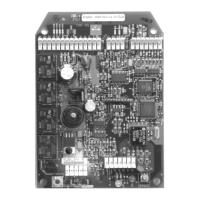
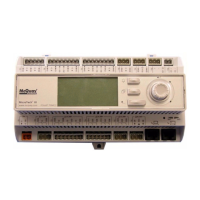
The MicroTech 2000™ Water Source Heat Pump (WSHP) unit controller is a preprogrammed microprocessor designed to monitor and control McQuay and AAF water source heat pumps. It manages the unit's operating mode, monitors water and air temperatures, and indicates fault conditions. The controller is factory programmed, wired, and tested for effective operation.

Function Description:

The controller provides comprehensive control over WSHP units, including heating and cooling operations based on room sensor input. It continuously monitors all equipment protection controls, fan and compressor operation, discharge air temperature, and leaving water temperature. The system also tracks the status of all vital unit functions and offers optional control outputs.

The MicroTech 2000 WSHP controller utilizes LONWORKS® technology, with two application software versions: LONMARK® 3.3 certified application code (current standard for new applications, including standalone units or those integrated into a LONWORKS communication network) and LonTalk® application code (for existing systems with a MicroTech Communications Gateway (MCG) or MCG for Open Protocol (MCGOP) panel). The LONMARK code has a software identification of WHPE2E or higher.

Important Technical Specifications:

  • Operating Temperature: 32°F to 140°F (0°C to 60°C).
  • Storage Temperature: 40°F to 176°F (40°C to 80°C).
  • Relative Humidity: Up to 95% (noncondensing) for both operation and storage.
  • Analog Inputs: Six standard analog inputs, capable of sensing temperatures from 0°F to 158°F (-18°C to 70°C). These include discharge air temperature, leaving water temperature, condensate overflow, brownout (supply voltage), room air temperature, and tenant override/set point adjust sensors.
  • Digital Inputs: Four standard digital inputs, sensing the presence or absence of an external 24 VAC ± 20% power source with a minimum of 10 mA AC current. These include refrigerant high pressure (N/C), refrigerant low pressure (N/C), refrigerant low temp (N/C), and remote start/stop (N/O) switches. Digital input conditioning includes RC filtering with a time constant of at least 4.7 milliseconds.
  • Digital Outputs: All digital outputs, except for the on-board and off-board status LEDs, can control electromechanical or solid-state relays. They switch inductive loads at 24 VAC ± 20%, 0.4 pF, and at steady-state AC RMS currents. Outputs include fan contactor, compressor contactor, reversing valve solenoid, on-board status LED (yellow), off-board status LED (DC-sourced signal, current limited to 10 mA-DC), and multi-purpose (spare) isolated E/M contacts.
  • Power Supply: Requires a 24 VAC power supply, connected to terminals J41 and J42.
  • Compressor Short Cycle Protection: Minimum 2 minutes on-time, 5 minutes off-time.
  • Random Start Delay: 5 to 37 seconds, determined by the Neuron chip ID.
  • Delayed Reversing Valve De-energization: Approximately 10 seconds delay after compressor re-energization in heating mode.
  • Brownout Protection: Detects supply voltage below 82% of nameplate value, de-energizes compressor. Resets when voltage is above 90% for 1 second.
  • High Pressure Refrigerant Alarm: Triggered by high pressure switch opening (395 ± 10 psig), closes at 250 ± 25 psig. Manual reset.
  • Low Temperature Refrigerant Alarm: Triggered by low temperature switch opening. Manual reset.
  • Low Pressure Refrigerant Alarm: Triggered by low pressure switch opening (7 ± 3 psig), closes at 22 ± 7 psig. Manual reset.
  • Condensate Overflow Alarm: Triggered by condensate overflow sensor sensing a grounded signal (conductivity trip point: 2.5 micro ohms). Manual reset.
  • Change Filter Notification: Network-adjustable set point for fan run time.

Usage Features:

  • Operating Modes: Supports Occupied, Unoccupied, and Holding modes.
  • Tenant Override Mode: A wall-mounted switch allows temporary override to occupied mode for a set time (default 60 minutes). Pressing the button for 1.0 to 6.0 seconds activates override. A second press for 1.0 to 6.0 seconds returns to unoccupied mode.
  • Remote Room Set Point Adjustment: Potentiometer on wall sensor packages allows adjustment of room set point by ±3°F (1.7°C).
  • Configurable Relay Outputs: One relay output can be configured for:
    • Boilerless system/auxiliary heat relay (LONWORKS or LONMARK): Provides output to electric heat or energizes when space temperature reaches heating set point.
    • Motorized water valve relay: Shuts off water when compressor is not operating.
    • Fresh air damper relay: Opens damper when fan is operating in occupied cycle.
    • Timed output relay (LONWORKS only): Controls an auxiliary load based on a specific time schedule.
  • Network Communication: Allows control sequencing, stop/start, equipment protection monitoring, and fault resets via a network connection. Provides access to various unit parameters like temperatures, compressor/fan status, set points, and run hours.
  • Optimal Start (LONWORKS only): Calculates optimal time to switch from unoccupied to occupied operation to reach set point by scheduled time.
  • Load Shed Mode (LONWORKS only): Activates when network load shed level meets threshold, adjusting set points based on network threshold and step value.
  • Unit Identification (Wink) Command: Allows verification of an individual unit network address by causing the status LED to flash (on 0.5 sec, off 0.5 sec for 15 seconds) and the fan to cycle (off for 5 sec, on for 5 sec, off for 5 sec).
  • Wall-Mounted Sensor Packages: Optional packages include a remote status LED and tenant override button, with optional set point adjustment and thermometer.

Maintenance Features:

  • Diagnostic LEDs:
    • Yellow Status LED: Indicates operating mode (e.g., Occupied, Unoccupied, Tenant Override) and alarm conditions (e.g., Condensate Overflow, Brownout, Compressor Fault). Flashes constantly during a fault (on 0.1 sec, off 0.1 sec).
    • Red Service LED: Indicates Neuron chip status (e.g., Normal, No application/damaged, Unconfigured).
  • Service Pin: Button to broadcast the Neuron chip's unique 48-bit ID over the LONWORKS network for commissioning.
  • Fault Monitoring and Control: The controller monitors for specific alarm conditions and executes appropriate control actions. Faults are prioritized, with higher priority faults requiring manual clearing before lower priority faults are indicated.
  • Clearing Faults: Auto-reset faults clear when conditions disappear. Manual-reset faults require cycling power to the controller. Investigation and elimination of the fault cause are required before returning to service.
  • Troubleshooting Procedures: Detailed procedures for diagnosing:
    • Microprocessor problems (using status LED).
    • Power supply problems (checking 24 VAC at transformer secondary).
    • Erroneous temperature readings (measuring sensor resistance and comparing to thermistor chart).
    • Digital input faults (checking voltage, wiring, and switch contacts).
    • Brownout faults (measuring voltage at terminals J41 and J42).
  • WSHP Controller Replacement: Requires providing full model number, serial number, date code, and software version to the factory for loading unit-specific software onto a replacement controller.

McQuay MicroTech 2000 Specifications

General IconGeneral
BrandMcQuay
ModelMicroTech 2000
CategoryController
LanguageEnglish

Related product manuals