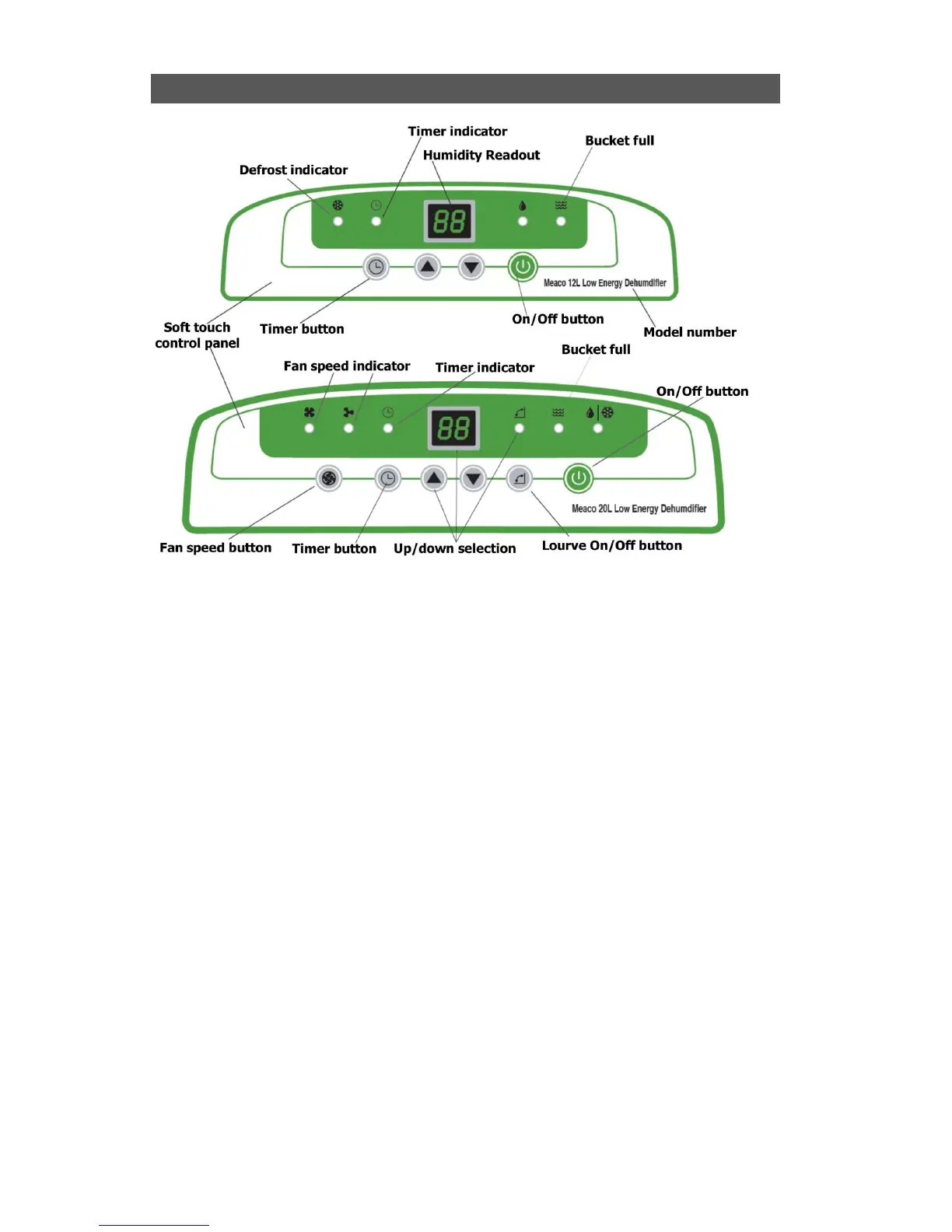
THE CONTROL PANEL
How to use your dehumidifier
Plug the dehumidifier in and press the On/Off button
Select your target relative humidity in steps of 5%rh by using the up and down arrows (we
recommend 55%rh for the home)
On the 20L you can select your fan speed
On the 20L you can also turn the lourve on or off by pressing the lourve button.
On the 12L you can manually adjust the lourve to the correct angle
Other functions of the control panel
When the tank is full the dehumidifier will stop working, and the Bucket full light will flash.
This is an off timer and allows you to run the dehumidifier for a set number of hours before it turns
itself off. Use this mode when you are drying washing and want to turn the machine off after say
two hours of high speed drying.
Below 16°C the Defrost light will come on internittently to indicate that the dehumidifier is in
defrost mode. On the 20L the defrost light is shared between defrost and drying and flashes to
indicate defrost mode.
The one droplet indicator comes on when the dehumidifier is deghumidifying.
Press the Up and Down arrows at the same time to activate the Child Lock. Repeat the process
to turn the Child Lock off.



 To Next Page