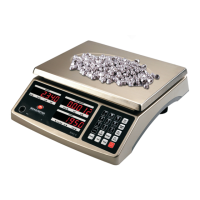
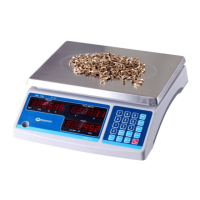
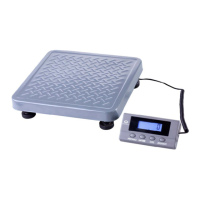
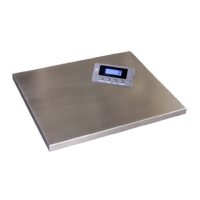
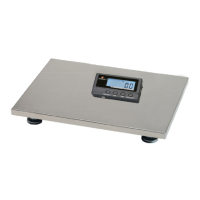
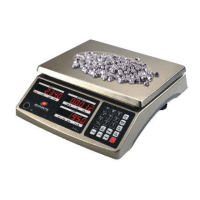
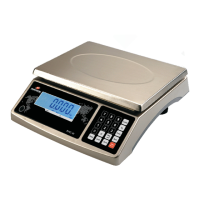
The device described in this manual is a MEASURETEK® EHC-W series quality scale, designed for various weighing applications. The EHC-W series includes models 52WX78B (EHC-W-3), 52WX79B (EHC-W-6), 52WX80B (EHC-W-15), and 52WX81B (EHC-W-30), offering different capacities and readabilities to suit diverse needs.
Function Description:
The EHC-W scale is a versatile instrument capable of performing several functions:
- Weighing: Standard measurement of weight.
- Counting: Determines the number of pieces based on a sample weight.
- Check Weighing: Compares the current weight against pre-set high and low limits, indicating if the weight is HI, OK, or LO.
- Percent Weighing: Displays the current weight as a percentage of a previously set sample weight.
- Accumulation: Stores and totals multiple weight readings, either manually or automatically.
The scale features a 1-window backlit LCD display, 1 inch high with 6 1/2 digits and 7-segment indicators, providing clear visibility of readings. Control functions are managed via a keypad with dedicated keys for Tare, Zero, Unit, Print, Limit, Percent, Function, Accumulation, and an ESC/ON/OFF key. Number keys (0-9) are used for inputting values in various modes.
Important Technical Specifications:
The EHC-W series offers a range of capacities and readabilities:
- Max. Capacity:
- EHC-W-3: 6 lb (3 kg)
- EHC-W-6: 12 lb (6 kg)
- EHC-W-15: 30 lb (15 kg)
- EHC-W-30: 60 lb (30 kg)
- Readability:
- EHC-W-3: 0.0002 lb (0.1 g)
- EHC-W-6: 0.0005 lb (0.2 g)
- EHC-W-15: 0.001 lb (0.5 g)
- EHC-W-30: 0.002 lb (1 g)
- Display Resolution: 1:30000 for all models.
- Min. Recommended Weight: Ranges from 0.004 lb (2 g) for EHC-W-3 to 0.04 lb (20 g) for EHC-W-30.
- Min. Sample Weight 1%FS: Ranges from 30g to 300g across the series.
- Weighing Units: g / kg / lb / oz.
- Calibration Unit: kg / lb.
- Zero Range: Power-on zero range: calibration zero point ±10%FS; ZERO key range: power-on zero ±5%FS.
- Tare Range: Full capacity.
- Stabilization Time: <5 seconds.
- Operating Temperature: 14° to 105°F (-10° to 40°C).
- Humidity Range: <90% relative humidity, non-condensing.
- Power Supply: Acid battery or AC power adapter (12Vdc/500mA with central positive).
- Battery Performance: 80-hour continuous use with 12-hour recharge time (with backlit OFF).
- External Interface: RS232.
- Safe Overload Capacity: 150% of capacity.
- Platter Dimensions: 11.4” x 8.7” (290 x 220 mm).
- Scale Dimensions (L x W x H): 13.5" x 11.6" x 4.5" (294 x 342 x 115 mm).
Usage Features:
- Turning On/Off: The scale is powered on by pressing the ESC/ON/OFF key after turning on the physical power switch. It performs a self-check and displays zero. To power off, press and hold the ESC/ON/OFF key.
- Zero Operation: The ZERO key sets the zero point within ±5% of the power-up zero.
- Tare Function: The TARE key subtracts the weight of a container, displaying only the net weight of the product. The "NET" indicator illuminates when tare is active.
- Unit Change: The UNIT key cycles through kg, g, lb, and oz in normal weighing mode.
- Check Weighing Mode: Activated by the LIMIT key, allowing users to set high and low limits for weight. The display shows HI, OK, or LO based on the weight relative to these limits, with an audible beeper for feedback.
- Counting Mode: Initiated by the FUNC key. Users input a sample quantity, and the scale calculates the number of pieces. The % key can display unit weight, total weight, or count.
- Percent Weighing Mode: Activated by the % key. Users place a sample, confirm its weight as 100%, and subsequent weights are displayed as a percentage of that sample.
- Accumulation: Supports both manual and automatic accumulation. In manual mode, the ACCU key stores stable weight readings. In automatic mode, the scale automatically stores stable readings. The total accumulated value can be viewed by pressing the ACCU key when the scale is at zero.
- Auto-off Timer: Configurable from 0 to 30 minutes, with a default of 5 minutes, to conserve battery life.
- Parameter Setting: Accessible via ESC/ON/OFF + 2, allowing adjustment of various settings such as auto-off time, backlight behavior, beeper mode, baud rate, byte format, and output mode.
- Calibration: A multi-step process involving setting the calibration unit, zero point, and inputting standard load weights for up to three calibration points. Accessed via ESC/ON/OFF + 0.
- RS232 Communication: The scale can output data via its RS232 port, with a default baud rate of 9600 and data format of 8N1, for integration with computers or other devices.
Maintenance Features:
- Battery Management: The scale uses a rechargeable lead-acid battery. It displays "Lo.bAt" when the battery needs recharging. Full charging takes approximately 10-12 hours. For extended storage, the battery should be charged every 90 days to prevent degradation.
- Troubleshooting Guide: The manual provides a comprehensive list of display error codes (e.g., Err01 for overload, Err04 for exceed zero range, Err20 for calibration error) and their probable causes and remedies, aiding in self-diagnosis and basic problem-solving.
- Replacement Parts: Key replacement parts listed include the 12Vdc/500mA AC power adapter (Part Number 34UW02) and the underside foot (Part Number 31MP29).
- Warranty: The product comes with a one-year limited warranty covering defects in material and workmanship, excluding misuse, accidental damage, overload, alteration, or improper installation.
The EHC-W series is designed for use in dry environments and emphasizes the importance of proper setup, including leveling and allowing warm-up time, for accurate readings. It also advises against operating near electronic devices that emit radio frequencies to avoid unstable readings.


 To Next Page
 General